25
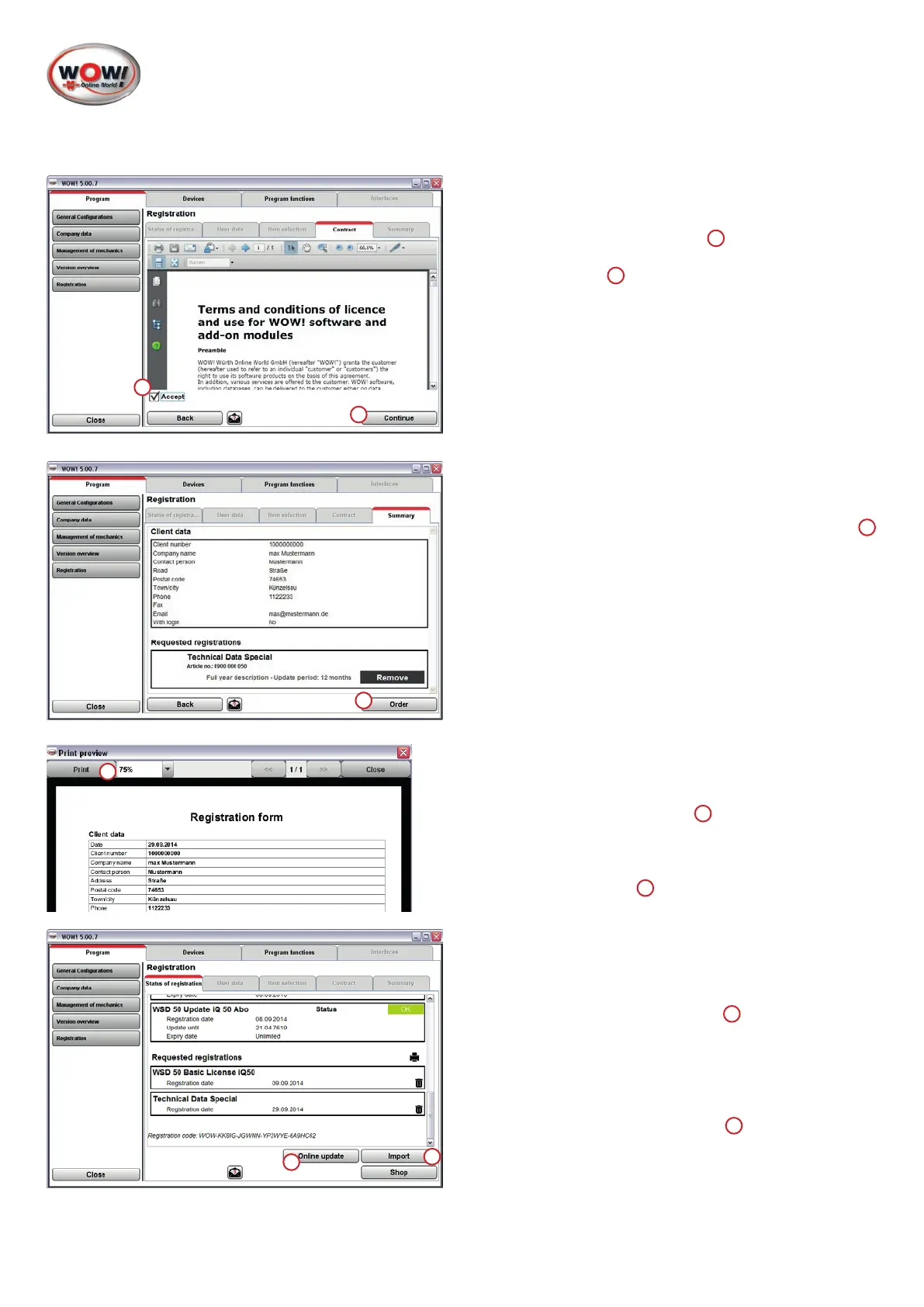
5. General terms and conditions.
Beforecontinuingitisnecessarytoacknowledgethe
general terms and conditions
1
.
Press
Continue
2
to proceed to the next step.
6. Submittingaregistrationrequest.
Ifthecomputerisonline,theregistrationrequestis
sentautomaticallytotheserverbyclickingon
Order
1
.
7. Ifthecomputerisnotonline,therequestmustbe
printedoutandsentbyfaxtoyourWOW!service
partner.
Print out the form to do this
1
.
The contact details and the fax number can be found
on the consignment note or invoice.
Proceed with
Close
2
.
8. Therequestedregistrationsareshownintheregistra-
tion tab index.
If the computer is online, enabling the device can be
nalisedwithanonlineupdate.
To do this, click on
Online update
1
.
If there is no internet connection, a license can be
requestedbyphoningthehotlineoftherespective
WOW! service partner.
Thelicenselesentbyemailcanbecopiedtothe
softwarebymeansofthe
Import
2
option.
1
2
1
1
1
2


 To Next Page
 Loading...