24
4.2 RegisteringtheWOW!software
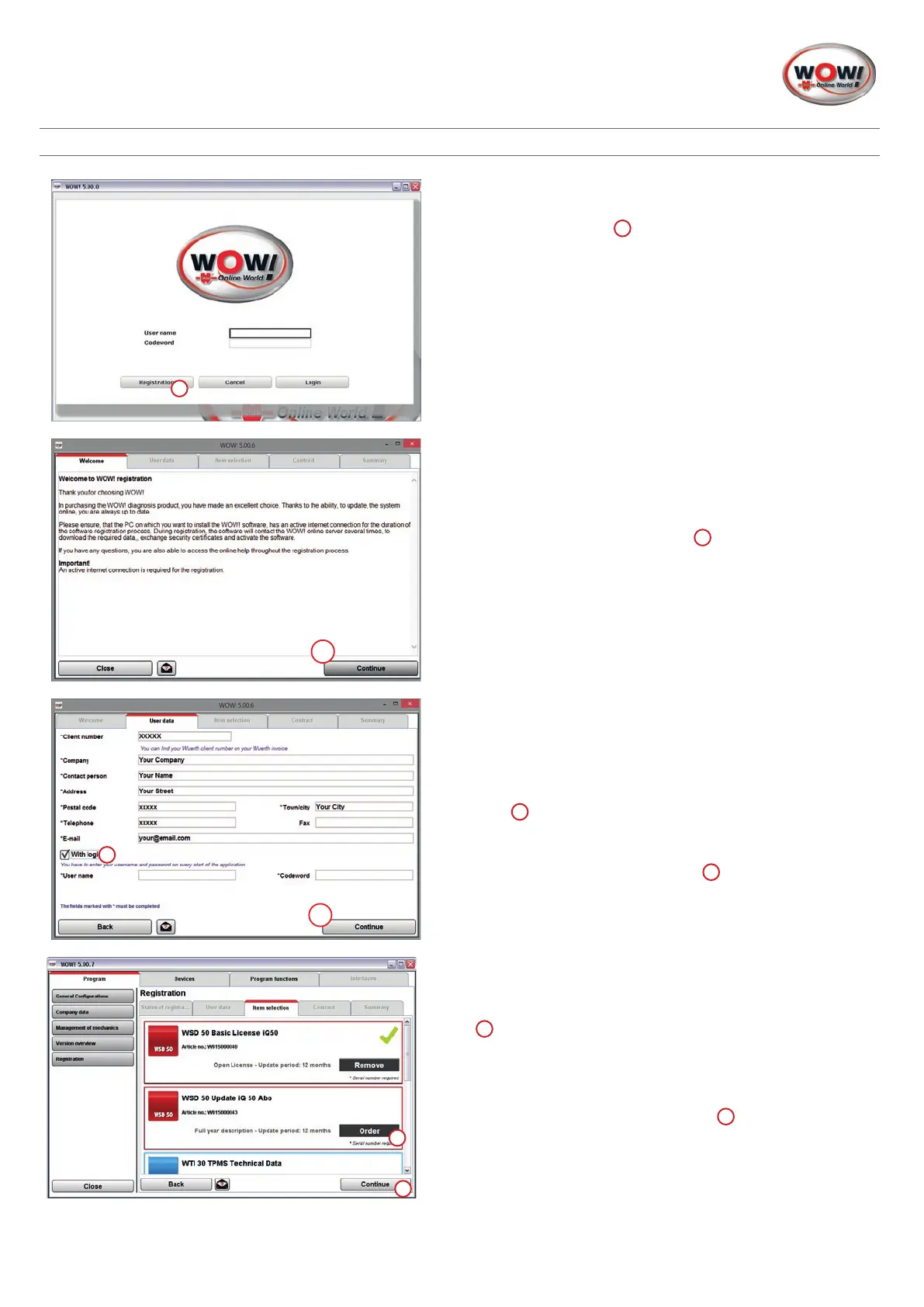
1. Performing registration.
Click on
Registration
1
.
Follow the instructions in the registration assistant.
1
2. Information
Follow the instructions in the registration assistant.
Conrmthenoteswith
Continue
1
1
3. Enter the customer details.
Alloftheeldsmarkedwith*mustbelledin.
Youcanndyourcustomernumbere.g.ontheconsign-
ment note or invoice.
The
User name
and
Codeword
are optional and, if ticked
here
2
, are to be entered each time the program starts.
The
user name
and
password
canbesetasrequired.Note
thattheeldsarecasesensitive.
Conrmtheentrieswith
Continue
1
4. Product selection.
Selectyourorderedproducts(seeinvoice).
Atleastoneproductmustbeselectedbyclickingon
Order
1
.
For products with hardware, e.g. the Snooper device, the
serial number must be entered.
Conrmtheselectionwith
Continue
2
1
2
1
2


 To Next Page
 Loading...