29
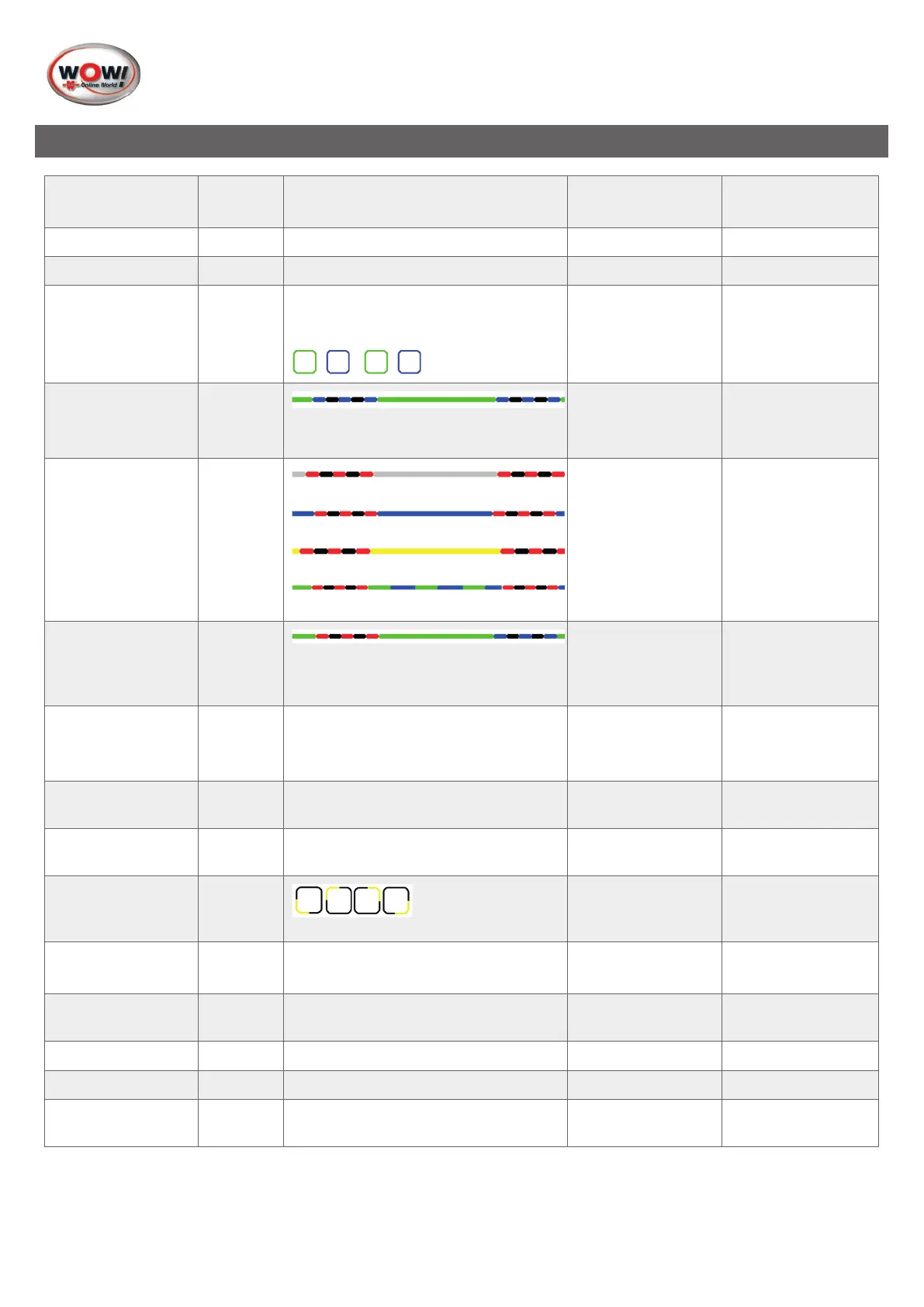
5. Signal Description LED display
Function Colour Comment Sound Sounddescription
Voltage White Continuouslightforvoltagesupply - Silent
PC connection Blue USB or Bluetooth connection - Silent
Diagnosis Green /
Blue
Active diagnostic session
Green/Bluealternating(50%)
Silent
Diagnosis
PC connection lost
Green
/ Blue
ashing
LostPCconnectionisdisplayedonly
when diagnosis is active
Warning sound!
PC connection lost
4 short high sounds
Batterylow Current
colour
/ Red
ashing
Voltage/batterylow
PCconnection/batterylow
Flightrecorder/batterylow
Diagnosis / battery low
Warning sound!
Batterylow
4 short low sounds
BatterylowandPC
connection lost
Green,
Red and
Blue
ashing
4 low sounds,
pause, 4 high
sounds
Flight recorder
start OK
Yellow Flight recorder session started, data
are not saved (communication is being
established)
Acknowledgment
FR start
Long low sound
FR start not OK - NovalidFRconguration Acknowledgment
FRnoconguration
FR stop - Stopsightrecordersession Acknowledgment
FR stop
Long low sound
FR data recording Yellow
sequence
light
Silent
FR data recording
no valid response
- No valid response within 10 ECU
inquiries
Warning sound!
FR no valid data
1 short low sound
FR trigger - User presses button to set marking Acknowledgment
FR trigger
1 short high sound
Normware Red Silent
Loadrmware Red Flashes in relation to data transfer Silent
Monitor - Monitoringmechanism,preventsthe
unit from hanging
Warning sound!
Monitor
Dierentsounds


 To Next Page
 Loading...