G
ETTING
S
TARTED
1.8
3
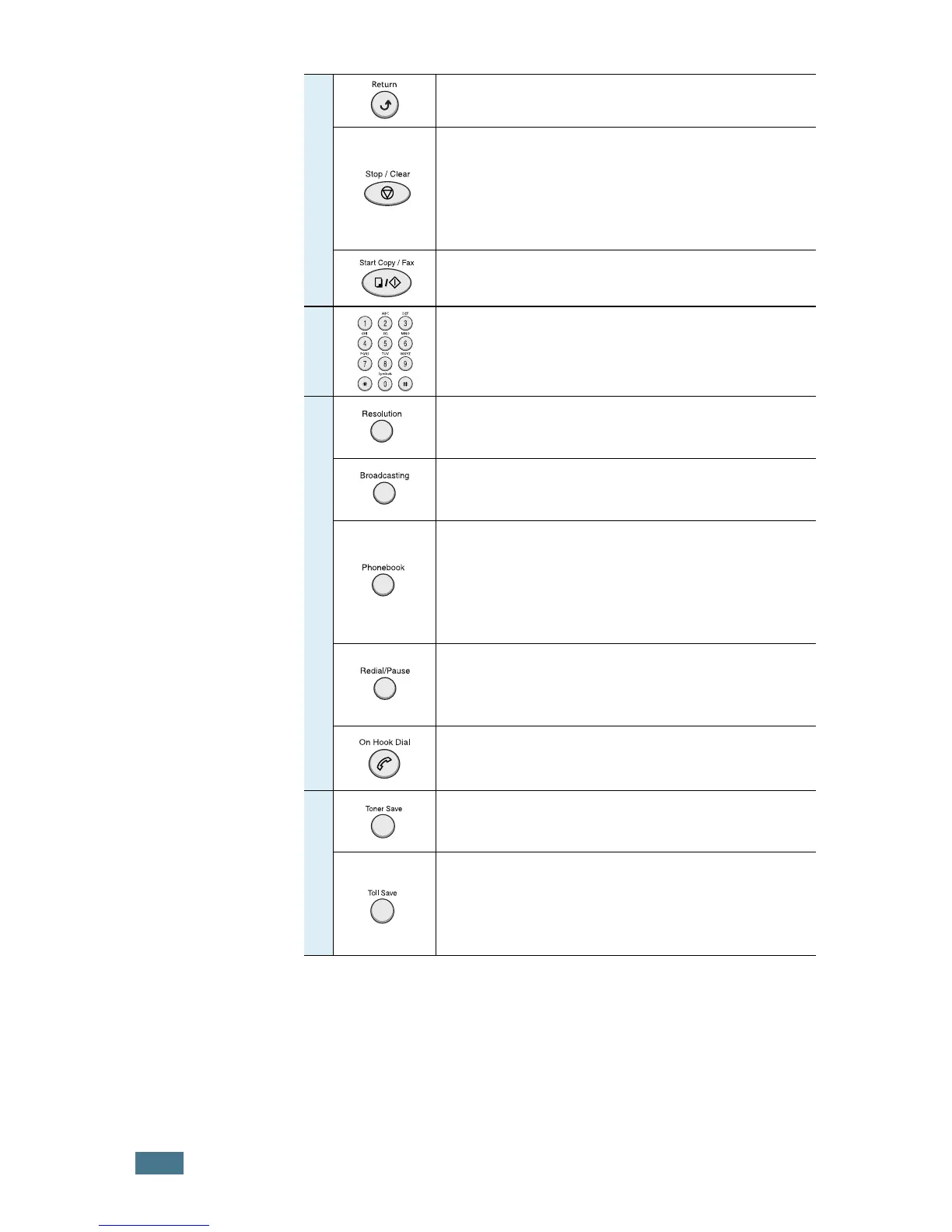
Sends you back to the upper menu level.
Stops an operation at any time.
In Standby Mode, clears/cancels the copy
options, such as the contrast, the image
setting, the copy size and the number of
copies.
Starts a job.
4
Dials a number or enters alphanumeric
characters.
5
F
A
X
Adjusts the resolution of the documents for
the current fax job.
Allows you to send a fax to multiple
destinations.
• Allows you to store frequently-dialed fax
numbers using a one or two-digit speed dial
or group number for automatic dialling and
edit the stored numbers.
• Allows you to print a Phonebook list.
Redials the last number in Standby Mode or
inserts a pause into a fax number in edit
mode.
Engages the telephone line.
6
S
A
V
E
Allows you to save on toner by using less
toner to print a document.
Allows you to save on call costs by sending a
fax at a preset toll-saving time. Using this
feature, you can take advantage of lower long
distance rates at night, for example.


 To Next Page
 Loading...