Product Guide VESDA ECO Detector by Xtralis
40 Configuration 17898_05
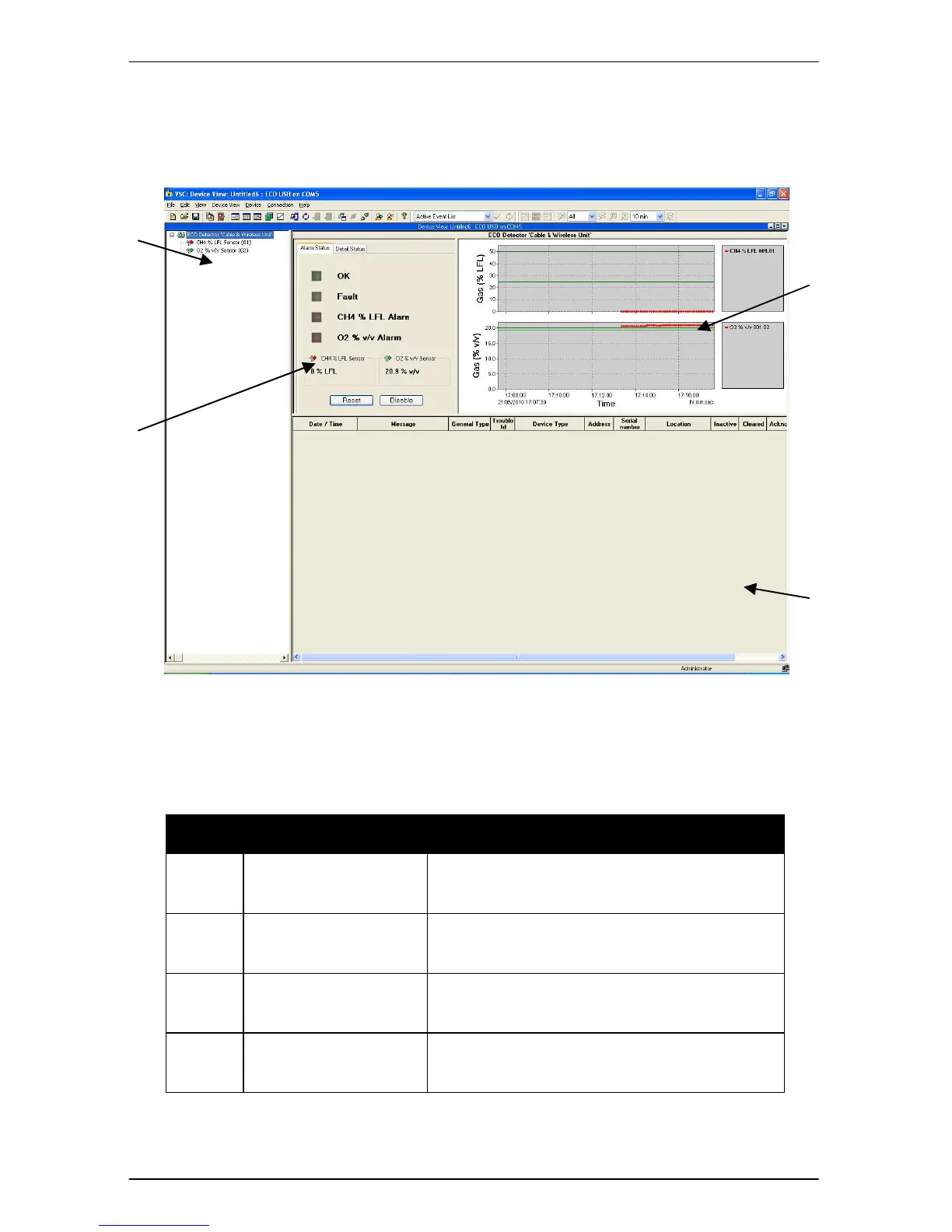
Xtralis VSC now connects to the attached ECO detectors. The main window will
update and show the ‘Device View’. It will look similar to that shown in Figure 23.
Figure 23 VSC Main Window
An Xtralis VSC window comprises a number of distinct zones as shown in Figure
23. See Table 3 for their definitions.
Zone Name Purpose
1 Detector Overview
Displays connected ECO detectors and
their respective sensor modules.
2
Detector
Status
Displays ECO Alarm status mimic and
ECO/Sensor detail.
3 Trend graphs Displays trend graph of sensor readings
4 Active Event List
Displays current and previously un-
cleared events.
Table 3 Xtralis VSC Window Zone/Purpose Mapping
3


 To Next Page