Product Guide VESDA ECO Detector by Xtralis
48 Configuration 17898_05
Flow Normalization
Flow normalization is the process by which the ‘Normal’ volume of air passing
across the ECO detector sensors becomes equivalent to 100% air flow.
ECO performs Air Flow fault monitoring. For more information on configuring the Air
Flow monitoring fault conditions see page 45.
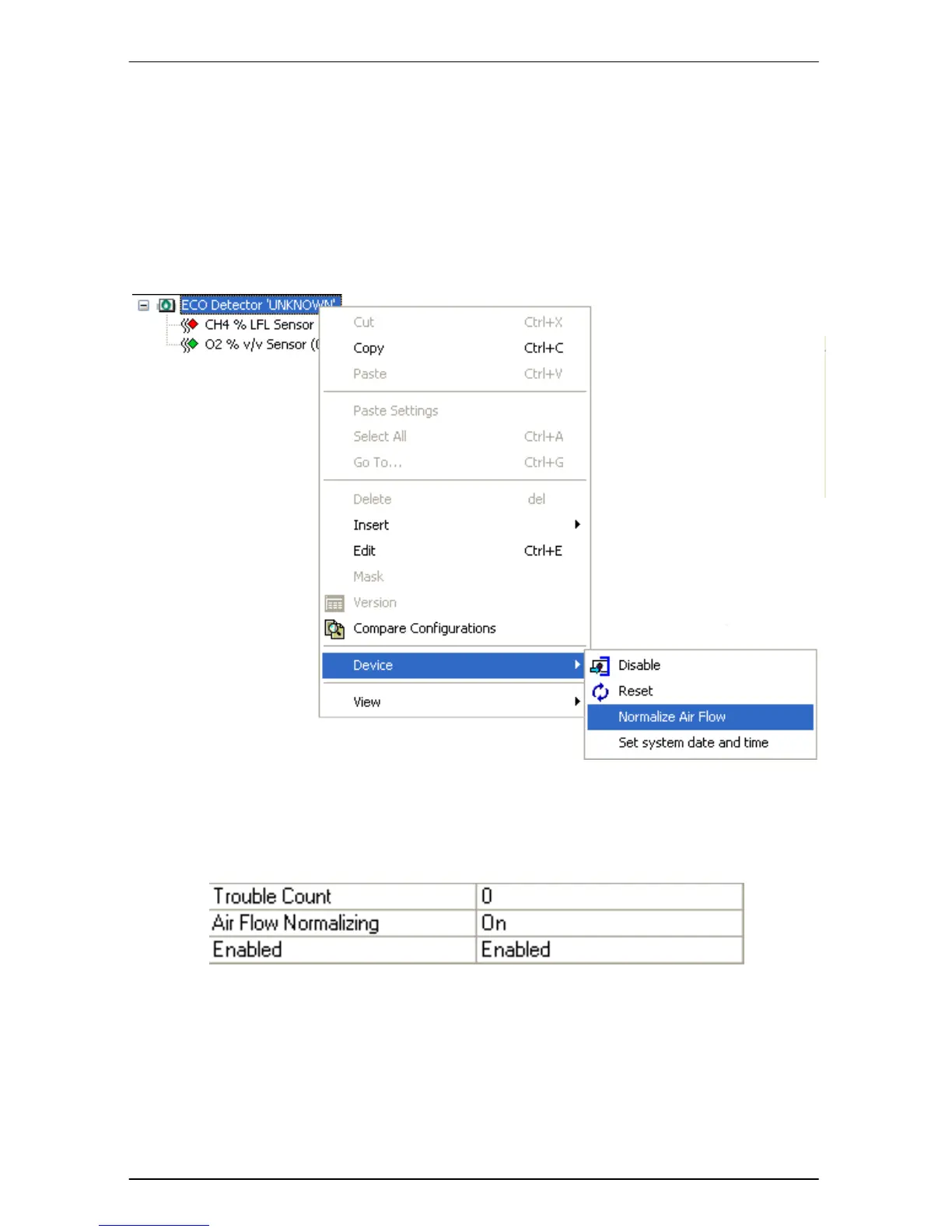
Flow normalization is performed by right clicking the detector to be calibrated. A
context sensitive menu will pop-up. See Figure 31
Figure 31 Flow Normalization
Click the ‘Device’ menu option and then click the ‘Normalize Air Flow’ menu
option. The ‘Air Flow Normalizing’ entry on the ‘Detail status’ tab will now show
‘On’ as shown in Figure 32below.
Figure 32 Normalizing Status
On completion of normalization this will return to ‘Off’
Note: Normalization in ECO takes 30 Seconds. While performing flow normalization
care should be taken to NOT vary the volume air passing through the ECO
detector.


 To Next Page