Product Guide VESDA ECO Detector by Xtralis
54 Configuration 17898_05
Detector Status Zone
The ‘Detector Status Zone’ of Xtralis VSC’s main window provides an easy way of
checking status of the ECO detector, its alarms and faults conditions.
The status information is available to the user via a simple ‘Tabbed’ interface as
described in the following sections.
Alarm Status Tab
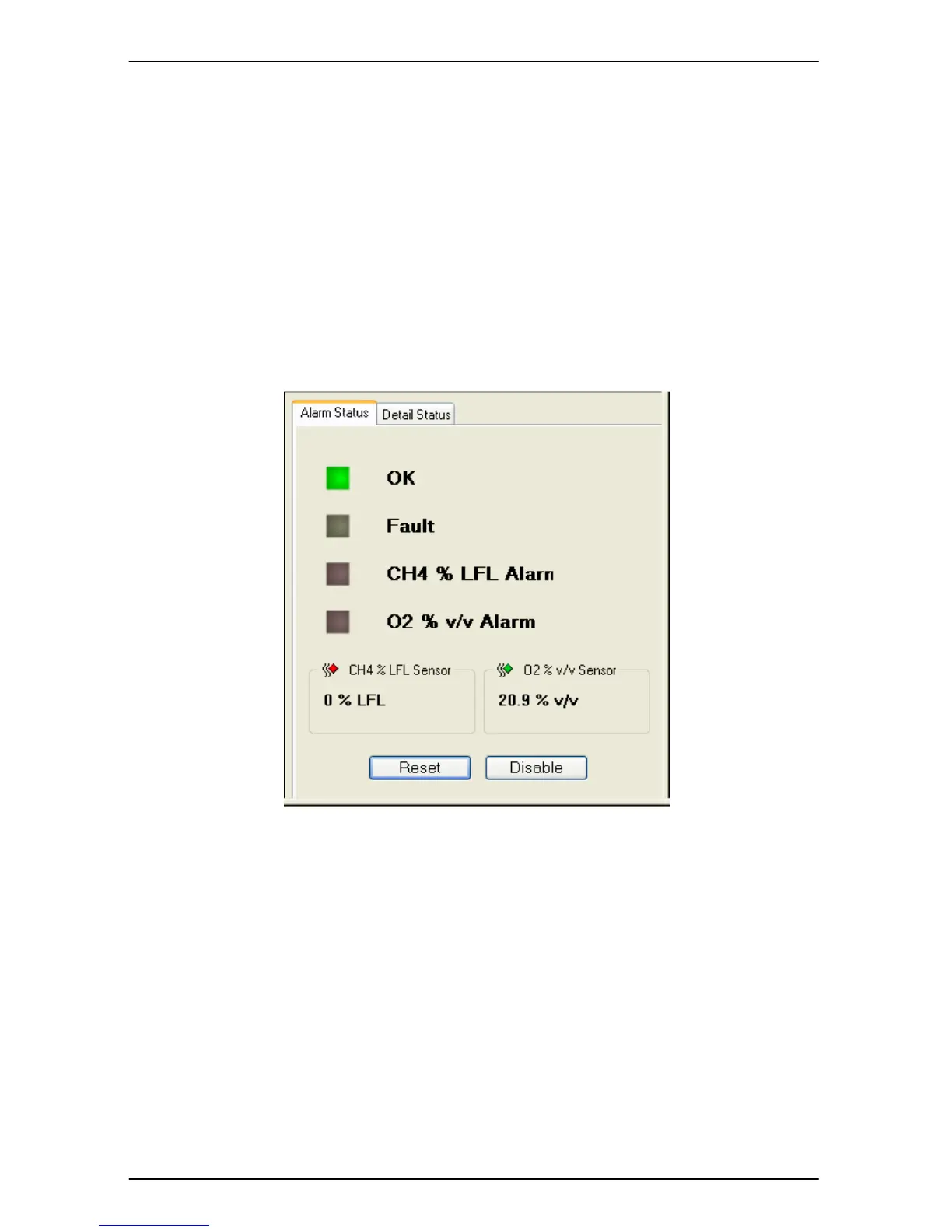
The ‘Alarm Status’ tab displays a snapshot of the selected detector alarms, faults
and gas readings. See Figure 40.
Figure 40 Alarm Status
A mimic of the detector LEDs is displayed and indicates the operational status of
the detector. This mimic follows the layout of the detector local status indicators.
To reset all Alarms and Faults for the selected detector click the ‘Reset’ button.
• The reset function will reset the current alarm states. If the alarm
condition is still present the alarms will not be cleared. Latched alarm
states are cleared if the alarm condition is no longer active.
To disable or isolate the selected detector click the ‘Disable’ button.
• The Disable state inhibits the alarm relays from activating during an
alarm condition and may be used during testing or calibration.


 To Next Page