VESDA VLI Product Guide VESDA by Xtralis
38 www.xtralis.com
5.3 Commands
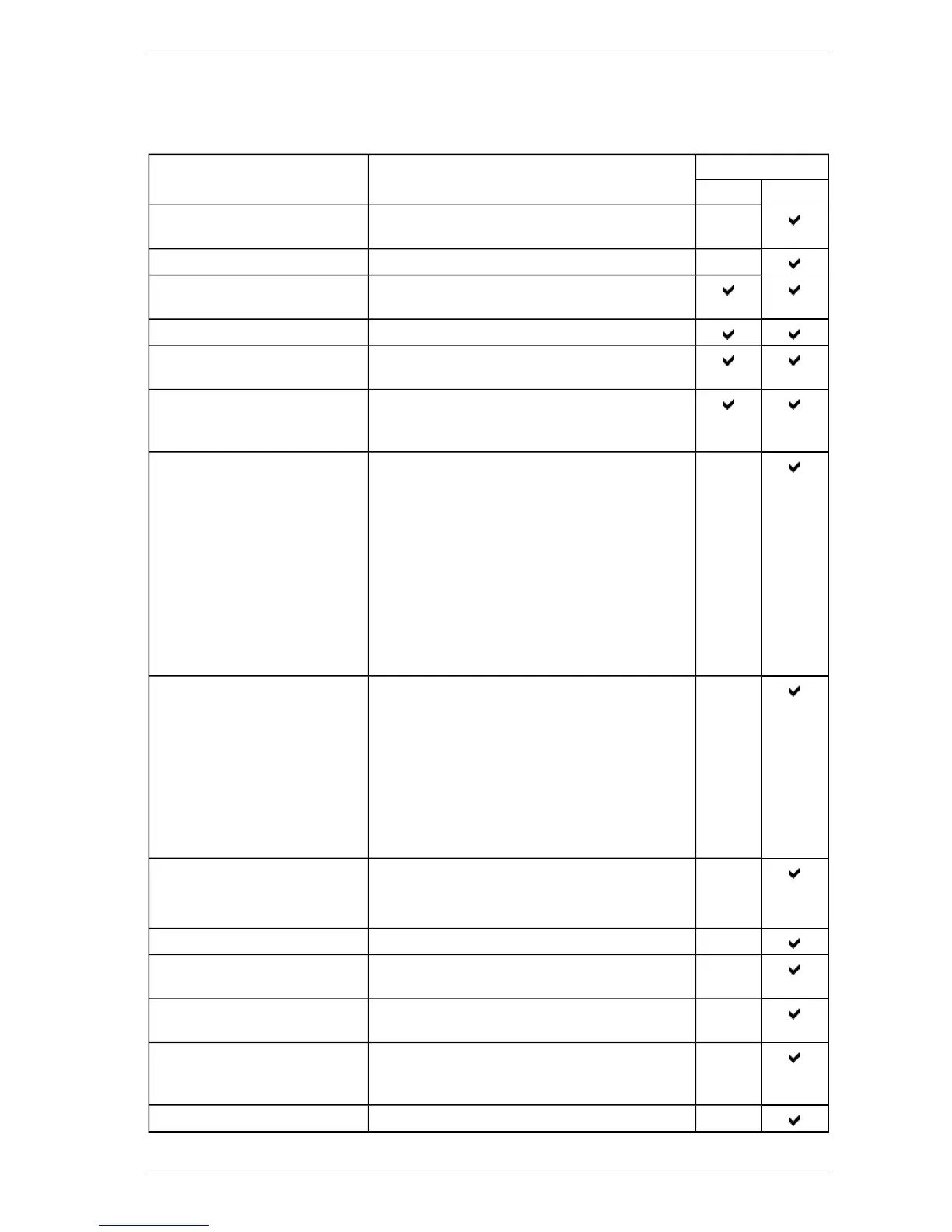
The following commands are able to be issued to the detector:
Command Description Execute From
Detector VSC
Return to Factory Defaults Restores the configuration of the detector to the
initial factory default values.
Accept Factory Defaults Applies the factory default settings to the detector.
Disable Disables all the output relays associated with the
detector.
Standby Turns off the aspirator and stops all signaling.
Enable Enables all the output relays associated with the
detector.
Reset Unlatches all latched alarms and faults, and
returns relays to their normal state. Reset does not
apply to the Isolate condition.
Normalize AirFlow Starts the air flow normalization process for the
selected detector.
The normalization process determines the
reference flow rate.
The detector can be in normal or disabled mode,
but not standby mode.
While the aspirator is turned off during the process,
the detector will not register smoke levels from the
protected environment.
A fault will be generated if the process fails.
Start AutoLearn Smoke In Xtralis VSC you will be prompted to set the
period of time that the environment is monitored to
allow the system to decide what smoke thresholds
are most appropriate.
It is recommended to set the smoke thresholds a
little higher than expected before starting the
AutoLearn to prevent any unnecessary triggering of
alarms. When the AutoLearn has finished, the
levels are overwritten.
Cancel AutoLearn Smoke Cancel the AutoLearn Smoke process.
Smoke thresholds will remain at levels set prior to
commencing AutoLearn Smoke.
Reset Aspirator Reset the smoke hours for the aspirator.
Reset Intelligent Filter Reset the Intelligent Filter status information after
installing a replacement.
Reset Secondary Foam Filter Reset the Secondary Foam Filter status
information after installing a replacement.
Rebuild Zone List Send a command to detectors on the same
VESDAnet for them to rebuild the list of display
modules that are assigned to each detector.
Clear Event Log Remove all entries from the Event Log.














 To Next Page