VESDA VLI Product Guide VESDA by Xtralis
46 www.xtralis.com
7.4 Replacing the Secondary Foam Filter
To maintain the operational integrity of the detector, it is recommended that the secondary foam filter
be replaced every 2 years, or when a filter fault occurs or more often for environments that
experience high levels of contamination.
When the secondary foam filter needs to be replaced, a fault is raised on the detector. During the
replacement process the detector needs to be informed that a new filter has been installed.
Remove the Secondary Foam Filter
1. Set the detector to Standby mode. Refer to section 7.1 for further information.
2. Remove the front cover. Refer to section 7.2 for further information.
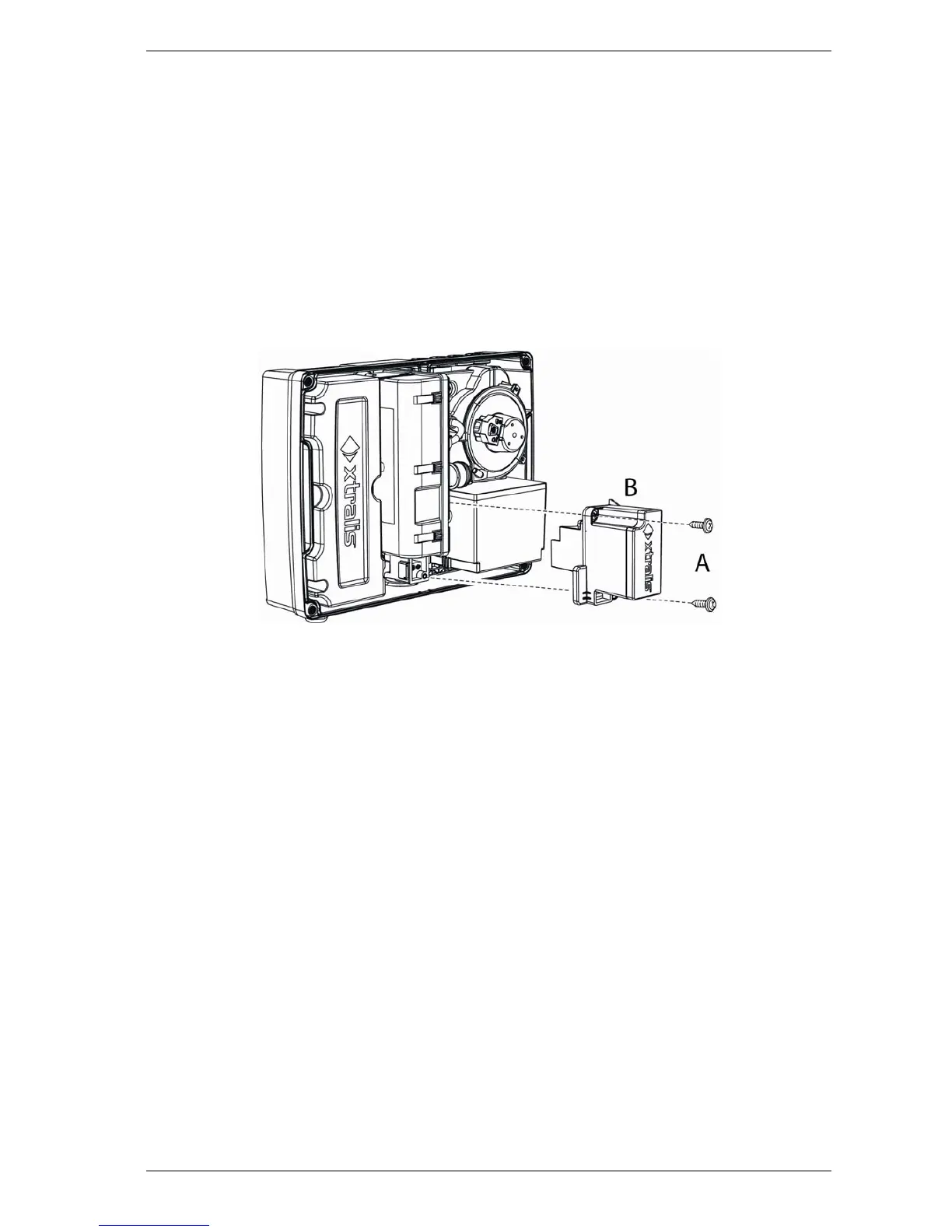
3. Remove two secondary foam filter screws (A).
4. Remove the secondary foam filter (B).
Figure 7-4: Secondary Foam Filter Replacement
Reinstall the Secondary Foam Filter
To reinstall the Secondary Foam Filter, follow the removal procedure in reverse order and execute
the Reset Filter command in Xtralis VSC.
Note: Do not reinstall a used filter.














 To Next Page