12.Enter the User name and Password.
The default user name is config and the default password is ef56.
13.Click OK.
The Quick overview view opens.
6.5 Set the IP address with the web tool
1. Connect the computer to the web tool
For more information, see Connect a computer directly to the web tool (page 20).
2. Click Setup > General configuration > Ethernet.
3. Enter an IP address that is compliant with the existing LAN.
4. Enter the Netmask.
The netmask is normally 255.255.255.0.
5. Enter the Gateway.
If the network consists of several subnets, then enter the IP address to the router.
Otherwise, leave it blank.
6. Click Update.
7. Click Restart.
6.6 Set the IP address with the operator panel
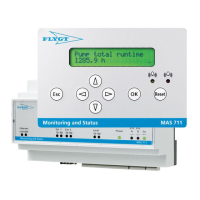
1. Go to the General Config 2.5 menu.
2. Press OK.
3. Set the Ethernet IP address.
a) Press the down arrow to go to the Ethernet IP address 2.5.16 menu.
b) Press OK to enter the edit mode.
c) Enter the IP address.
Use the up, down, and right arrow buttons.
d) Press OK to confirm the change.
Save value? appears.
e) Press OK.
Value saved! appears.
4. Set the Ethernet IP address.
a) Press the down arrow to go to the Ethernet netmask 2.5.17 menu.
b) Press OK to enter the edit mode.
c) Enter the Ethernet netmask.
Use the up, down, and right arrow buttons.
d) Press OK to confirm the change.
6 System Setup
22 MAS 711 Installation, Operation, and Maintenance Manual


 To Next Page
 Loading...









