53
SW 838023
EN 2.10 Shuttle Manual 1712
Appendix
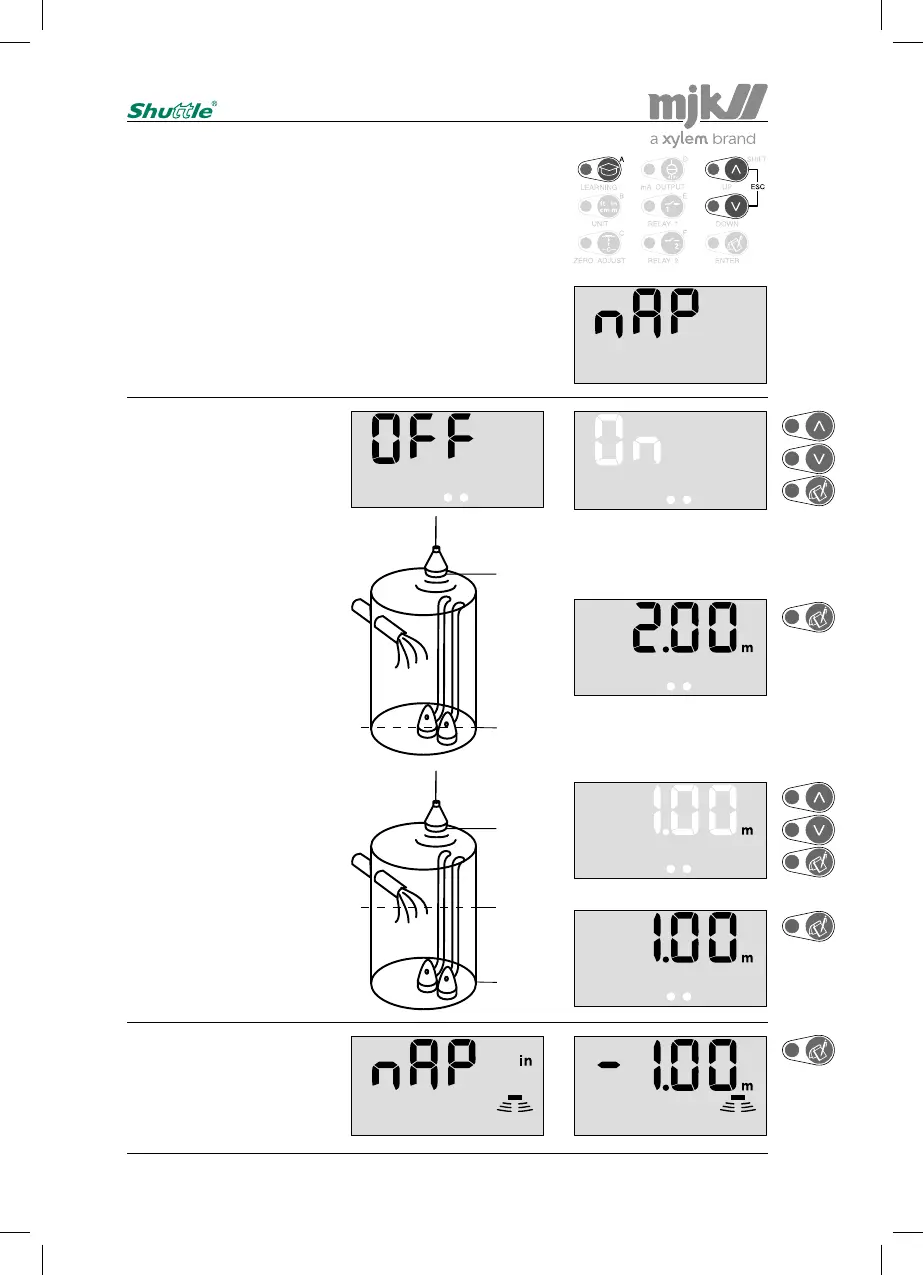
Offset level readout
Shuttle
®
can display the levels with reference to a selectable
offset level.
This means that the normal zero level (when the tank is
empty) is displaced up or down.
Note:
It is very important, that the distance from sensor
to zero is set correctcly (see page 18), and that the
active measuring range (see page 48) is set to a
distance, that corresponds to the longest meaas-
uring distance that can occur.
Shuttle
®
wil now display the
level as the distance from
sensor to zero.
2,00 m
0,00 m
Shuttle
®
reverts to normal
read-out. Every 5 seconds
the display indicates that
the level readouts are dis-
placed from zero.
1,00 m
-1,00 m
0,00 m
Select the desired zero ref-
erence with the arrow keys
and confirm with 'Enter'.
Zero refer-
ence
Zero refer-
ence


 To Next Page