59
SW 838023
EN 2.10 Shuttle Manual 1712
Appendix
Readout of version numbers
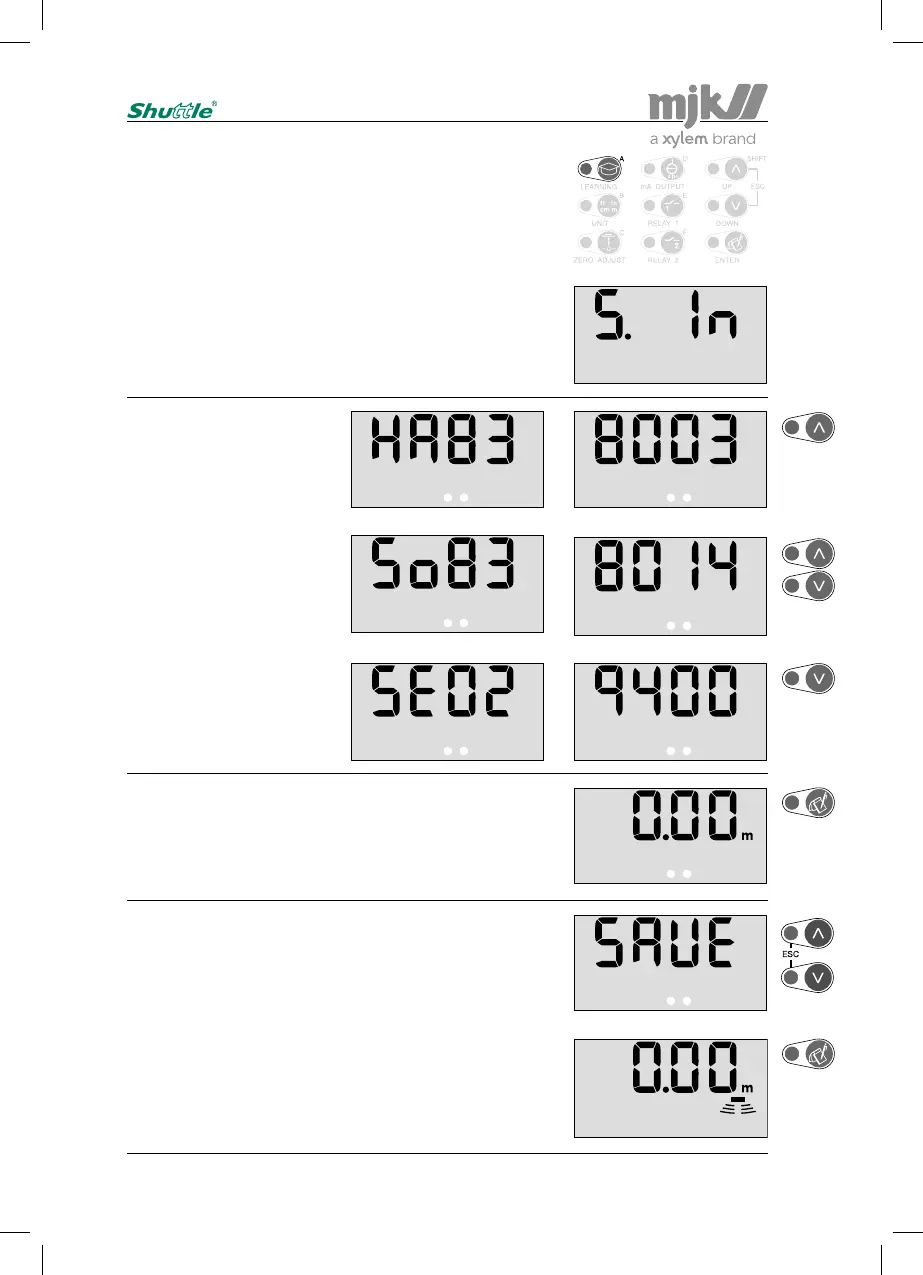
Enter the access code (see page 58) and press'A':
This menu is used to display version numbers for software
and hardware and the unit's serial number.
The hardware version number
is displayed first:
(Ex.: HW version 838003)
Use the up-arrow to proceed.
The software version number is
displayed next:
(Ex.: SW version 838014)
Use the arrows to proceed.
At last the Shuttle
®
's serial
number is displayed:
(Ex.: serial no. 029400)
Use the down-arrow to proceed.
Shuttle
®
is ready for a new selection of a password protect-
ed menu after pressing 'Enter'.
(Re-entering the access code is not necessary if a menu
selection is made within 5 minutes.)
Press 'Escape' if no further password protected menu
selections are needed …
... or confirm with 'Enter' that the changes should be saved,
whereupon Shuttle
®
revert to normal read-out, and the next
password protected menu can be selected.
(Press 'Escape' if the changes should not be saved.)


 To Next Page