65
SW 838023
EN 2.10 Shuttle Manual 1712
Appendix
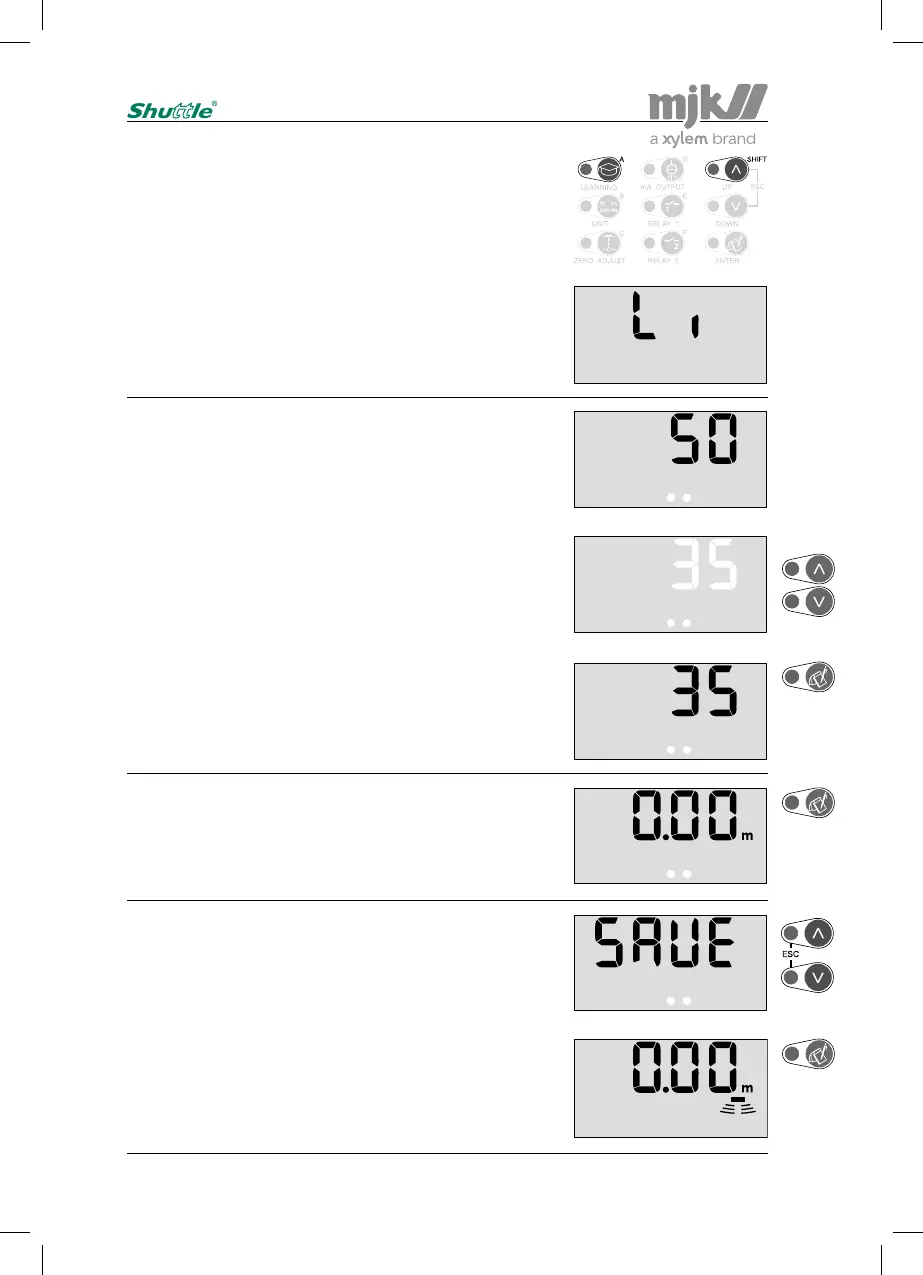
Use the arrow keys to select a new value:
(5 dB increments.)
Confirm the new setting:
The actual setting is shown immediately:
(Value in dB.)
Shuttle
®
is ready for a new selection of a password protect-
ed menu after pressing 'Enter'.
(Re-entering the access code is not necessary if a menu
selection is made within 5 minutes.)
Press 'Escape' if no further password protected menu
selections are needed …
... or confirm with 'Enter' that the changes should be saved,
whereupon Shuttle
®
revert to normal read-out, and the next
password protected menu can be selected.
(Press 'Escape' if the changes should not be saved.)
Max. amplification level
Enter the access code (see page 58) and press 'Shift' + 'A':
If Shuttle
®
periodically has a system error and/or the level
readout jumps to a high or low level during measuring in
favourable conditions, it may be necessary to limit the ampli-
fication of the received echo. (See also page 66.)
The effect from electrical noise can also be reduced or elimi-
nated with this function.
Note:
A reduction in the amplification level may affect the
maximum measuring range.


 To Next Page