Page 26 FT-2000D OPERATING MANUAL
+
CLAR
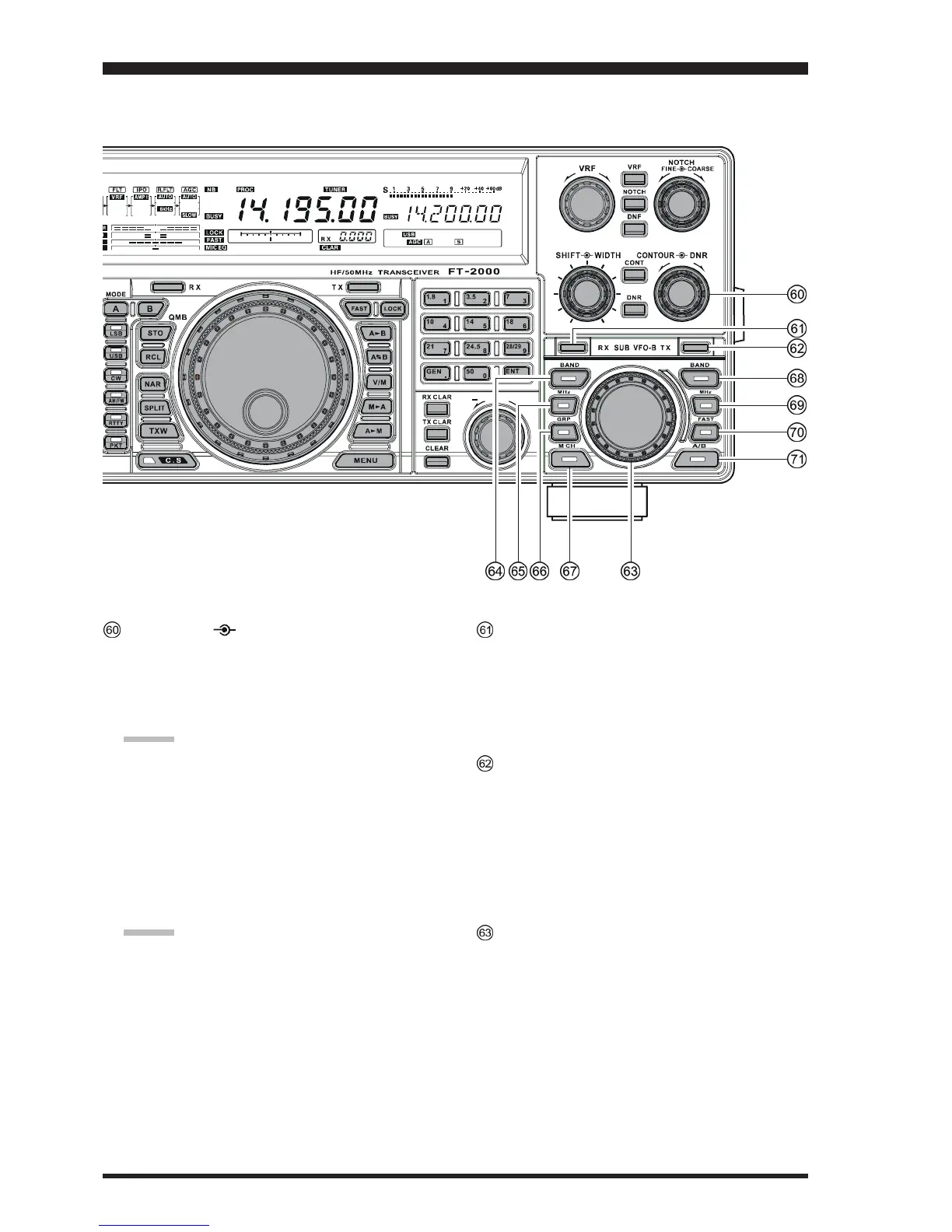
CONTOUR DNR Knob
CONTOUR Knob
The inner
[
CONTOUR
]
knob selects the desired Main
band (VFO-A) receiver’s CONTOUR filter response.
The CONTOUR filter is engaged via the
[
CONTOUR
]
button.
ADVICE:
The Sub band (VFO-B) frequency display will show
the CONTOUR frequency for 3 seconds whenever the
inner
[
CONTOUR
]
knob is turned.
You may disable this feature (displaying the CON-
TOUR frequency) via Menu item “015 diSP LVL
IND.” See page 117 for details.
DNR Knob
The outer
[
DNR
]
knob is used to select one of the 15
available noise reduction parameters for the Main band
(VFO-A) receiver’s Digital Noise Reduction system.
ADVICE:
The Sub band (VFO-B) frequency display will show
the current noise reduction parameter for 3 seconds
whenever the outer
[
DNR
]
knob is turned.
You may disable this feature (displaying the current
noise reduction parameter) via Menu item “015 diSP
LVL IND.” See page 117 for details.
RX Indicator/Switch
This is the button that turns the Sub (VFO-B) receiver
On and Off. When this button is pressed to make the
Sub (VFO-B) receiver active, the Green LED imbed-
ded within the button will light up. Pressing the button
again will disable this receiver, and the imbedded Green
LED will turn off.
TX Indicator/Switch
This is the button that turns the Sub (VFO-B) trans-
mitter On and Off. When this button is pressed to trans-
fer transmitter control to the Sub (VFO-B) frequency
and mode, the Red LED imbedded within the button
will light up. Pressing this button once more will trans-
fer frequency/mode control back to the Main (VFO-
A) side, and the Red LED imbedded within this button
will turn off.
SUB VFO-B Knob
Depending on the status of the
[
A/B
]
button located at
the right bottom of the
[
SUB VFO-B
]
knob, the
[
SUB
VFO-B
]
knob is used for functions associated with the
Main (VFO-A) or Sub (VFO-B) frequency control reg-
isters.
FRONT PANEL CONTROLS & SWITCHES










 To Next Page