11
z
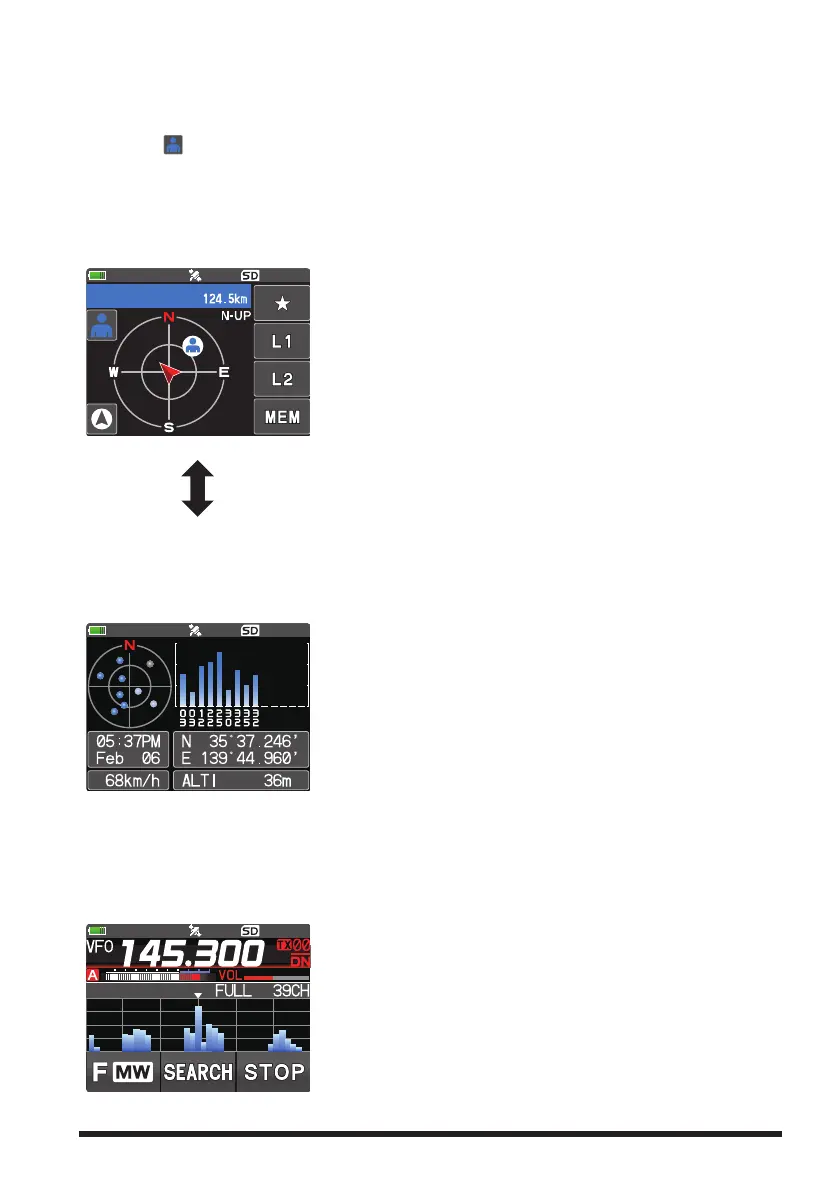
BACKTRACK Screen
Either the backtrack screen or the GPS information screen that was displayed last will
be displayed.
•Real-time navigation function
Touch [
] at the top left of the screen to display the position and direction of the
partner station in real time during communication in C4FM digital V/D mode. (The sig-
nal of the partner station must contain location information.)
•BACKTRACK function
May be register the departure point etc. up to 3 places (“
H
”, “L1”, “L2”) in advance
and display the distance from the current location to the registered point in real time.
Touch the screen (other than the Touch keys)
z
GPS Screen
The backtrack screen, or the GPS information screen, whichever was displayed last, will
be displayed.
The GPS satellites status and numbers are shown.
The following information is displayed.
• Direction and elevation of satellites, and their signal
strengths
• Current latitude and longitude
• Moving Speed
• Altitude of current location
z
Band Scope Screen
In VFO mode, the Band Scope searches the channels above and below the center re-
ceive frequency at high speed. The signal strengths are displayed on a graph, so the
presence or absence of a signal on any channel is easily noted.
• The frequency may be changed by turning the DIAL
knob.
• Touch [SEARCH] or [STOP] to begin or stop the
search.
• The number of channels to search in Band Scope may
be set to 19, 39 or 79. (See “Setting the Search Chan-
nel for the BAND SCOPE Function” (page 63)).



 To Next Page