10
z
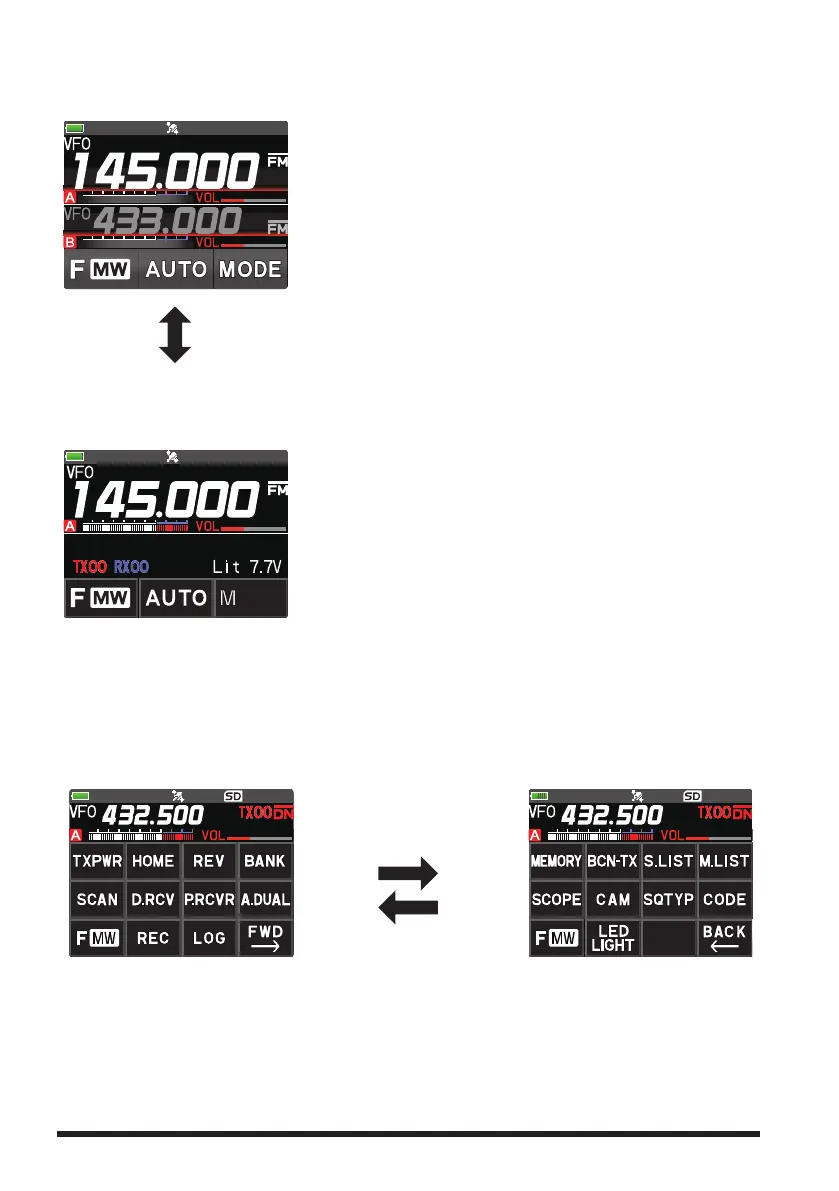
Dual Band Screen
A-band and B-band are displayed in a top-down fashion.
Both bands are received simultaneously.
• Touch the frequency of the operation band (white dis-
play) to display the numeric keypad screen for frequen-
cy input.
• Touch the sub-band (gray display) frequency to change
the operation band.
Press and hold the [A/B] key.
z
Mono Band Screen
A-band or B-band is displayed.
Receives only the displayed band.
• Touch the frequency to display the numeric keypad
screen for frequency input.
• The memory tag and battery voltage etc. are displayed
on the lower segment.
z
Function Menu Screen
Touch [F MW] to display the function menu screen.
Press the [BACK] key to return to the previous screen.
There are two function menus. Touch [FWD →] or [BACK ←] at the bottom right of the
display to switch the screens.
Function Menu Screen 1
Touch [FWD →] to display
“Function menu screen 2”.
Touch [FWD →]
Touch [BACK ←]
Function Menu Screen 2
Touch [BACK ←] to display
“Function menu screen 1”.



 To Next Page