58
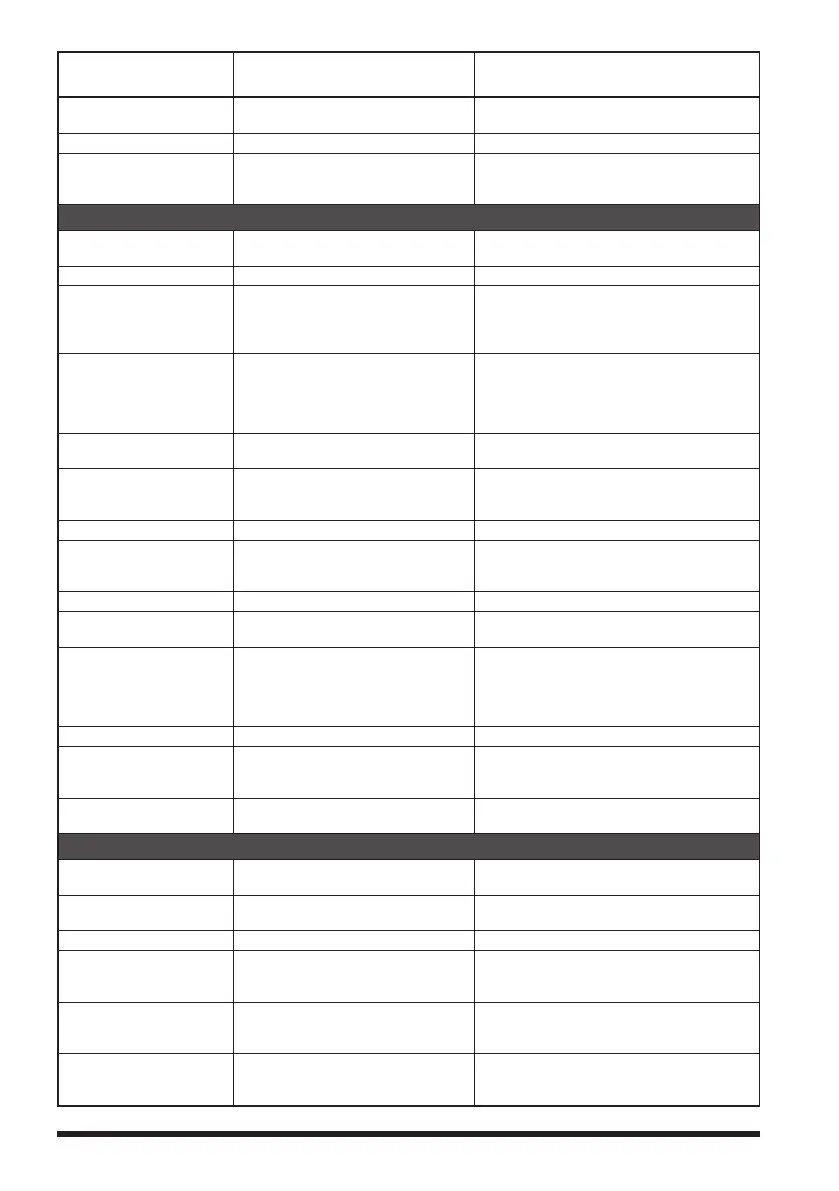
Set mode no. / item Description
Selectable options
(
Options in bold are the default settings
)
4 MEMORY PROTECT Set whether to allow or prohibit
memory channel registration.
ON / OFF
5 MEMORY SKIP Set for skip memory / specify memory. OFF / SKIP / SELECT
6 MEMORY WRITE Set the automatic channel number
increment when registering to a
memory channel.
NEXT / LOWER
SIGNALING
1 BELL Set the bell function settings. SELECT: OFF / BELL
RINGER: 1time to 20times / CONTI
2 DCS CODE Set the DCS code. DCS 023 to DCS 754
3 DCS INVERSION Select a combination of DCS inversion
codes in terms of communication
direction.
RX (Receive): NORMAL (Homeomorphic) /
INVERT (Inversion) / BOTH (Both Phase)
TX (Transmission): NORMAL
(Homeomorphic) / INVERT (Inversion)
4 DTMF MODE Set the transmission of DTMF code
registered to a DTMF memory
channel, DTMF code transmission
delay time, and DTMF code
transmission speed.
MODE: MANUAL / AUTO
DELAY: 50ms / 250ms / 450ms / 750ms /
1000ms
SPEED: 50ms / 100ms
5 DTMF MEMORY Set the DTMF auto dialer channel
and code (16 characters).
CH1 to CH10
6 PAGER Turn the pager answerback Function
ON/OFF, and specify a personal code
(transmit/receive).
ANS-BACK: ON / OFF
CODE-RX: 01 to 50 for each, 05 47
CODE-TX: 01 to 50 for each, 05 47
7 PR FREQUENCY Set a non-communication squelch. 300Hz to 3000Hz 1600Hz
8 SQL LEVEL Select a squelch level. LEVEL 0 to LEVEL15 LEVEL 1
LEVEL 0 to LEVEL 8 LEVEL 1 (AM radio)
LEVEL 0 to LEVEL 8 LEVEL 2 (FM radio)
9 SQL S-METER Select an S-Meter squelch level. OFF / LEVEL1 to LEVEL10
10 SQL EXPANTION Set a squelch type separately for
Receive and transmit.
ON / OFF
11 SQL TYPE Select a squelch type. OFF / TONE / TONE SQL / DCS /
REV TONE / PR FREQ / PAGER / (D CD) /
(TONE-DCS) / (D CD-TONE SQL)
* The options in the parentheses are
available when the SQL expansion is ON.
12 TONE SQL FREQ Set a tone frequency. 67.0Hz to 254.1Hz 100.0Hz
13 TONE SEARCH Set the audio output during tone
search. Turn the muting function on/
off and select a tone search speed.
MUTE: ON / OFF
SPEED: FAST / SLOW
14 WX ALEAT Enables/Disables the Weather Alert
Feature.
ON / OFF
SCAN
1 DW TIME Set the priority memory channel
monitoring interval.
0.1sec to 10sec 5.0sec
2 SCAN LAMP Set whether or not to light up the scan
lamp when scanning stops.
ON / OFF
3 SCAN RE-START Set the scanning restart time. 0.1sec to 10sec 2.0sec
4 SCAN RESUME Configure the scan stop mode
settings.
SCAN:
BUSY / HOLD / 2.0sec to 10sec 5.0sec
DW: BUSY / HOLD / 2.0sec to 10.0sec
5 SCAN WIDTH Set the scan mode operation. VFO: ALL / BAND
MEMORY: ALL CH / BAND
BANK LINK: ON / OFF
6 PRIORITY REVERT Turn the “Priority Channel Revert”
feature ON or OFF during Dual
Receive.
ON / OFF



 To Next Page