21
advanced operatIon
LOCK Function
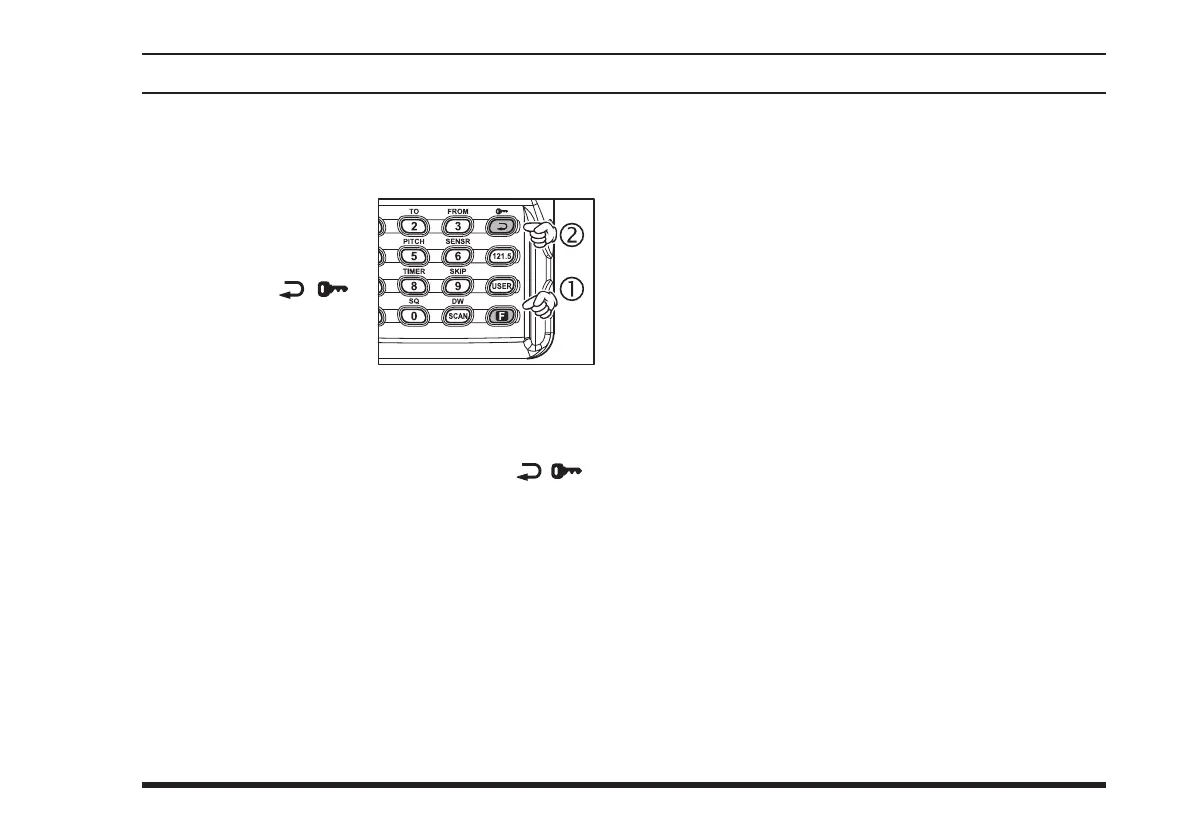
The lock function prevents accidental changes to the
frequency setting and the keypad controls.
To activate the lock
feature, press the
[
F
]
key momentarily, then
press the
[ ( )]
key.
In the LOC K mode,
the display will show
“
-
LOCK
-
” when you rotate the
DIAL
selector
knob, press downward on the
VOLUME
knob, or
touch a key on the keypad.
To turn the lock feature off, press
[
F
]
[ ( )]
again.
You can still access the 121.500 MHz Emer-
gency Frequency when the LOCK function is on.
Simply press the
[
121.5
]
key momentarily (this key
never locks). Pressing this key also unlocks the ra-
dio.
You may choose the lockout conguration according to
your operating preferences. See page 51 for details.
Beep On/Off
The
FTA-310
’s key/button beeper provides convenient
audible feedback whenever a button is pressed. Each
key and button has a different beep pitch, and each func-
tion has a unique beep combination.
When you are scanning, the beeper will be heard each
time the scanner halts on a busy channel. This may be
distracting in some environments; if you want to turn the
beeper off (or back on again):
Press the
[
F
]
key, then press downward on the
VOLUME
knob to activate the Menu (“SET”) mode.
Rotate the
DIAL
selector knob to select Menu Item
05 “
BEEP
.”
Press downward on the
VOLUME
knob to enable
adjustment of this Menu item.
Rotate the
DIAL
selector knob to select the desired
“beeper.” The selections available are
on
,
DTM
, and
oFF
.
on
: Sounds a beep corresponding to a musical note.
DTM
: Sounds a beep corresponding to a DTMF tone.
oFF
: Disables the key beeper.
When you have made your selection, press down-
ward on the
VOLUME
knob to save the new set-
ting, and then press the
PTT
key to exit to normal
operation.



 To Next Page