5
controls & connectors
(
top panel
)
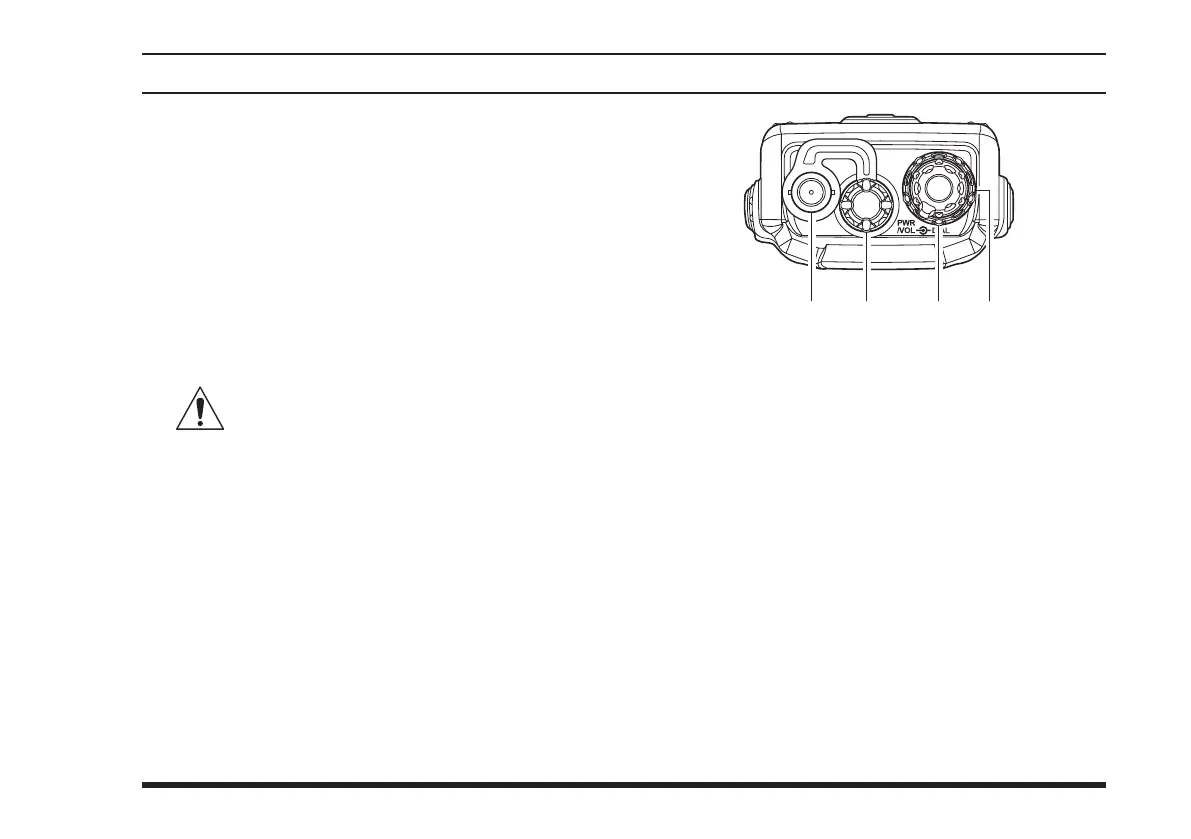
Antenna Jack
This BNC connector accepts the supplied flexible
antenna, or another antenna designed to provide 50
impedance on the Aircraft Communication Band.
MIC/EAR
Jack
You may connect the supplied
CT-96
Headset Cable
or the (optional)
MH-44
B4B
Speaker/Microphone
to this jack. To use this jack, you must rst remove
the plastic cap by rotating it counter-clockwise, then
lifting it away from the transceiver body.
Do not allow the
FTA-310
to become sub-
merged in water while the plastic cover
over the MIC/EAR jack is removed.
POWER/VOLUME
(Inner) Knob
Turn this (inner) control clockwise to turn the radio
on and to increase the volume. Counterclockwise
rotation into the click-stop will turn the radio off.
Pressing this knob downward momentarily selects
the tuning methods among the VFO (Variable Fre-
quency Oscillator), MR (Memory Recall), BOOK
(Pre-Programmed Memories), and WX (Weather
Channel Memories) modes.
Note: The WX mode is available in the USA ver-
sion only.
DIAL
Selector (Outer) Knob
This (outer) 20-position detented rotary switch tunes
the operating frequency or selects the memory chan-
nels.



 To Next Page