37
vor navIgatIon
To Select the DVOR Mode
When entering the NAV band (108.000 - 117.975
MHz), the
FTA-310
selects the DVOR mode auto-
matically. The “
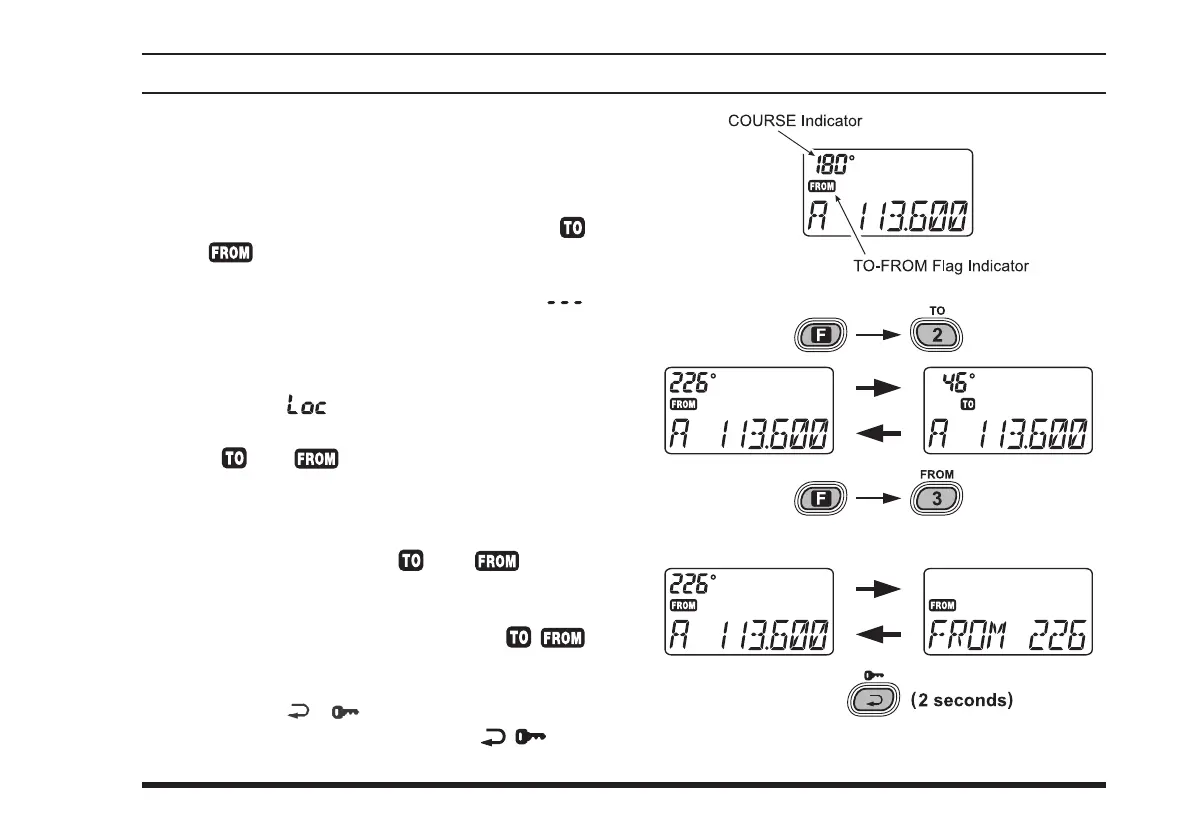
Course IndICator” eld will appear
at the upper left corner on the display, and the “
”
or “
” indicator will appear below the “Course
Indicator” eld on the display.
Note: The “Course IndICator” indicates “ ”
when either your aircraft is too far away from the VOR
station or the frequency is not correctly set to that of
the VOR station. Conversely, the “Course Indicator”
will indicate “
” when receiving a localizer chan-
nel. The
FTA-310
cannot decode a localizer signal.
The “
” or “ ” ag indicators tell you wheth-
er the VOR navigation information is based on a
course leading to the VOR station or leading away
from the VOR station.
To change the flag from “ ” to “ ” or vice
versa, press the
[
F
]
key momentarily, then press the
[
3
(
FROM
)]
or
[
2
(
TO
)]
key, respectively.
The small “Course IndICator” and “ / ”
flag indicators may be toggled to the larger “Fre-
quency” portion of the display. To do this, press and
hold in the
[
( )]
key for 2 seconds to toggle
to the larger display area. Press the
[ ( )]
key
momentarily again to return to the smaller displays.



 To Next Page