28
Timer Operation
The
FTA-310
is provided a “Stop Watch” timer and a
“Count Down” timer. These can be used for a variety of
time-keeping purposes.
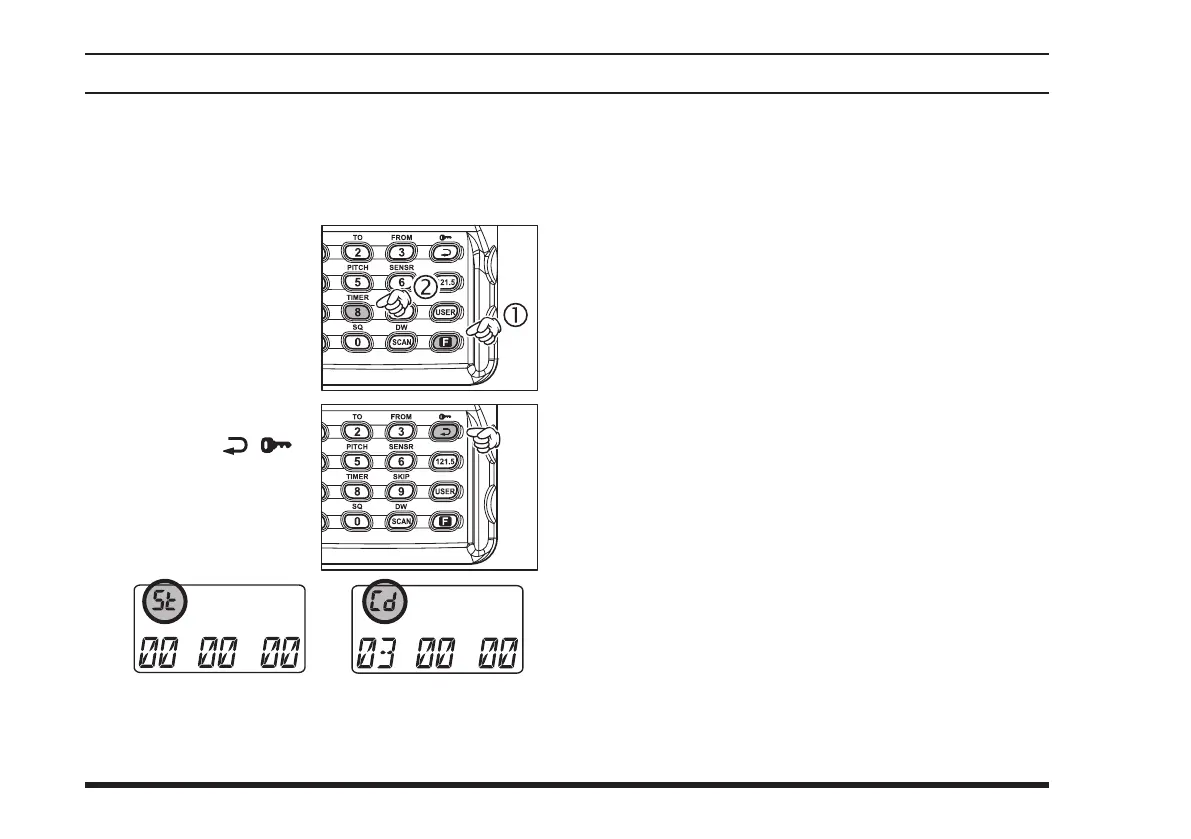
P r e s s t h e
[
F
]
k e y m o m e n -
tarily, then press the
[
8
(
TIMER
)]
key to ac-
tivate the Timer Mode.
Press the
[
( )]
key toggle the Timer
b e t w e e n t h e “ S t o p
Wa tch ” a nd “C oun t
Down” timer modes.
advanced operatIon
If you select the “Count Down” timer, rotate the
DIAL
knob to set the values for the timer (1 minutes
- 60 minutes).
The Timer is designed to start/stop/reset repeatedly
whenever you
press downward on the
VOLUME
knob
.
In the “Count Down” timer mode, an alert will
sound and the timer will stop when the “Count
Down” timer reaches “
00 00 00
.”
To disable the Timer Mode, press
[
F
]
[
8
(
TIMER
)]
again.
“Count Down” timer mode“Stop Watch” mode



 To Next Page