38
Flying to a VOR Station
The
FTA-310
can indicate the deviation from the direct
course to a VOR station.
Select a VOR station on your aeronautical chart and
turn the
DIAL
selector knob (or enter the frequency
directly with the keypad) to the frequency of the
VOR station.
To indicate the deviation between your current ight
path and the desired course, press the
[
F
]
key mo-
mentarily, then press the
[
4
(
CDI
)]
key to change
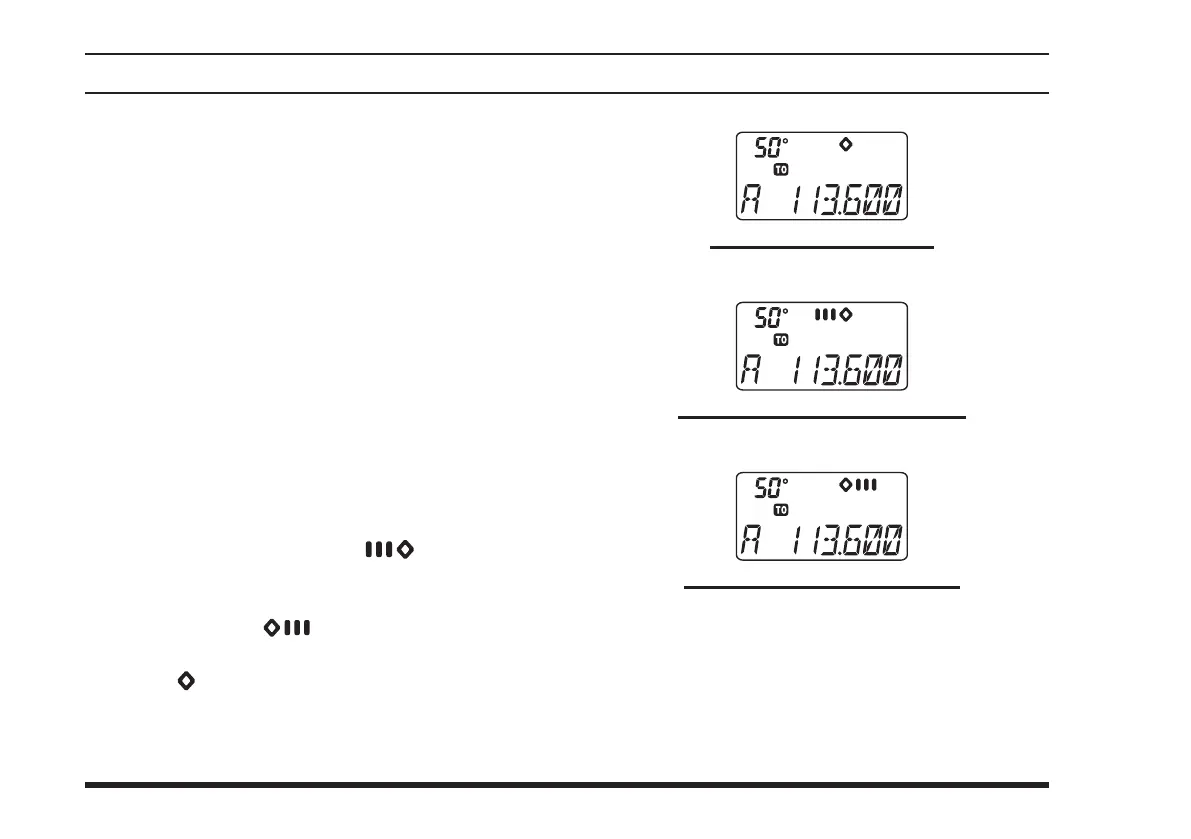
to the CDI (Course Deviation Indicator) mode. The
“Course devIatIon arrow” will appear above the
frequency eld on the display when your aircraft is
off the direct course to the VOR station.
When your aircraft is off course to the right, the
Course Deviation Arrow display will show bars to
the left side of the diamond (“
”). When your
aircraft is off course to the left, the Course Devia-
tion Arrow display will show bars to the right side
of the diamond (“
”). Correct your course until
no bars appear on either side of the CDI “Diamond”
(only “
”) will be visible when the heading is cor-
rect).
To return to the DVOR mode, press the
[
F
]
key mo-
mentarily, then press the
[
1
(
DVOR
)]
key.
vor navIgatIon
The Aircraft is “ON COURSE”
OFF COURSE to the “right” 6 degrees
OFF COURSE to the “left” 6 degrees



 To Next Page