Sampling Mode [SAMPLING]
Reference
DTX900 Owner’s Manual
143
Drum Kit mode
Reference
Song modeClick modeTr igger modeFile modeUtility modeChain modeSampling mode
The explanations here apply to Steps 4 – 8 of “Basic Proce-
dure of the Sampling Jobs” on page 142.
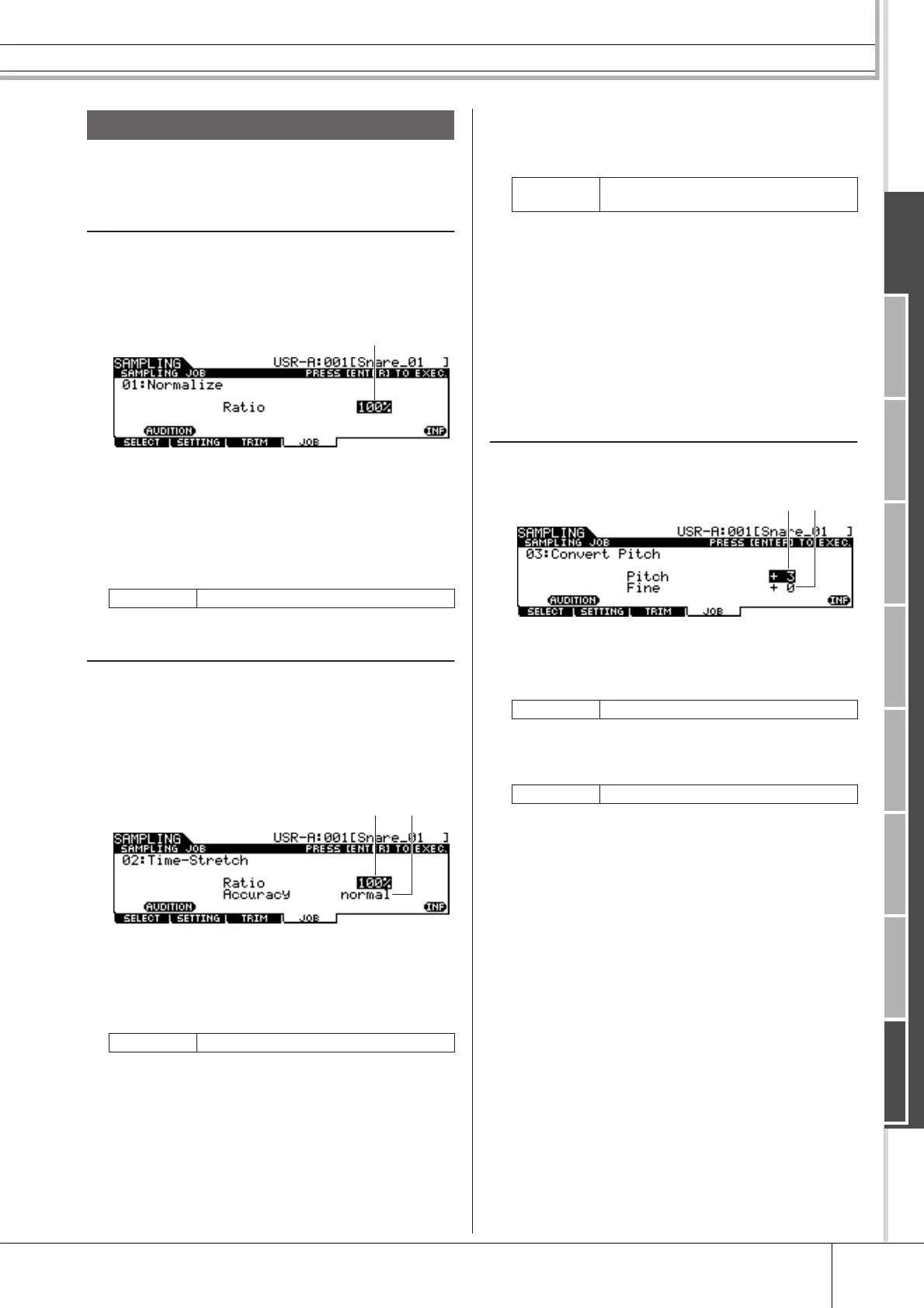
01: Normalize
This Job maximizes (normalizes) the overall level of the
specified User Voice. This is useful for bringing up the vol-
ume of a User voice that was inadvertently recorded at a
low level.
1 Ratio
Determines the post-normalization level of the User Voice. A
setting of 100% maximizes the level so that the highest peak
level in the User Voice is just below clipping (maximum digi-
tal signal level). Settings higher than 100% will raise the User
Voice level above the maximum, producing deliberate clip-
ping. Normally, set this to 100% or less.
02: Time Stretch
This Job lets you change the length of the User Voice with-
out changing the pitch. By using this Job, you can synchro-
nize playback of the audio data included in the User Voice
with Song/Click playback, since changing the length of the
User Voice also changes the playback tempo of the audio
data included in the User Voice.
1 Ratio
Determines the length of the post-process Voice as a ratio of
the length of the original Voice (100%). The tempo change
and the appropriate Ratio value can be calculated as follows.
Ratio value = (original tempo/modified tempo) x 100.
B Accuracy
Determines the quality of the resulting Voice by specifying
which aspect of the original is to be emphasized: sound qual-
ity or rhythmic feel.
sound4 – sound1 These settings place emphasis on
sound quality, with the “sound4” set-
ting producing the highest sound
quality.
normal Produces an optimum balance of
sound quality and rhythmic feel.
rhythm1 – rhythm2 These settings place emphasis on
rhythmic feel, with the “rhythm2” set-
ting producing the most accurate
rhythmic feel.
03: Convert Pitch
This Job lets you change the pitch of the User Voice with-
out changing the tempo.
1 Pitch
Determines the amount and direction of pitch shift in semi-
tone increments.
B Fine
Determines the amount and direction of pitch shift in cent
increments. 1 cent is equivalent to 1/100th of a semitone.
Sampling Jobs
Range 1% – 800%
Range 1% – 400%
1
1
2
Settings
sound4 – sound1, normal, rhythm1 –
rhythm2
Range -12 – +0 – +12
Range -50 – +0 – +50



 To Next Page