Sampling Mode [SAMPLING]
Reference
144
DTX900 Owner’s Manual
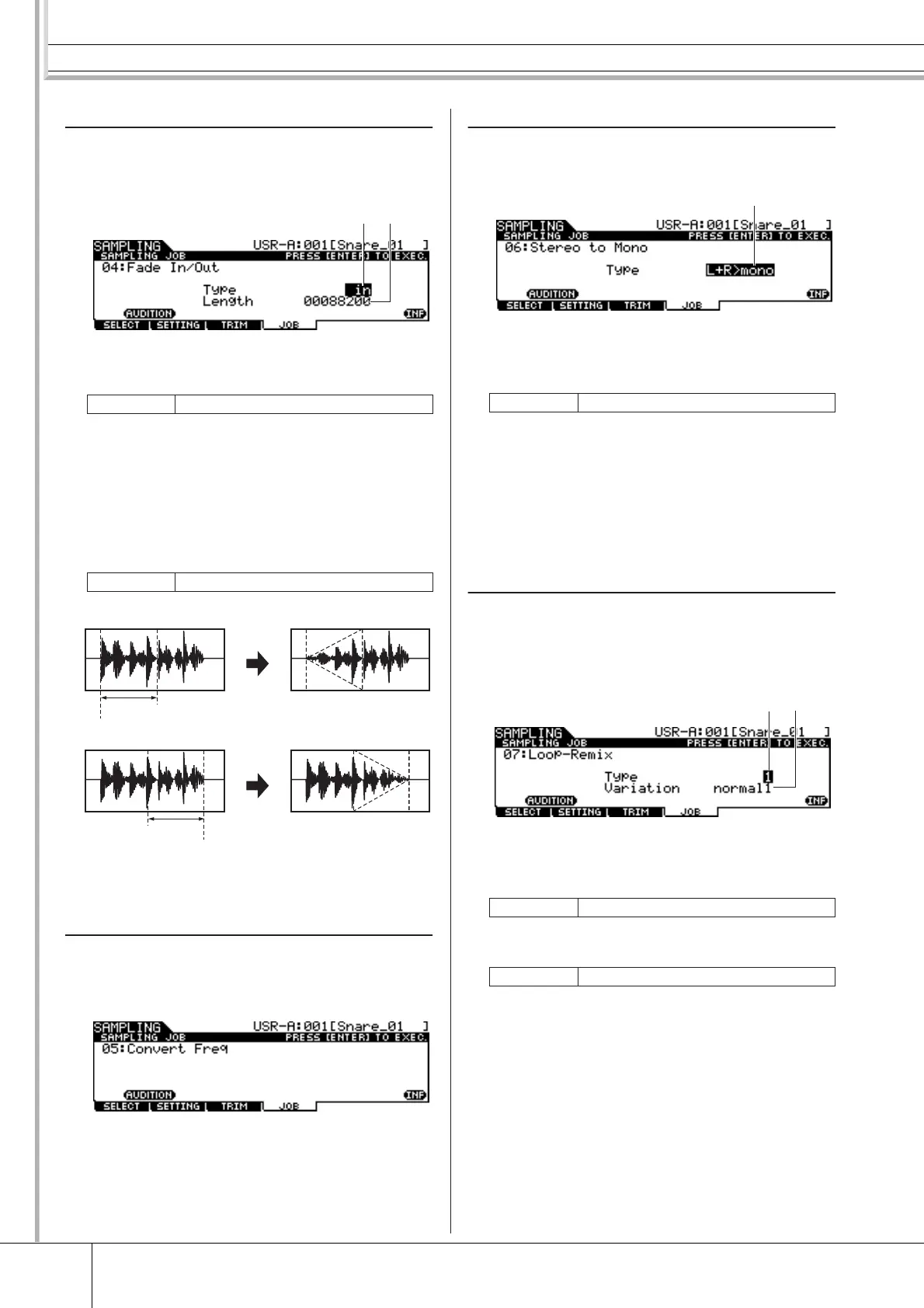
04: Fade In/Out
This Job lets you create a fade-in for the starting portion of
the User Voice and a fade-out for the ending section of the
User Voice.
1 Type (Fade Type)
Determines the type of level fade: fade-in or fade-out.
B Length
Determines the length of the fade-in or fade-out. When a fade-
in is selected, this parameter specifies the length of the fade
starting at the specified Start point. When a fade-out is
selected, this parameter specifies the length of the fade start-
ing at the beginning of the fade and ending at the specified
End point. A Length setting of 4410 is roughly equivalent to
0.1 seconds when the Frequency is set to 44.1 kHz in the Set-
ting display (page 136) of the Sampling mode.
05: Convert Freq
This Job lets you halve the sampling frequency of the spec-
ified User Voice. This can be used to convert hi-fi Voices to
a lo-fi sound, as well as reduce the User Voice size by half.
06: Stereo to Mono
This Job lets you convert a stereo User Voice to a mono
User Voice.
1 Type
Determines which channel, or both channels, of the stereo
User Voice will be converted to a mono User Voice.
L+R>mono The left and right channels of a stereo Sam-
ple are mixed and converted to a mono Sam-
ple.
L>mono The left channel of a stereo Sample is con-
verted to a mono Sample.
R>mono The right channel of the stereo sample is con-
verted to a mono sample.
07: Loop-Remix
This Job lets you automatically cut the audio data included
in the User Voice into separate “slices” and randomly rear-
range the slices for special effects and unusual rhythmic
variations.
1 Type
Determines the degree to which the looped portion of the
User Voice will be sliced.
B Variation
Determines how the original User Voice is varied by this Job.
normal1 – 2 These settings slice and rearrange the User
Voice data, without performing any other
audio changes.
reverse1 – 2 In addition to slicing and rearranging, these
settings reverse the playback of some of the
slices.
Settings in (fade-in), out (fade-out)
Range 00000000 – End point
1
2
Fade In
Fade Out
Length
End point
Length
Start point
Settings L+R>mono, L>mono, R>mono
Settings 1 – 4
Settings normal1 – 2, reverse1 – 2
1
1
2



 To Next Page