M7CL Owner’s Manual
Directly outputting an INPUT channel
112
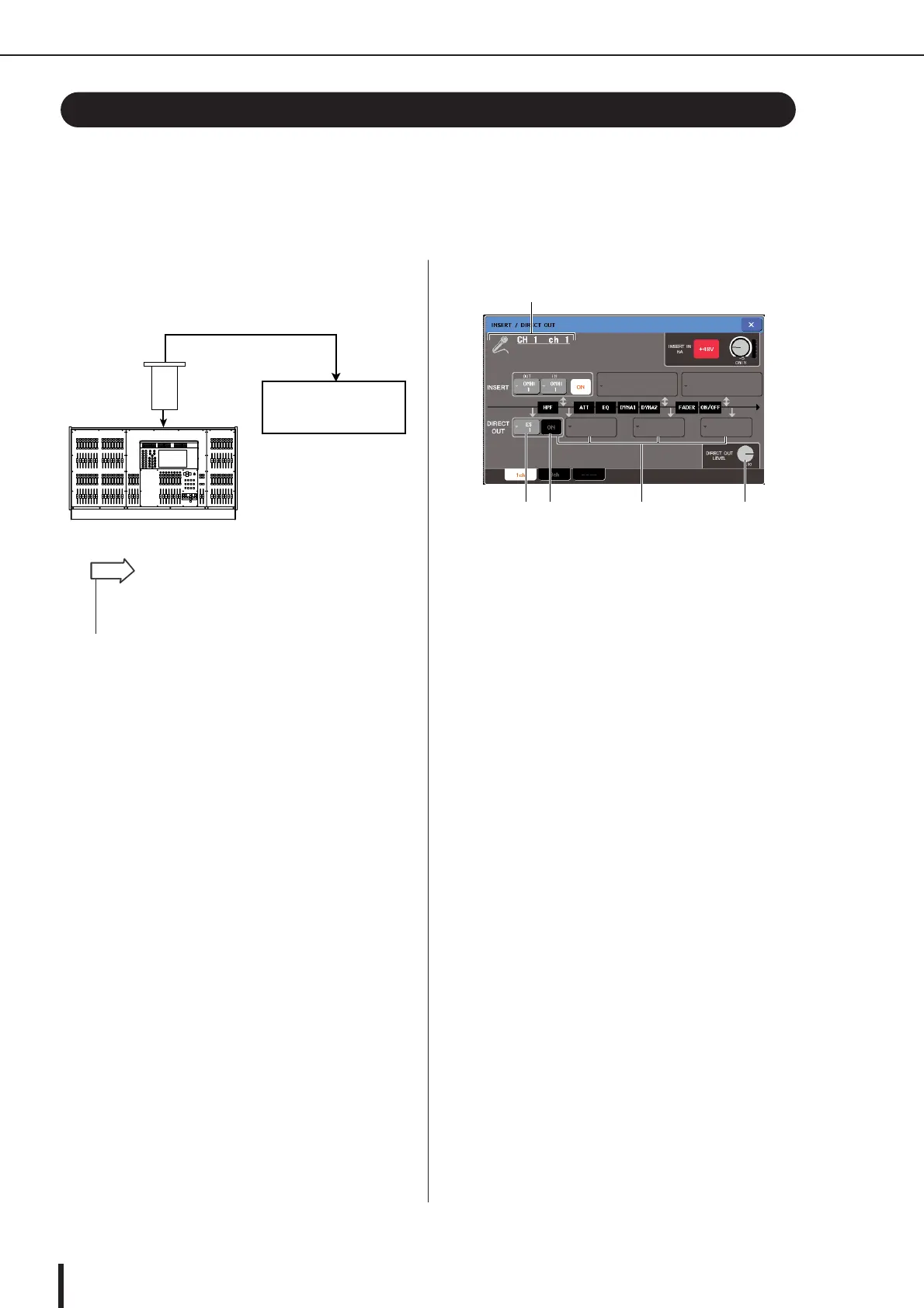
The signal of an INPUT channel can be directly output from a desired OMNI OUT jack, OUTPUT
jack, or from an output channel of the desired slot. For example, signals can be sent via a digital
I/O card installed in a slot to an external digital recorder, so that a live recording can be made
without being affected by mixing operations within the M7CL.
1
As desired, connect your external equip-
ment to an OMNI OUT jack, OUTPUT jack,
or to an I/O card in slots 1–3.
2
Use the navigation keys to access the
OVERVIEW screen for the input channel
that you want to directly output.
3
Press the INSERT/DIRECT OUT field to
access the INSERT/DIRECT OUT popup
window.
There are two variations of this popup window; one-
channel and eight channel. These windows include the
following items.
[INSERT/DIRECT OUT popup window (1ch)]
1 Icon / Channel number / Channel name
This indicates the icon selected for that channel, the
channel number, and the channel name.
B DIRECT OUT field
Here you can make settings for direct output. Press a
field to select PRE HPF (before the HPF), PRE EQ
(after the attenuator), PRE FADER (before the fader),
or POST ON (after the [ON] key) as the position for
direct output.
C DIRECT OUT popup button
This indicates the output port used for direct output.
Press this button to open a popup window where you
can select the output port.
D DIRECT OUT ON/OFF button
Turns the direct output on/off.
E DIRECT OUT LEVEL knob
Adjusts the level of the signal that is directly output.
Directly outputting an INPUT channel
M7CL
DIGITAL IN
DIGITAL OUT
digital
I/O card
digital recorder
• If you install a digital I/O card in a slot and digitally connect an
external device, you’ll need to synchronize the word clock
between the M7CL and your external device (
→ p. 230).
HINT
43 2 5
1
M7CL-48ES





 To Next Page