M7CL Owner’s Manual
Top panel
20
D
[DYNAMICS 1] encoder
●
When an input channel is selected
Adjusts the THRESHOLD parameter of the gate, etc.
●
When a MIX, MATRIX, or STEREO/MONO
channel is selected
Adjusts the THRESHOLD parameter of the compres-
sor, etc.
E
[DYNAMICS 2] encoder
●
When an input channel is selected
Adjusts the THRESHOLD parameter of the compres-
sor, etc.
●
When a MIX, MATRIX, or STEREO/MONO
channel is selected
No function.
F
[HPF] encoder
Adjusts the HPF cutoff frequency for an input channel.
This does nothing for other types of channel.
G
EQ [Q], EQ [FREQUENCY], EQ [GAIN] encod-
ers
For each band of the four-band EQ, these adjust the Q,
center frequency (cutoff frequency), and gain.
Press the EQ [Q] and EQ [GAIN] encoders simulta-
neously to reset the GAIN setting for each band to the
default setting (0.0 dB).
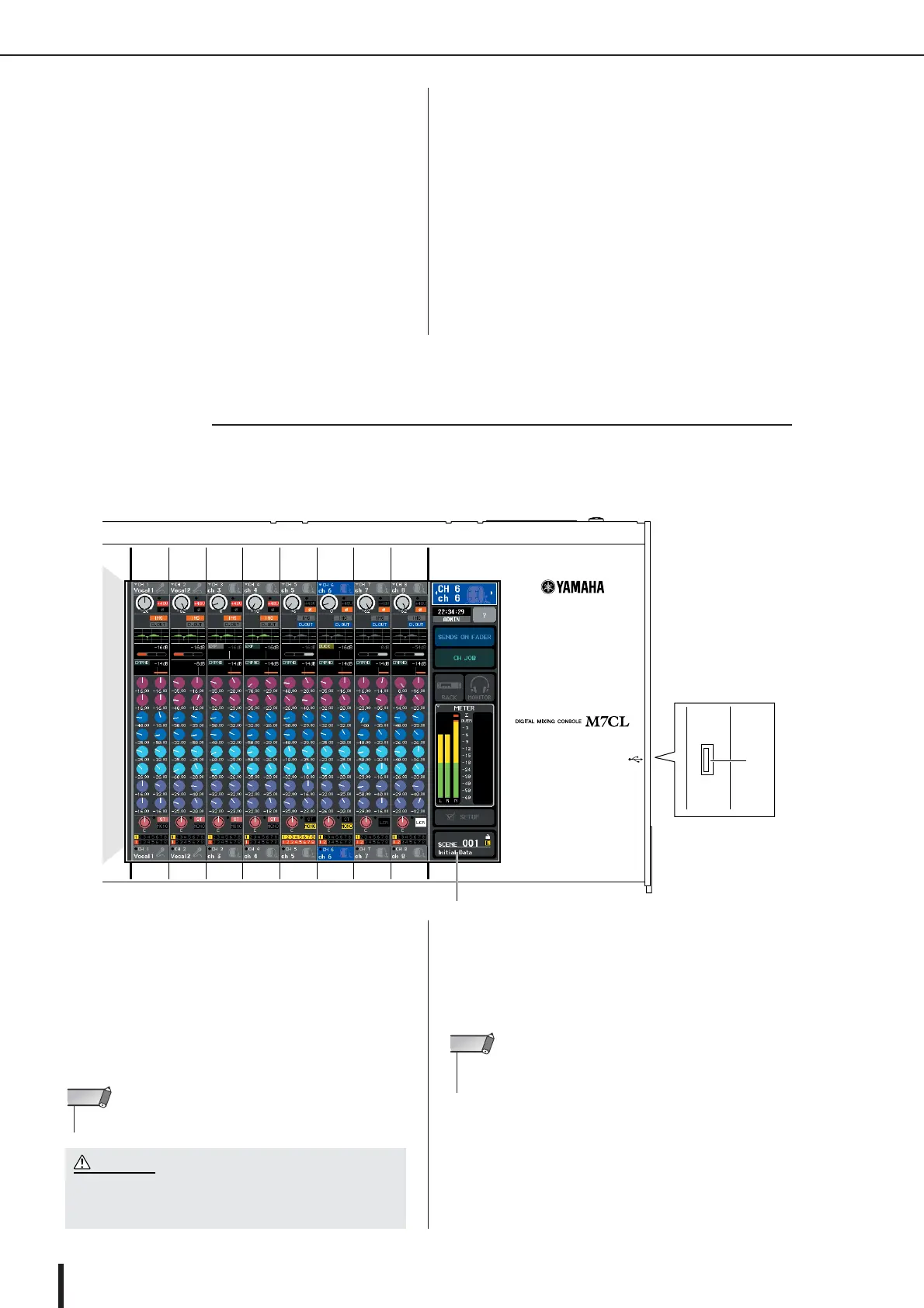
This is a touch screen that you can operate by touching the
surface of the screen. A USB connector is provided on the
right side of the display.
1
Display (touch screen)
This display shows the information you need to operate
the M7CL, and lets you make system-wide settings and
control mix parameters for input and output channels.
Since this is a touch screen, you can use your finger on the
screen to select menus or set parameters. However, you
cannot press two or more locations to operate them simul-
taneously.
B
USB connector
You can connect a USB storage device here to save/load
internal data. USER KEY data that determines the user
level can be saved on a USB storage device to limit the
functionality that can be operated by each user.
■ Display section
2
1
• If the touch screen becomes dirty, wipe it with a soft dry cloth.
NOTE
•Never use a sharp or pointed object such as your fingernail to
operate the touch screen. Doing so may scratch the screen
and render the touch screen inoperable.
CAUTION
•You can connect a USB storage device to the USB connector.
However, operation is guaranteed only with USB flash memory.
NOTE





 To Next Page