M7CL Owner’s Manual
Using scene memories
138
Here’s how to recall a stored scene from scene memory.
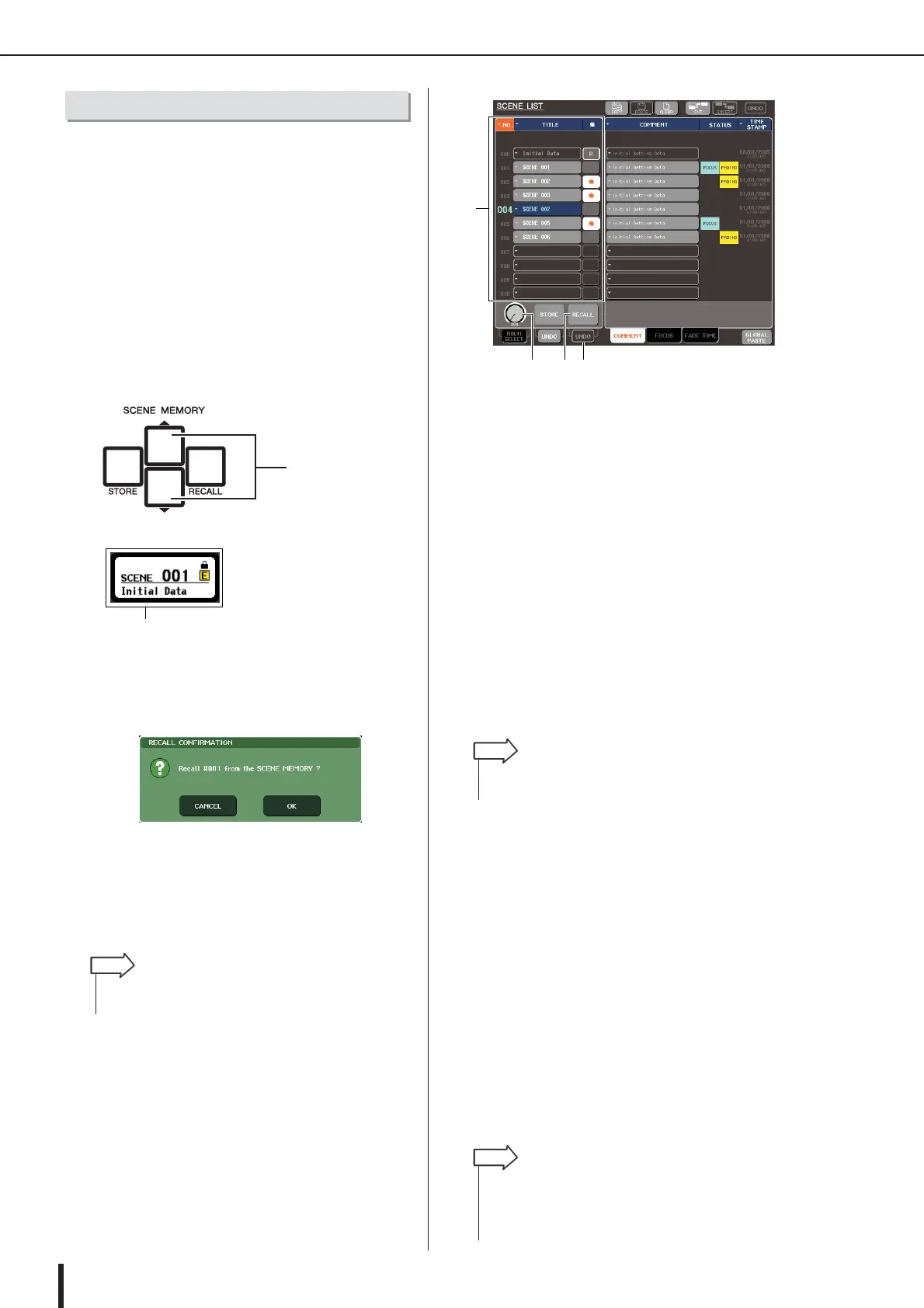
You can recall a scene either by using the keys of the top
panel SCENE MEMORY / MONITOR section, or by
using the SCENE LIST window.
●
Using the keys of the SCENE MEMORY/
MONITOR section
1
Use the SCENE MEMORY [
▲
]/[
▼
] keys to
select the scene number that you want to
recall.
The number of the currently selected scene is shown in
the SCENE field of the function access area.
2
Press the SCENE MEMORY [RECALL] key.
A dialog box will ask you to confirm the Recall opera-
tion.
3
To execute the Recall operation, press the
OK button.
The scene you selected in step 1 will be recalled. If
you decide to cancel the Recall operation, press the
CANCEL button instead of the OK button.
●
Using the SCENE LIST window
1
Press the SCENE field in the function
access area.
The SCENE LIST window will appear, where you can
perform various operations for scene memory.
1
Scene list
This list shows the scenes that are stored in scene
memory. The row highlighted in blue indicates that
this scene number is selected for operations.
B
RECALL button
This recalls the scene that is currently selected in the
scene list.
C
RECALL UNDO button
This button cancels (Undo) or re-executes (Redo) the
most recently performed scene Recall operation.
D
Scene select knob
This knob lets you rapidly select the desired scene
number. You can use any of the multifunction encoders
to operate this knob.
2
Turn one of the multifunction encoders to
select the recall-source scene number.
3
Press the RECALL button.
A dialog box will ask you to confirm the Recall opera-
tion.
4
To execute the Recall operation, press the
OK button.
The scene you selected in step 2 will be recalled. If
you decide to cancel the Recall operation, press the
CANCEL button instead of the OK button.
5
If you want to cancel the scene Recall,
press the RECALL UNDO button.
A dialog box asking you to confirm the Undo opera-
tion will appear; press the OK button if you want to
execute the operation. After undoing, you can press
the STORE UNDO button once again to Redo (re-exe-
cute).
Recalling a scene
SCENE MEMORY
[
▲]/[▼] keys
SCENE field
•You have the option of making settings so that the Recall
Confirmation dialog box does not appear in step 2 (
→
p. 214).
HINT
1
423
•You can also use the SCENE MEMORY [
▲
]/[▼] keys to
select scene numbers.
HINT
•You can also assign the same function as the RECALL UNDO
button to a user-defined key. (
→
p. 216)
•You can also use MIDI messages (program changes) to recall
scenes. (
→
p. 200)
HINT



 To Next Page