Using mute groups
M7CL Owner’s Manual
Grouping and linking
11
129
If necessary, specific channels belonging to a mute group
can be temporarily excluded from mute group operations
(Mute Safe).
1
In the function access area, press the CH
JOB button.
2
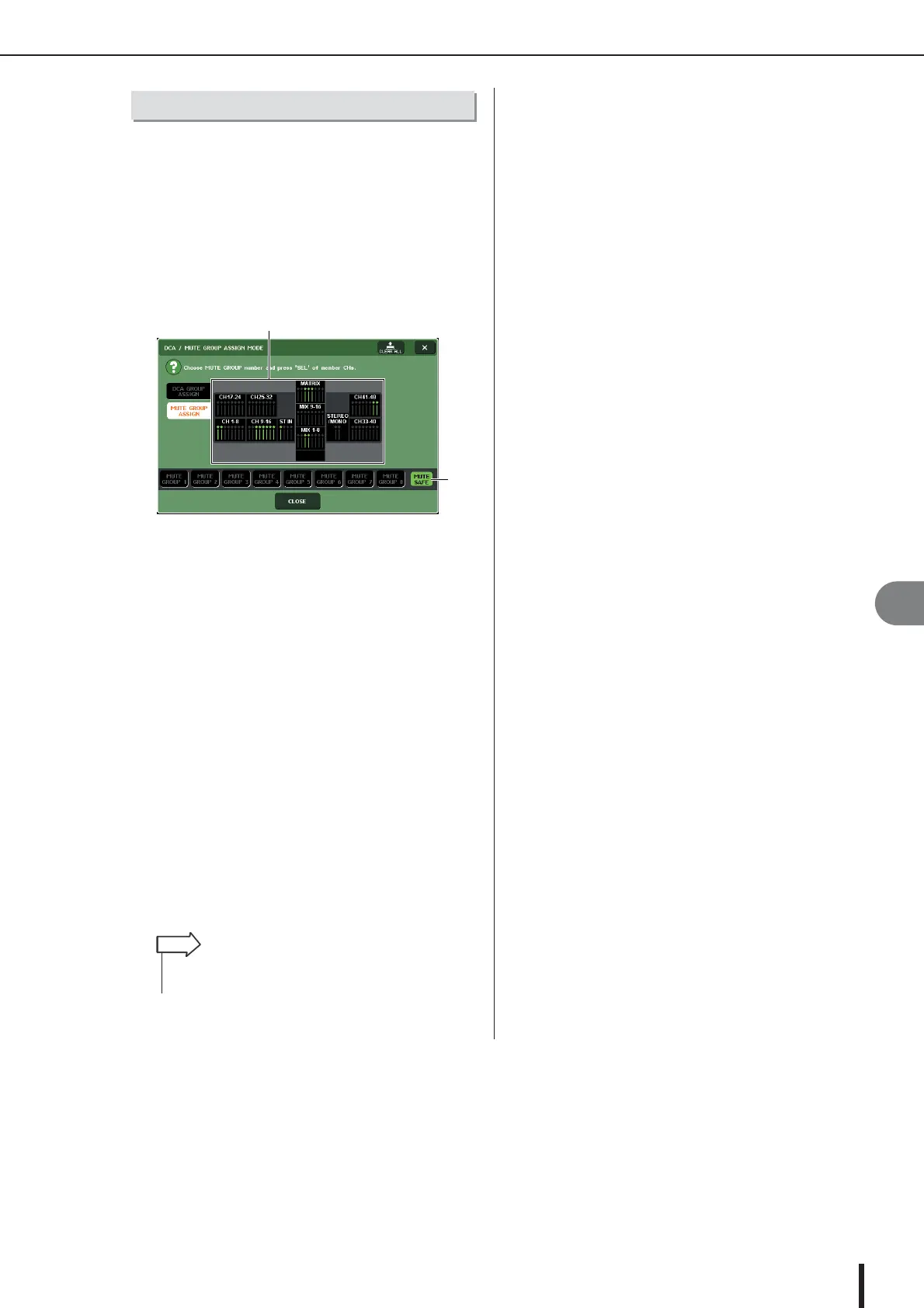
Press the MUTE GROUP button to access
the DCA/MUTE GROUP ASSIGN MODE
popup window.
1 Channel display field
When the MUTE SAFE button is on, channels that are
temporarily excluded from the mute group are high-
lighted in this field.
B MUTE SAFE button
This lets you select the channels that will be set to
Mute Safe status.
3
Press the MUTE SAFE button.
4
Press a [SEL] key to select the channel(s)
you want to exclude from mute groups
(multiple selections are allowed).
The [SEL] key will light, and the corresponding chan-
nel in the channel display field of the window will be
highlighted in green. You can cancel the Mute Safe
status by pressing a lit [SEL] key once again to make it
go dark.
Channels that are set to Mute Safe will not be affected
when you mute a mute group to which that channel
belongs.
Using the Mute Safe function
1
2
• Mute Safe settings are not saved in the scene. They will
remain valid until you cancel the settings.
HINT





 To Next Page