M7CL Owner’s Manual
Audio input/output connections
48
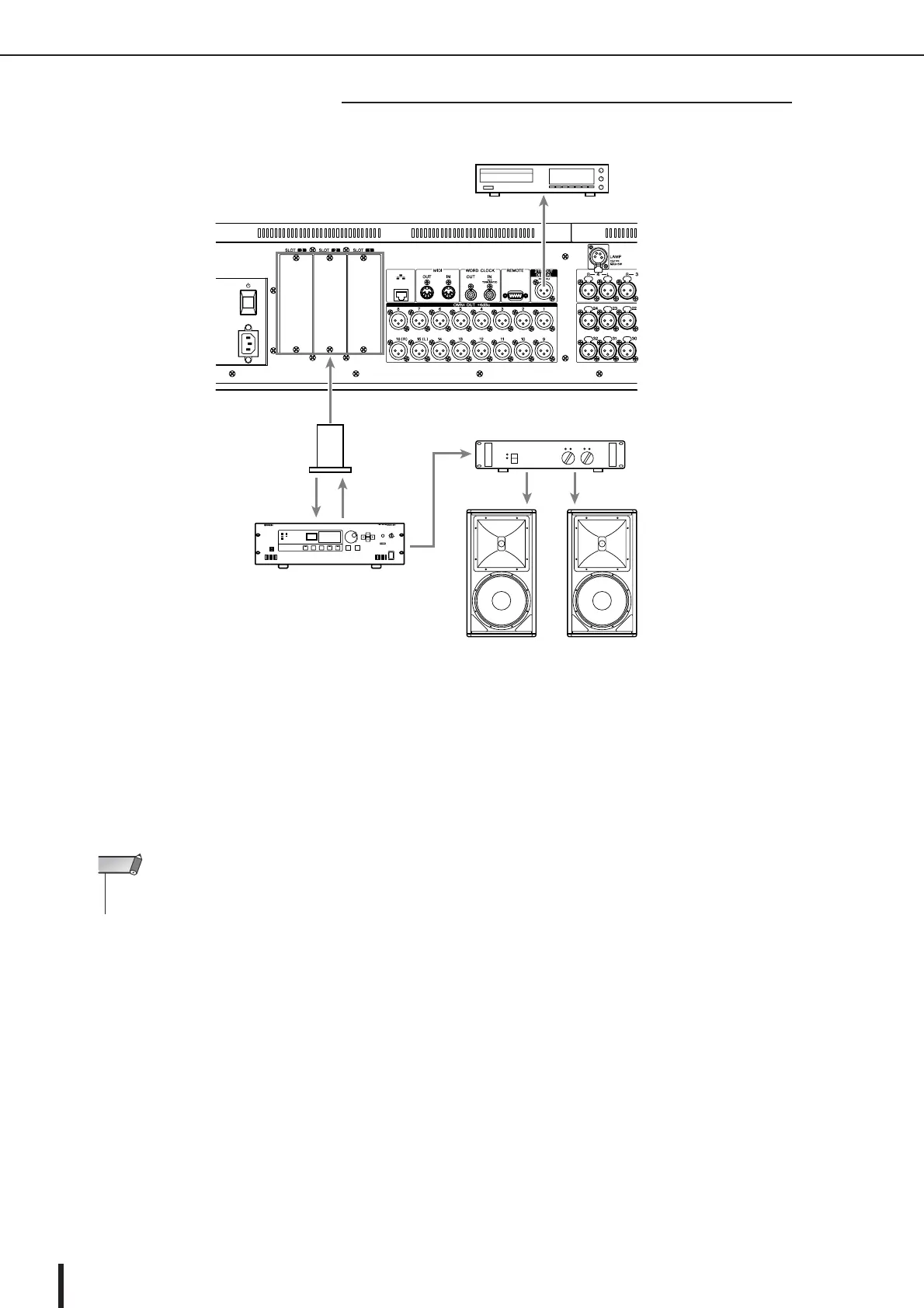
Use the 2TR OUT DIGITAL jack to send the M7CL’s internal signals to an external digital audio device. When the M7CL
is in the default state, the output signal of the STEREO channel is patched to the 2TR OUT DIGITAL jack, and can be used
to record the main mix onto a CD recorder or other device.
By installing separately sold mini-YGDAI I/O cards in slots 1–3, you can add input/output jacks to the M7CL or connect
HDR (Hard Disk Recorder) or speaker processor units.
Refer to the Yamaha professional audio website for the most recent information on I/O cards.
http://www.yamahaproaudio.com/
■ Digital input/output connections
CD recorder
Main speakers
Speaker processor
(e.g., Yamaha DME64N)
Digital I/O card
M7CL-48
• In order to send and receive digital audio signals via the 2TR OUT DIGITAL jack or slots 1–3, the word
clock of both devices must be synchronized p. 230.
NOTE





 To Next Page