40
4
4.2. Moving the Wheelchair
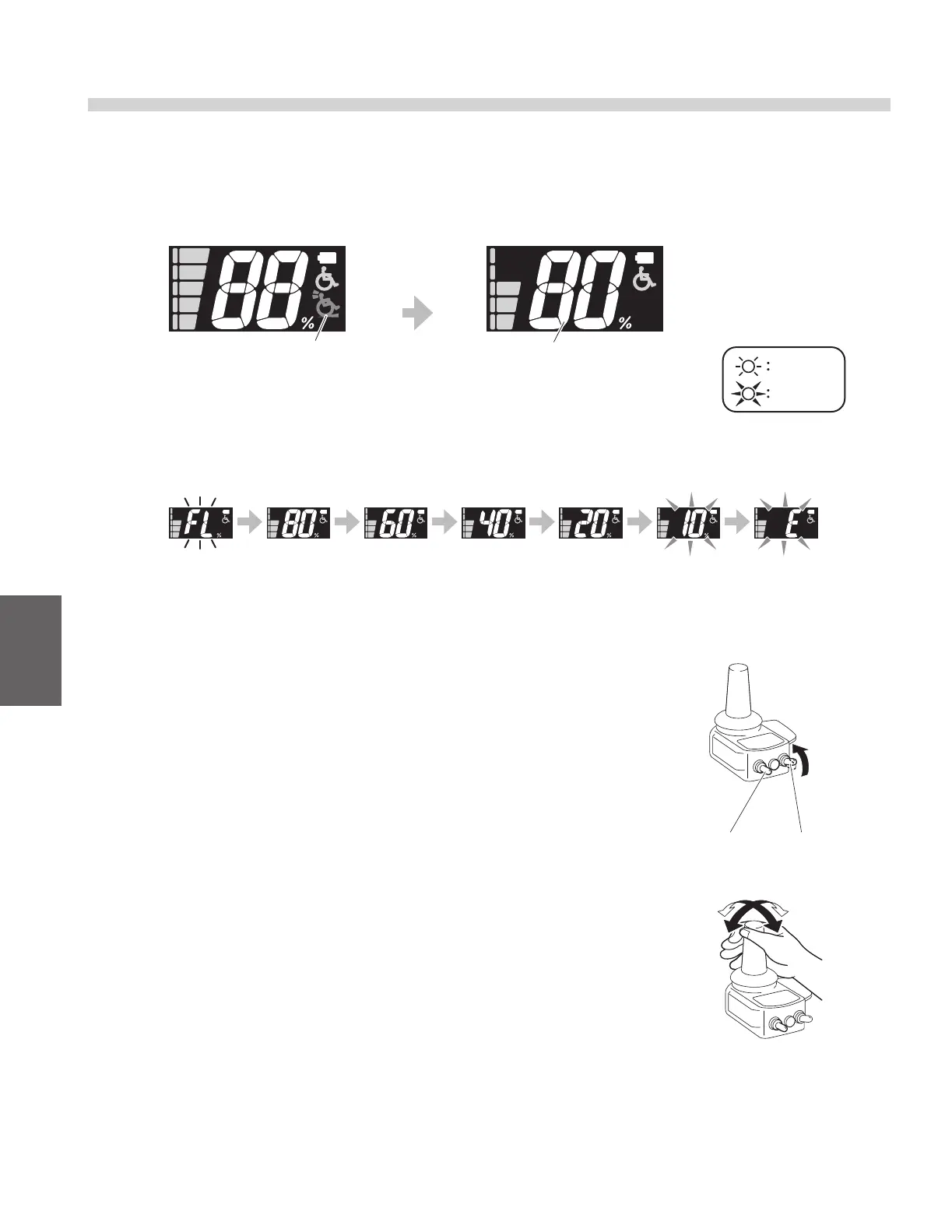
(1) Turn on the power switch (yellow).
When the power to the wheelchair is turned on, all the lamps on the controller illuminate. Then, after
1 second, the “retracted anti-tip device” warning lamp turns o, and the battery residual capacity indi-
cator indicates the battery level.
Battery residual capacity indicator
(2) If necessary, adjust the maximum speed.
For the adjustment method, refer to “4.3. Adjusting and Con-
rming the Maximum Speed”.
(3) Release the parking brakes.
(4) The wheelchair starts moving with you tilt the joystick to the de-
sired direction.
Make sure that the joystick returns to its neutral position and
the wheelchair stops properly when you release the joystick.
For beginners, refer to pages 46 and 47, and practice the
basic operations until you become familiar with them.
Battery residual capacity warning:
When the battery residual capacity becomes less than 10%, the residual capacity lamp ashes, and
a short buzzer beeps “Pi Pi Pi Pi” (4 times).
“Retracted anti-tip device”
warning lamp
Fully charged Empty
On
Flashing
Battery residual
capacity warning
Battery residual
capacity indicator
After 1
second
Speed selector
switch (black)
Power switch
(yellow)



 To Next Page