50
6
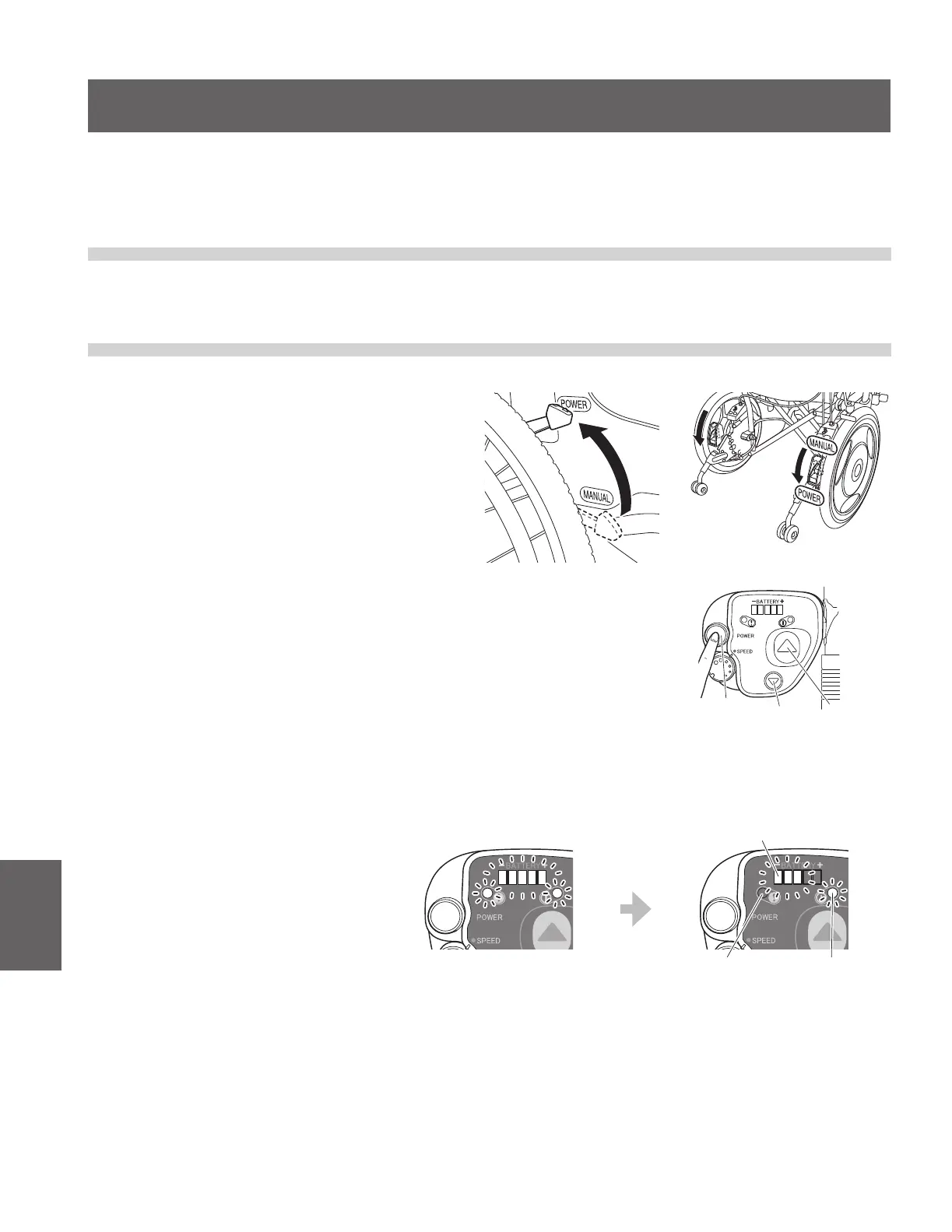
(1) Switch the left and right clutches to the
power drive position.
6. How to Use the Assistant Controller
Even if you are using the wheelchair with assistive operation, read “3. Before Sitting in the Wheelchair”, “4.
Riding the Wheelchair”, “5. After You are Finished Riding the Wheelchair”.
6.1. Getting in the Wheelchair
Have the user get in the wheelchair according to “4.1. Sitting in the Wheelchair”.
6.2. Starting Assistant Travel Mode
Forward
switch
Reverse
switch
Power
switch
After 1 second
All lamps turn on.
The battery residual capacity lamp indicates
the current battery residual capacity.
The warning
lamp (red)
turns o.
The power lamp
(green) stays lit.
(2) Turn on the power for the assistant controller.
When you turn on the power, the lamp display changes as shown in
the lower-right gure.
When you turn on the power switch, if the battery residual capacity is
less than 10%, the warning lamp ashes, and a buzzer beeps “Pi Pi
Pi Pi” (4 times). Charge the battery at your earliest convenience.
24″ 16″



 To Next Page