36
3
3.3. Checking the Residual Capacity of the Battery and In-
stalling the Battery on the Wheelchair
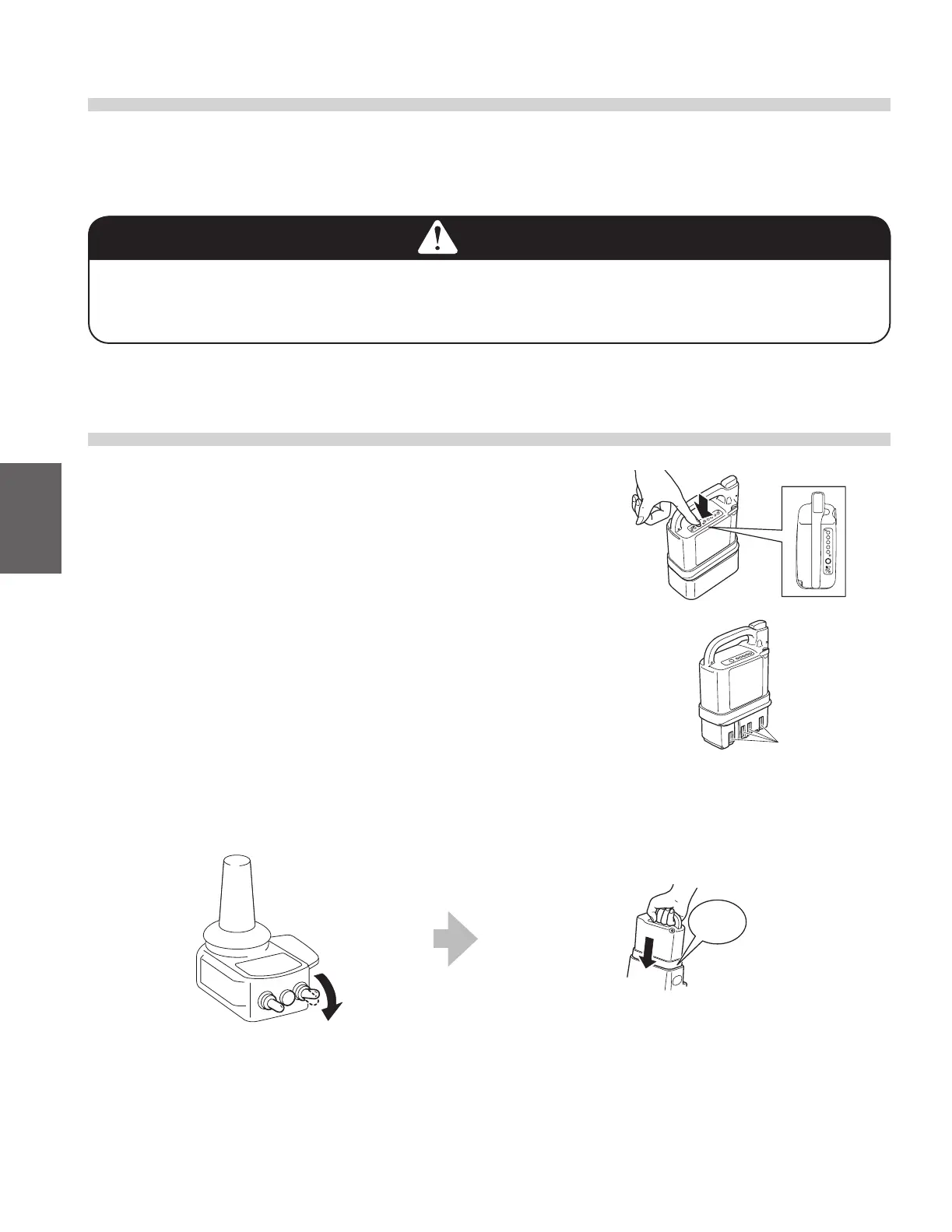
(1) Press the indicator switch to check the residual capacity
of the battery. The residual capacity of the battery will be
displayed on the capacity indicator lamps.
(2) Check the contacts to ensure that they are not dirty or
rusted. If the contacts are dirty or severely rusted, the
wheelchair may be rendered immobile.
(3) Install the battery on the wheelchair.
<How to install a nickel metal hydride (Ni-MH) battery>
Turn o the power switch Insert the battery until it clicks into place.
Contacts
Click!
3.2. Checking Your Clothing
Wear bright-colored, easily visible clothing when operating the wheelchair. Do not operate the wheelchair
while wearing clothing that is not suitable for wheelchair use. Refer to “1.5.6. General Operation” (Page 10).
WARNING
● Donottravelwithclothingthatarenotsafeforwheelchairs.
If you drive the wheelchair with such clothing, you or people in your surrounding area may
become injured.



 To Next Page