1 2
4
4-5
Instrument and control functions
TIP
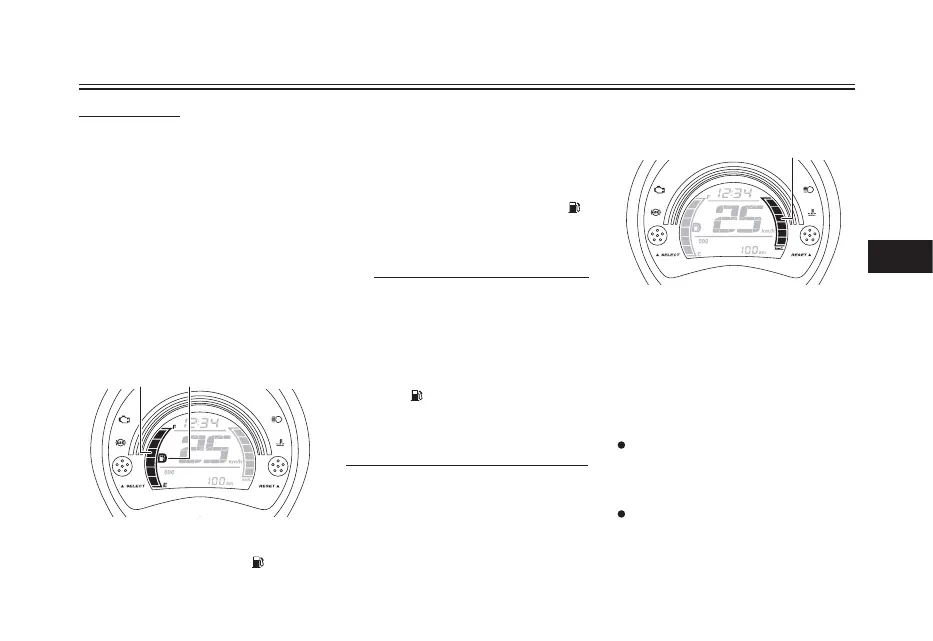
Fuel meter
1. Fuel meter
2. Fuel level warning indicator “ ”
1. Instantaneous fuel consumption meter
Turn the key to “ON”.
Push the “SELECT” button and
“RESET” button together for at
least two seconds.
When the hour digits start flashing,
push the “RESET” button to set the
hours.
Push the “SELECT” button, and the
minute digits will start flashing.
Push the “RESET” button to set the
minutes.
Push the “SELECT” button and
then release it to start the clock.
To set the clock
1.
2.
3.
4.
5.
6.
The fuel meter indicates the amount of
fuel in the fuel tank. The display
segments of the fuel meter disappear
towards “E” (Empty) as the fuel level
decreases. When the last segment
and fuel level warning indicator “ ”
start flashing, refuel as soon as
possible.
This fuel meter is equipped with a
self-diagnosis system. If a problem is
detected in the electrical circuit, the
following cycle is repeated until the
malfunction is corrected: fuel level
segments and fuel level warning
indicator “ ” flash eight times, then go
off for approximately 3 seconds. If this
occurs, have a Yamaha dealer check
the electrical circuit.
Instantaneous fuel consumption
meter
This meter shows the instantaneous
fuel consumption.
Depending on the display setting
selected for the instantaneous fuel
consumption mode “F/ECO”, the
displayed segments increase or
decrease.
km/L: The number of segments
displayed increases the more
efficiently the vehicle is being
operated.
L/100 km: The number of segments
displayed decreases the more
efficiently the vehicle is being
operated.





 To Next Page