1
1
2
3
4
4-9
Instrument and control functions
NOTICE
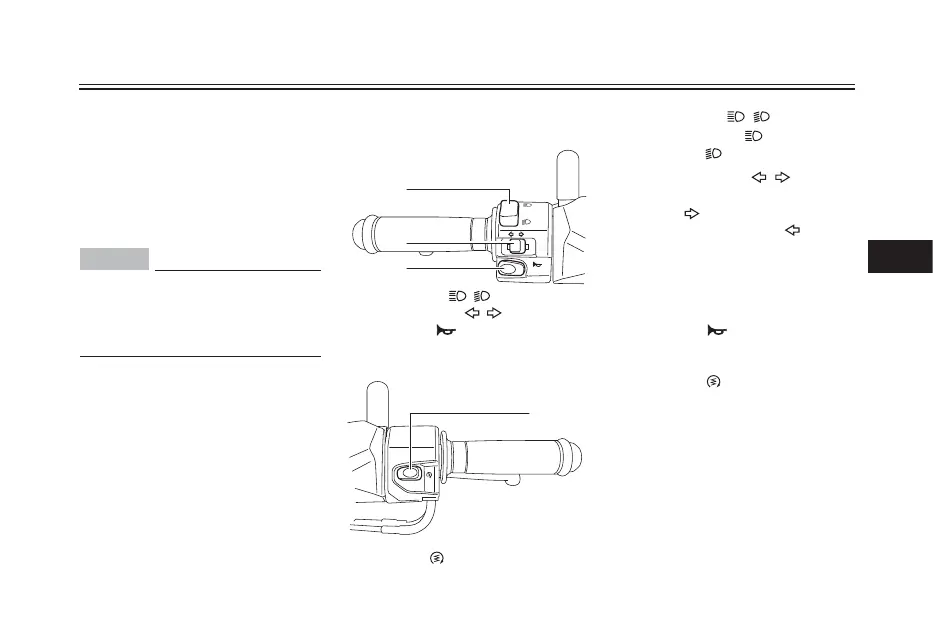
Left
1. Dimmer switch “ / ”
2. Turn signal switch “ / ”
3. Horn switch “ ”
If a problem is detected in any of those
circuits, the engine trouble warning
light will come on and the display will
indicate an error code.
If the display indicates any error codes,
note the code number, and then have a
Yamaha dealer check the vehicle.
If the display indicates an error
code, the vehicle should be checked
as soon as possible in order to
avoid engine damage.
Handlebar switches
Right
1. Start switch “ ”
Dimmer switch “ / ”
Set this switch to “ ” for the high
beam and to “ ” for the low beam.
Turn signal switch “ / ”
To signal a right-hand turn, push this
switch to “ ”. To signal a left-hand
turn, push this switch to “ ”. When
released, the switch returns to the
center position. To cancel the turn
signal lights, push the switch in after it
has returned to the center position.
Horn switch “ ”
Press this switch to sound the horn.
Start switch “ ”
With the sidestand up, push this switch
while applying the front or rear brake
to crank the engine with the starter.
See page 6-1 for starting instructions
prior to starting the engine.





 To Next Page