PSR-E433 Owner’s Manual
31
Quick Guide
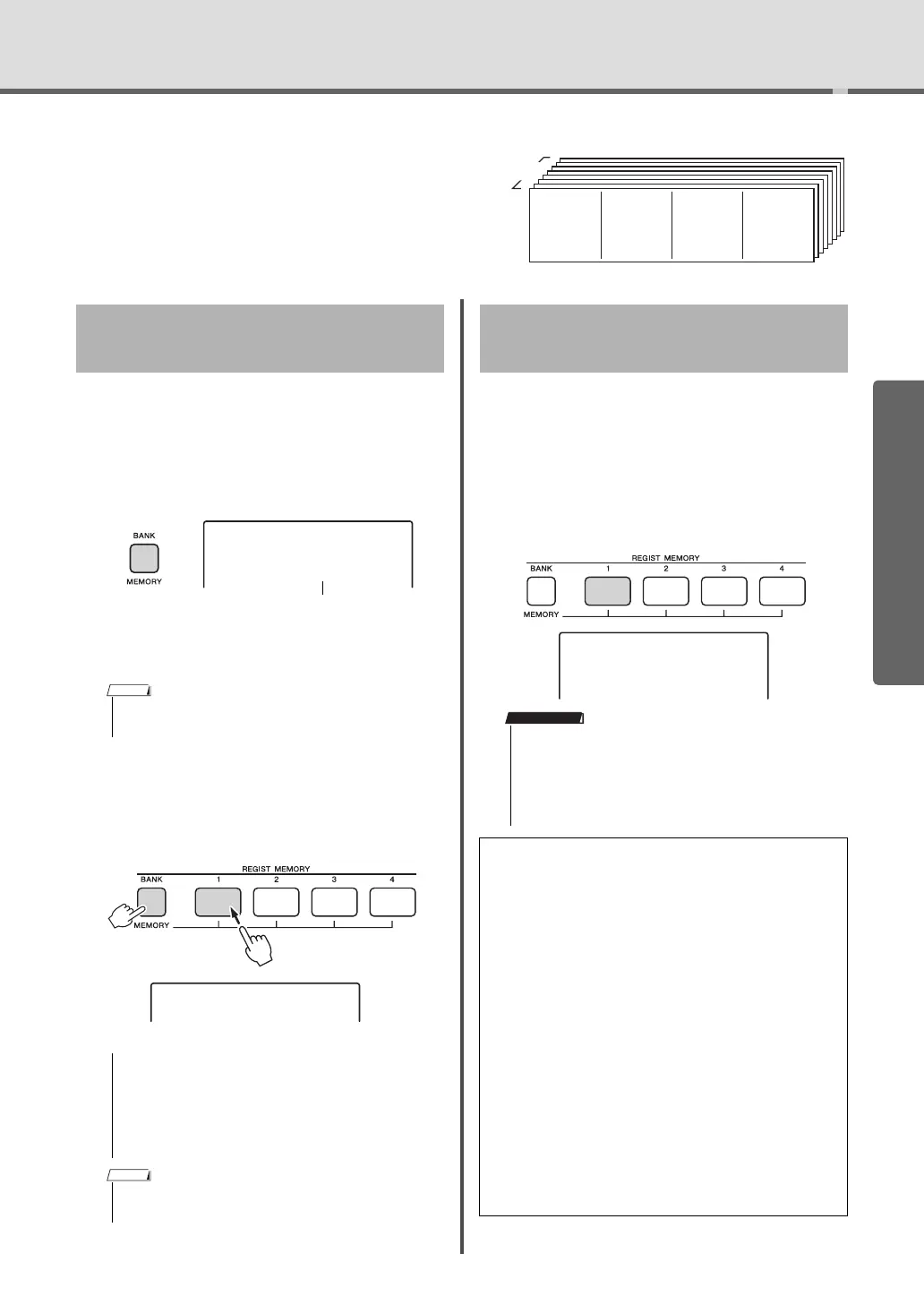
Memorizing Your Favorite Panel Settings
This instrument has a Registration Memory
feature that lets you memorize your favorite
settings for easy recall whenever they’re
needed. Up to 32 complete setups can be
saved (eight banks of four setups each).
1
Make the desired settings such as those
for Voice, Style, and Pattern.
2
Press and release the [MEMORY/BANK]
button to call up a Bank number on the
display.
3
Use the dial or the [1]–[8] number but-
tons to select a Bank number.
4
While holding down the [MEMORY/
BANK] button, press one of the [1]–[4]
buttons to memorize the current panel
settings.
1
Press and release the [MEMORY/BANK] but-
ton to call up a Bank number on the display.
2
Use the dial or the [1]–[8] number but-
tons to select a Bank number.
3
Press one of the [1]–[4] buttons to call
up the panel settings you memorized.
The recalled REGIST MEMORY number appears
in the display for a few seconds.
Up to 32 presets (eight banks of four each) can
be memorized.
Memory 1
8 Banks
Memory 2 Memory 3 Memory 4
Memorizing Panel Settings to
the Registration Memory
• Data cannot be saved to the Registration Memory during
Song playback.
• If you select a Registration Memory number that
already contains data, the previous data is deleted
and overwritten by the new data.
• Do not turn off the power while memorizing settings
to the Registration Memory, otherwise the data may
be damaged or lost.
• Appropriate panel settings for each Pattern are pre-pro-
grammed to Banks 1–3. For details, refer to page 34.
Writing!
Recalling Panel Settings from
the Registration Memory
• When recalling the panel settings from the Registration Mem-
ory, make sure to press the same button—[STYLE] or [PAT-
TERN]—corresponding to the mode used when you memorize
the panel settings. This is necessary since the mode status
(Style or Pattern) is not memorized to the Registration Mem-
ory, meaning that it cannot be called up even if you press the
REGISTRATION MEMORY button.
Parameters that can be memorized to Reg-
istration Memory
Style settings*
Style number, ACMP on/off, Style volume, Track on/off
Pattern settings**
Pattern number, Pattern volume, Section, Track on/off
Voice settings
Main Voice settings: Voice number and all settings of the
related Functions
Dual Voice settings: Dual on/off and all settings of the
related Functions
Split Voice settings: Split on/off and all settings of the
related Functions
Effect settings
Reverb Type, Chorus Type
Arpeggio settings
Arpeggio on/off and all settings of the related Functions
Harmony settings
Harmony on/off and all settings of the related Functions
Other settings
Transpose, Pitch Bend Range, Knob Effect Combination
number, Split Point, Tempo
* Available only when a Style is selected.
** Available only when a Pattern is selected.
REGIST 1
1
IMPORTANT



 To Next Page