OVERVIEW screen
Reference Manual
-
42
-
9 Displays the OUTPUT screen. (page 73)
0 Displays the SEND FROM screen (page 74) (V3.0 and later)
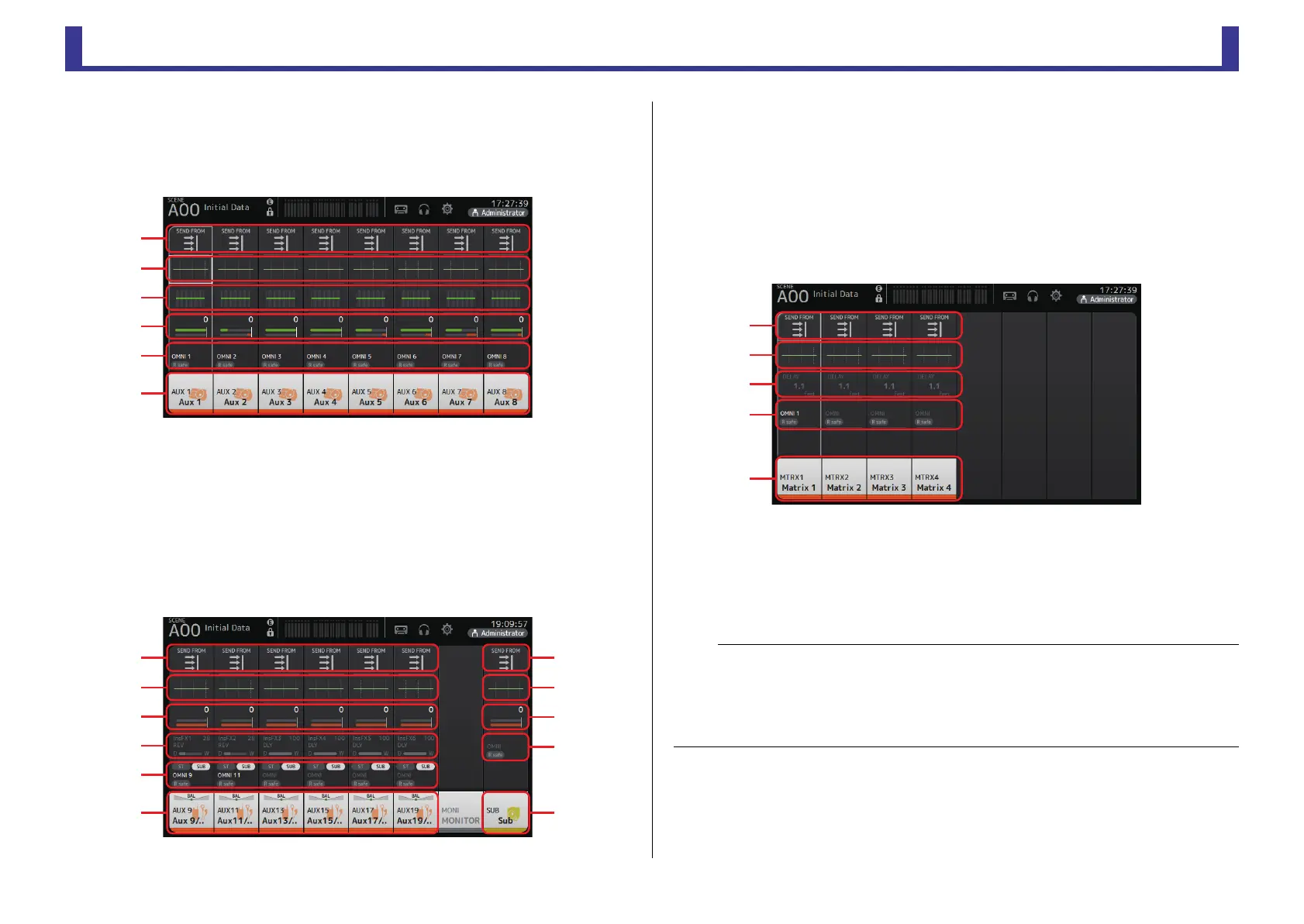
AUX1–AUX8 channels
1 Displays the SEND FROM screen. (page 74)
2 Displays the EQ screen. (page 48)
3 Displays the GEQ screen. (page 71)
4 Displays the COMP screen. (page 54)
5 Displays the OUTPUT screen. (page 73)
6 Displays the CH VIEW screen. (page 63)
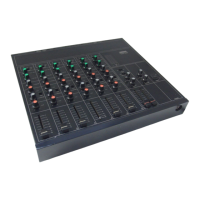
AUX9/10–19/20 channels, SUB channel
1 Displays the SEND FROM screen. (page 74)
2 Displays the EQ screen. (page 48)
3 Displays the GEQ screen. (page 71)
4 Displays the COMP screen. (page 54)
5 Displays the OUTPUT screen. (page 73)
6 Displays the CH VIEW screen. (page 63)
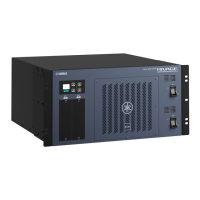
MATRIX1–4 channels (V2.5 and later)
1 Displays the SEND FROM screen. (page 74)
2 Displays the EQ screen. (page 48)
3 Displays the DELAY screen. (page 77)
4 Displays the OUTPUT screen. (page 73)
5 Displays the CH VIEW screen. (page 63)
ձ
ղ
ճ
մ
յ
ն
NOTE
• MATRIX channels 1–4 are in the OUTPUT FADER BANK. To use the faders on the top panel to control
these channels, press the [OUTPUT] key in the FADER BANK section, and then display the OUTPUT
BANK in the channel strip.
• For TF1, MATRIX channels 1–4 are not controlled by the faders, and are displayed only. Scroll the
displayed area to the right. To control these channels using the faders, register them to the CUSTOM
FADER BANK.


 To Next Page