Configuration screens
Reference Manual
-
56
-
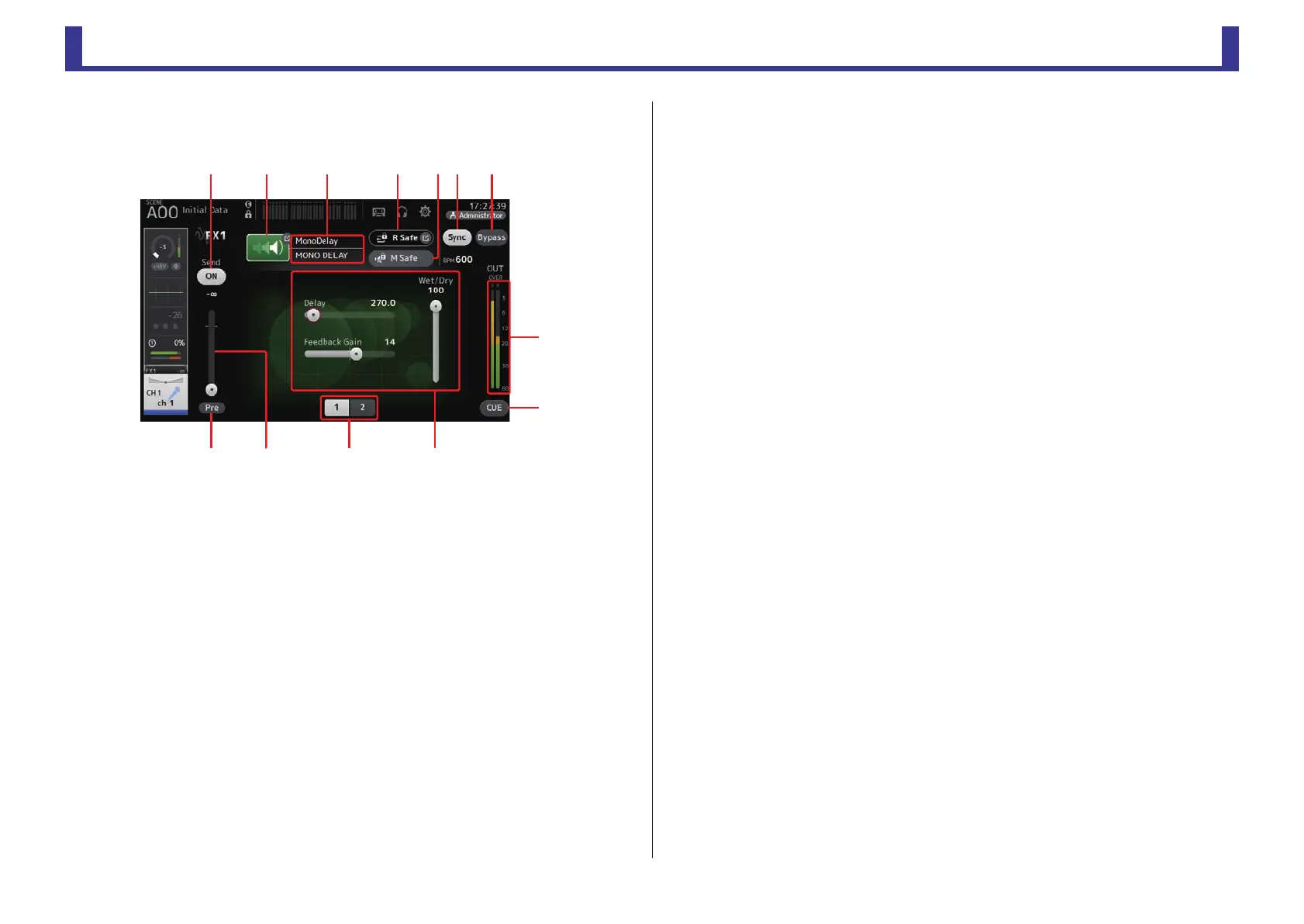
FX screen (FX1/2, InsFX1–6)
Allows you to select an effect and edit its parameters.
1 Send button
Displayed for CH 1–40, ST IN 1 and ST IN 2.
Determines whether a signal is sent (on) or not sent (off) to the FX return channel.
2 EFFECT TYPE button
Displays the EFFECT TYPE screen (page 57), where you can select an effect type.
3 Effect type and name
Displays the type and name of the current effect.
4 R Safe (recall safe) indicator
Displays the recall safe status of the effects module.
Displays the RECALL SAFE screen. (page 24)
5 M safe (mute safe) button
Turns mute safe on and off for the effects module.
6 FX send level slider
Displayed for CH 1–40, ST IN 1 and ST IN 2.
Allows you to adjust the amount of signal that is sent to the effects module.
7 Pre button
Displayed for CH 1–40, ST IN 1 and ST IN 2.
Allows you to select whether the pre-fader or post-fader signal is processed by the effect
module.
On: Before the fader
Off: After the fader
8 Parameter selection buttons
Touch to display other parameters available for the current effect.
9 Parameter sliders
Allow you to adjust the parameters available for the current effect.
0 Sync button
Displayed for effects that have a tempo setting, such as delays. When this button is
turned on, the effect's tempo setting can be controlled with the [TAP] button found in
the SENDS ON FADER section of the top panel.
A Bypass button
Allows you to bypass the effects module.
B Effects output level meter
Displays the effects output level.
C CUE button
Turns cue on and off for the effects module.
ձղ ճ մ ջպյ
ռ
ս
չոնշ


 To Next Page