Configuration screens
Reference Manual
-
66
-
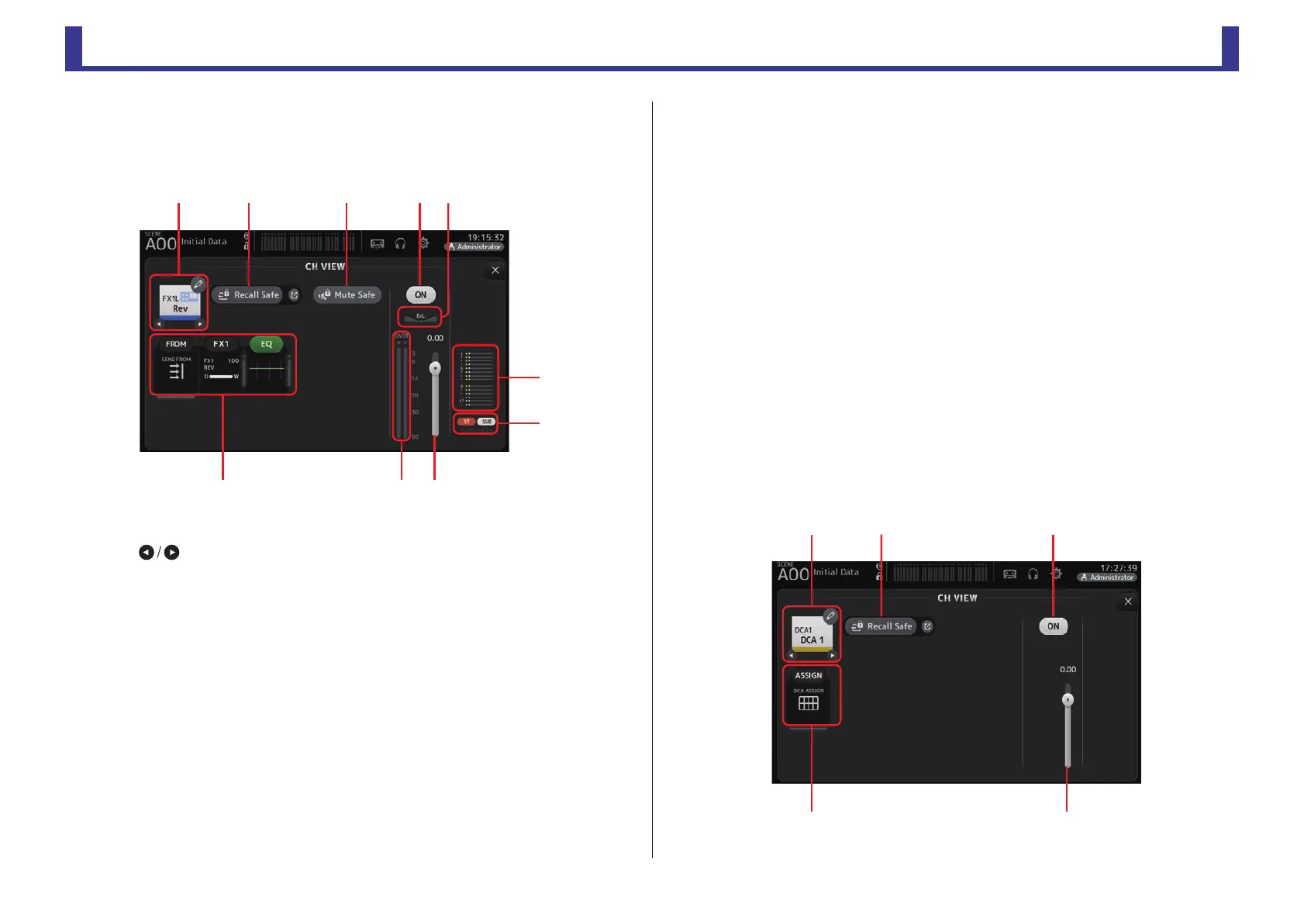
B Channel output level meter
Displays the channel's output signal level.
FX1L–FX2R
1 Channel name
Touch to display the CH NAME screen.
Touch to display information for a different channel.
2 Recall Safe button
Turns recall safe on and off for the corresponding channel.
You can display the RECALL SAFE screen (page 24) by touching the jump button in
the right corner of the Recall Safe button.
3 Mute Safe button
Touch to temporarily exclude the selected channel from the effects mute group.
If you mute the effects mute group, any channels in that group that have mute safe
enabled will not be muted.
4 Boxes
Touch to display the configuration screen for the corresponding feature.
You can touch the EQ button displayed here to turn EQ on and off.
FROM box: Displays the SEND FROM screen. (page 74) (V3.0 and later)
FX1 (FX2) box: Displays the FX screen. (page 56)
EQ box: Displays the EQ screen. (page 48)
5 Channel on/off button
Turns the selected channel on and off.
6 Channel pan slider
Adjusts the pan for the selected channel.
7 SEND TO AUX box
Touch when selected to display the SEND TO AUX screen.
Displays the amount of signal from the selected channel that is sent to each AUX bus.
Send level, the selected channel's fader level, and the actual send level grouped with the
DCA is displayed in the horizontal bar.
The information displayed here indicates whether the signal sent to the AUX bus is the
pre-fader or post-fader signal. Pre-fader signal is displayed in green; post-fader signal is
displayed in gray.
8 ASSIGN box
Displays the ASSIGN screen. (page 62)
9 Channel output level slider
Adjusts the fader level for the selected channel.
0 Channel output level meter
Displays the channel's output signal level.
DCA 1–DCA 8
ձղ ճ յն
շ
ո
չպմ


 To Next Page