Configuration screens
Reference Manual
-
48
-
INPUT screen menu (V1.1 and later)
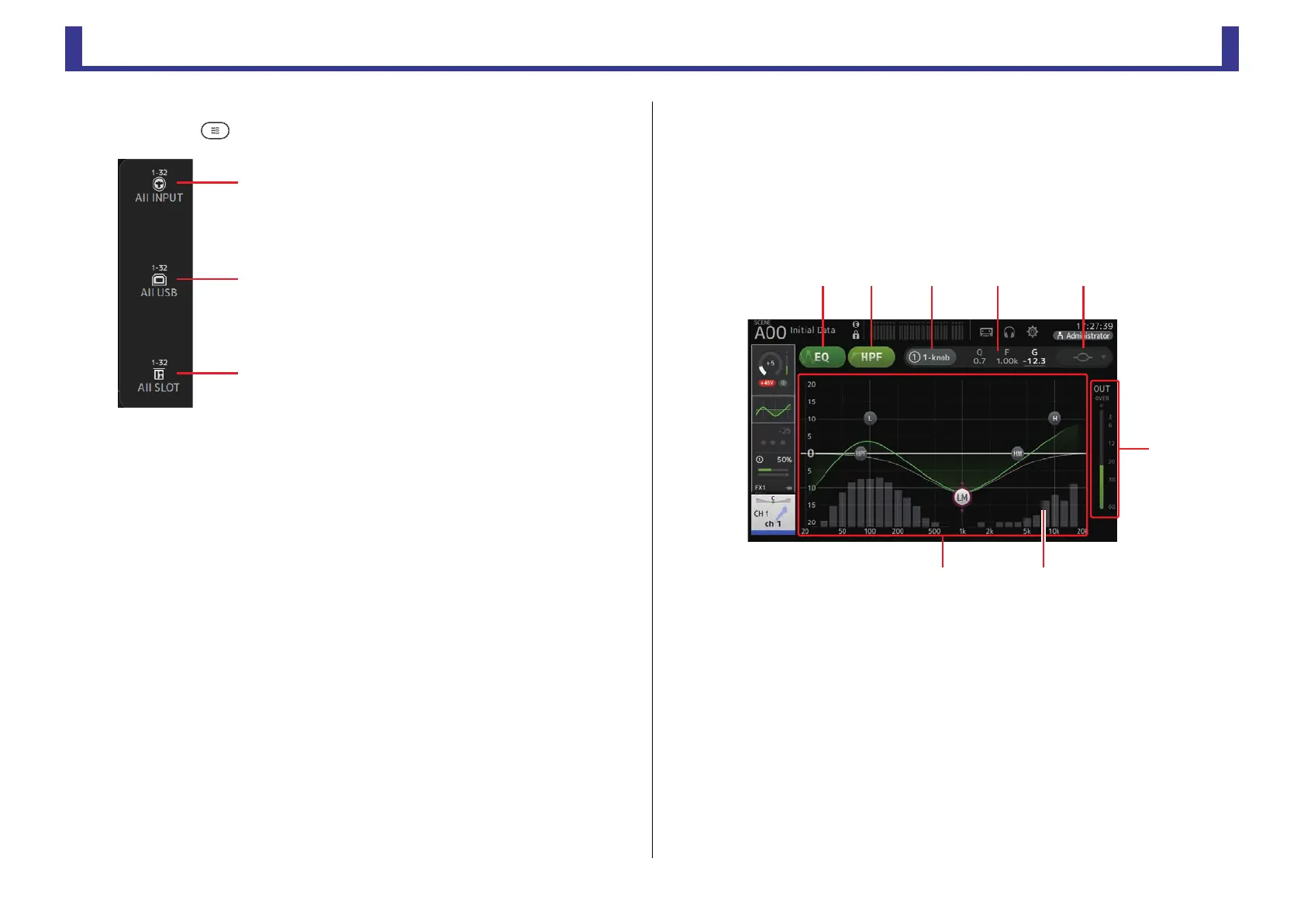
Touch the Menu key ( ) from the INPUT screen to display the following items.
EQ screen
Controls the EQ for each channel. 4-band parametric EQ is available for CH 1–32, AUX 1–20,
STEREO and MATRIX1-4; 2-band parametric EQ is available for CH 33–40, ST IN 1, ST IN
2, FX1, FX2, and SUB. You can adjust settings using 1-knob mode, which allows you to use
the [TOUCH AND TURN] knob to easily adjust settings, or manual mode, which allows you to
adjust each parameter individually.
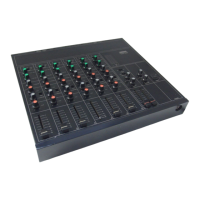
4-band parametric EQ
1 EQ button
Turns the EQ on and off.
2 HPF button
Turns the HPF (high-pass filter) on and off.
Displayed for CH 1–40.
3 1-knob button
Switches between 1-knob EQ mode and manual mode.
When using 1-knob EQ mode, the 1-knob level slider is displayed.
4 1-knob level slider
Adjusts the intensity of 1-knob EQ.
When using manual mode, information about the selected band's Q, F, and G is
displayed here.
1 All INPUT
Allows you to assign the INPUT jacks as the input
source for all input channels.
2 All USB
Allows you to assign the USB TO HOST connector
as the input source for all input channels.
3 All SLOT (V2.0 and later)
Switches all inputs to input sources of Dante
network devices that are connected to the NY64-
D installed in the expansion slot.
The input source for the following channels will be
changed.
TF5:
CH 1–32 (when CH 1–32 are selected)
CH 33–40 (when CH 33–40 are selected)
TF3:
CH 1–24 (when CH 1–24 are selected)
CH 25–32 (when CH 25–32 are selected)
CH 33–40 (when CH 33–40 are selected)
TF1/TF-RACK:
CH 1–16 (when CH 1–16 are selected)
CH 17–32 (when CH 17–32 are selected)
ձղ ճ մ յ
ն
շ
ո


 To Next Page