WH6X Frequently Asked Questions
18
Softphone Clients Issues
25.How to ensure clear audio when I use my headset?
Make sure the microphone is positioned close to your mouth to maximize speech quality. If the
boom arm is long enough, position the microphone approximately 0.5 inches from your mouth.
Use the Volume Up/Down key or Volume control panel on the headset to adjust the volume up
or down as needed.
For more information on how to adjust, refer to the specific Quick Start Guide or User Guide.
26.Why can't I hear my voice or I hear too much of my voice
when I speak with the microphone? How to adjust the
sidetone volume on my PC?
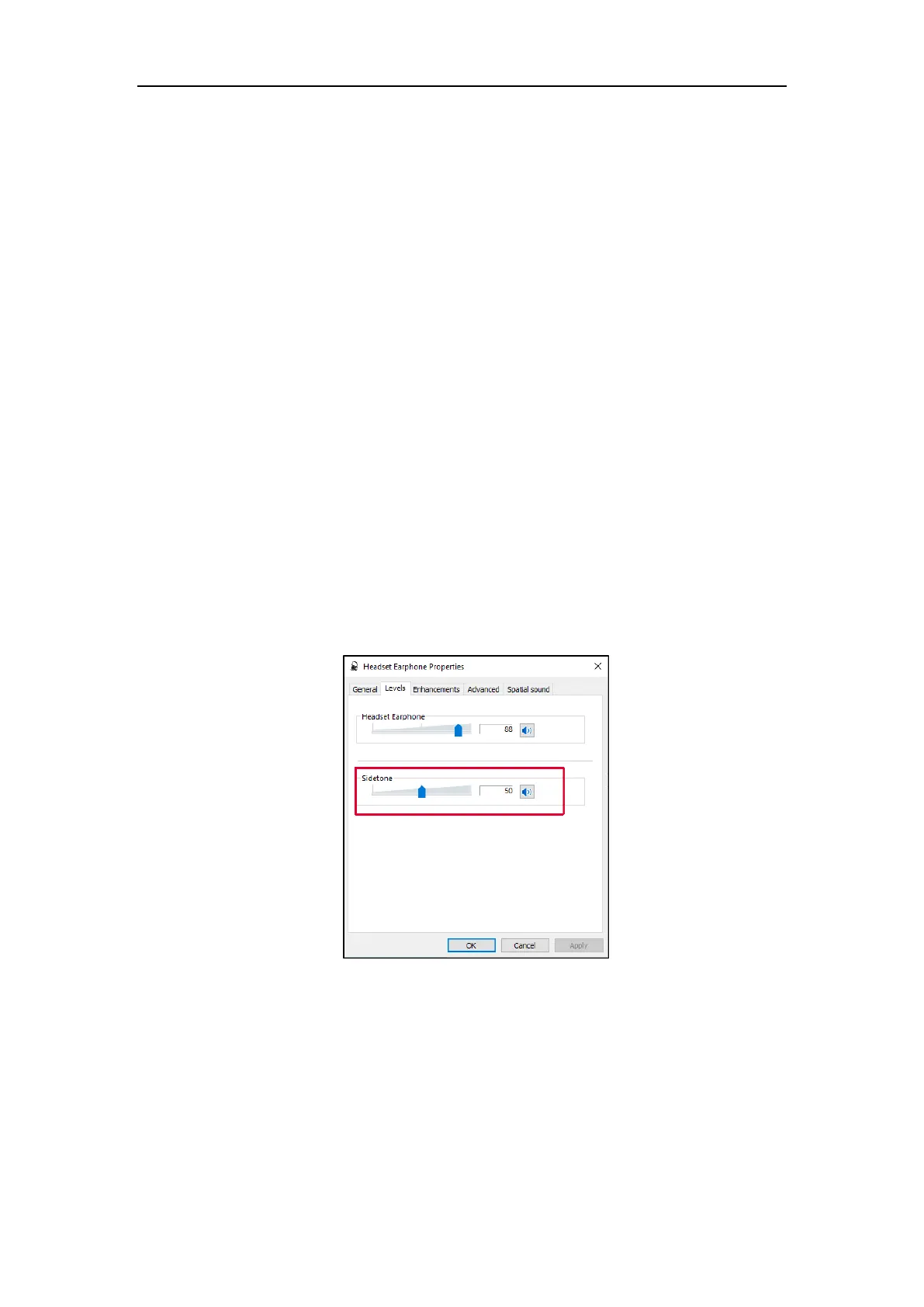
Do the following:
1) Go to Control Panel->Hardware and Sound->Sound.
2) Right-click the desired headset and select Properties.
3) In the Levels tab, adjust the sidetone.
If you cannot hear your own voice, please increase the sidetone volume. If you hear too much of
your own voice, please lower the sidetone volume.
4) Click OK.
27.How to use WH6X device to listen to music on PC?
If you need to use the WH6X device to listen to music on the PC, you can set the WH6X as the default
audio device on the PC.



 To Next Page
 Loading...











