Stereo microscope OPERATION
Stemi 305 Setting reflected-light illumination ZEISS
01/2015 435063-7044-001 31
4.2.5 Controller K LED
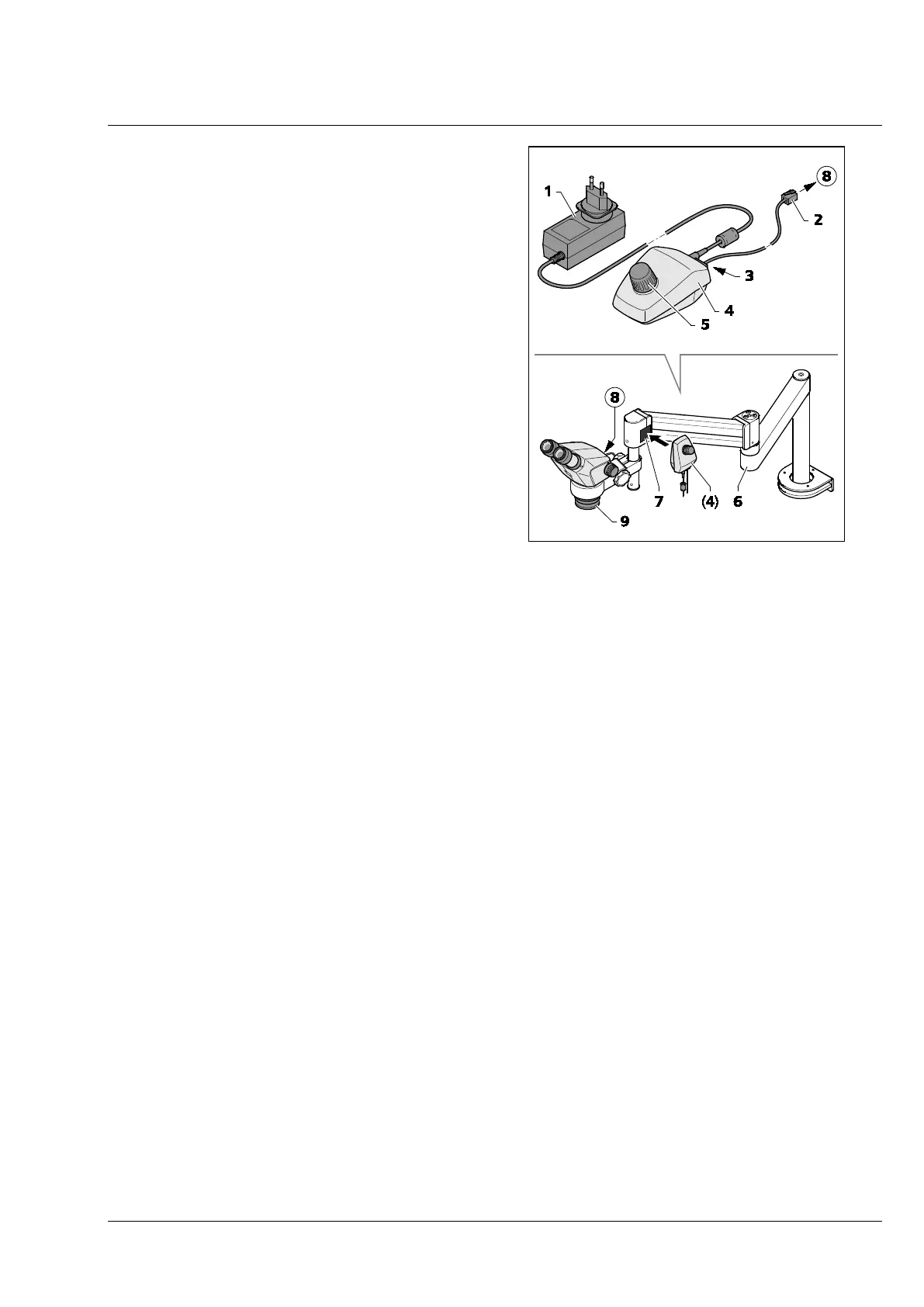
The controller K (Fig. 24/4) is used to activate the
vertical illumination of the Stemi 305 body or the
ring illuminator in case of applications with boom
stands A or U or additional stands.
• Mount the stands A and U including the
fastening of the Stemi 305 body to the Stemi
mount as described in the operating
instructions for the boom stands.
• Screw-fasten front lens system 0.5x/185 mm
(Fig. 24/9) to the microscope body.
• When using the ring illuminator, adapt the
latter to the front lens system (Fig. 24/9) using
the adapter supplied with the device (ID
58 mm, OD 66 mm).
• Secure the adhesive side of the magnetic plate
(Fig. 24/7) to the swivel arm stand.
• Plug the connection cable supplied with the
device (1 m long) (Fig. 24/2) into the socket
(Fig. 24/8) on the microscope body or the ring
illuminator and into the socket (Fig. 24/3) on
the back of the Controller K (Fig. 24/4).
• Place Controller K (Fig. 24/4) next to the
magnetic plate (Fig. 24/7).
• Connect Controller K to the power supply using the power unit (Fig. 24/1).
• Align swivel arm stand (Fig. 24/6) to enable an ergonomic working position.
• Turn the knob (Fig. 24/5) on the Controller K to switch the vertical illuminator (or the ring illuminator)
ON and adjust illumination intensity by turning the knob.
• Place specimen in the illuminated specimen field.
• Set the stereo microscope to its initial setting, see Section 4.1 on page 27.
Fig. 24 Controller K LED










 To Next Page