Stereo microscope INSTALLATION
Stemi 305 Mounting optional components ZEISS
01/2015 435063-7044-001 23
3.3 Mounting optional components
3.3.1 Mounting additional reflected-light illuminator
Various reflected-light illuminators can be used, depending on the case of application.
For fastening, defined interfaces have been provided on the microscope.
3.3.1.1 Mounting spot illuminator K LED or
double spot illuminator K LED
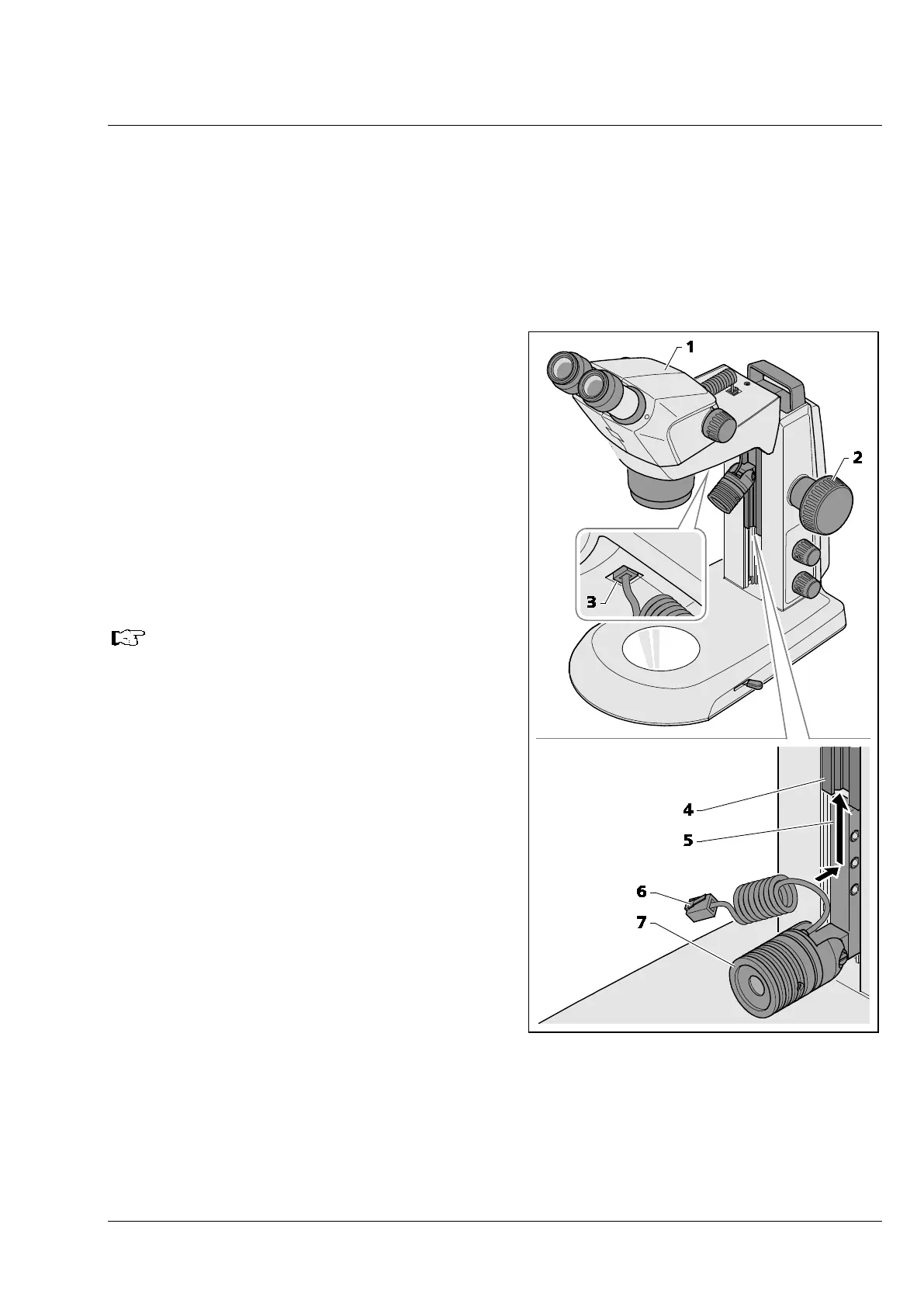
• Move the microscope body (Fig. 12/1) into its
uppermost position via the focusing knob
(Fig. 12/2).
• Insert the spot illuminator (Fig. 12/7) in the
stand by sliding the holder (Fig. 12/5) into the
stand guide (Fig. 12/4) from below and push it
upwards into the required position.
• Plug the connection cable (Fig. 12/6) of the spot
illuminator into the lower socket of the Stemi
mount (Fig. 12/3).
The double spot illuminator is
mounted in an analogical manner.
Fig. 12 Mounting spot illuminator










 To Next Page