INSTALLATION Stereo microscope
ZEISS Installing the stereo microscope Stemi 305
22 435063-7044-001 01/2015
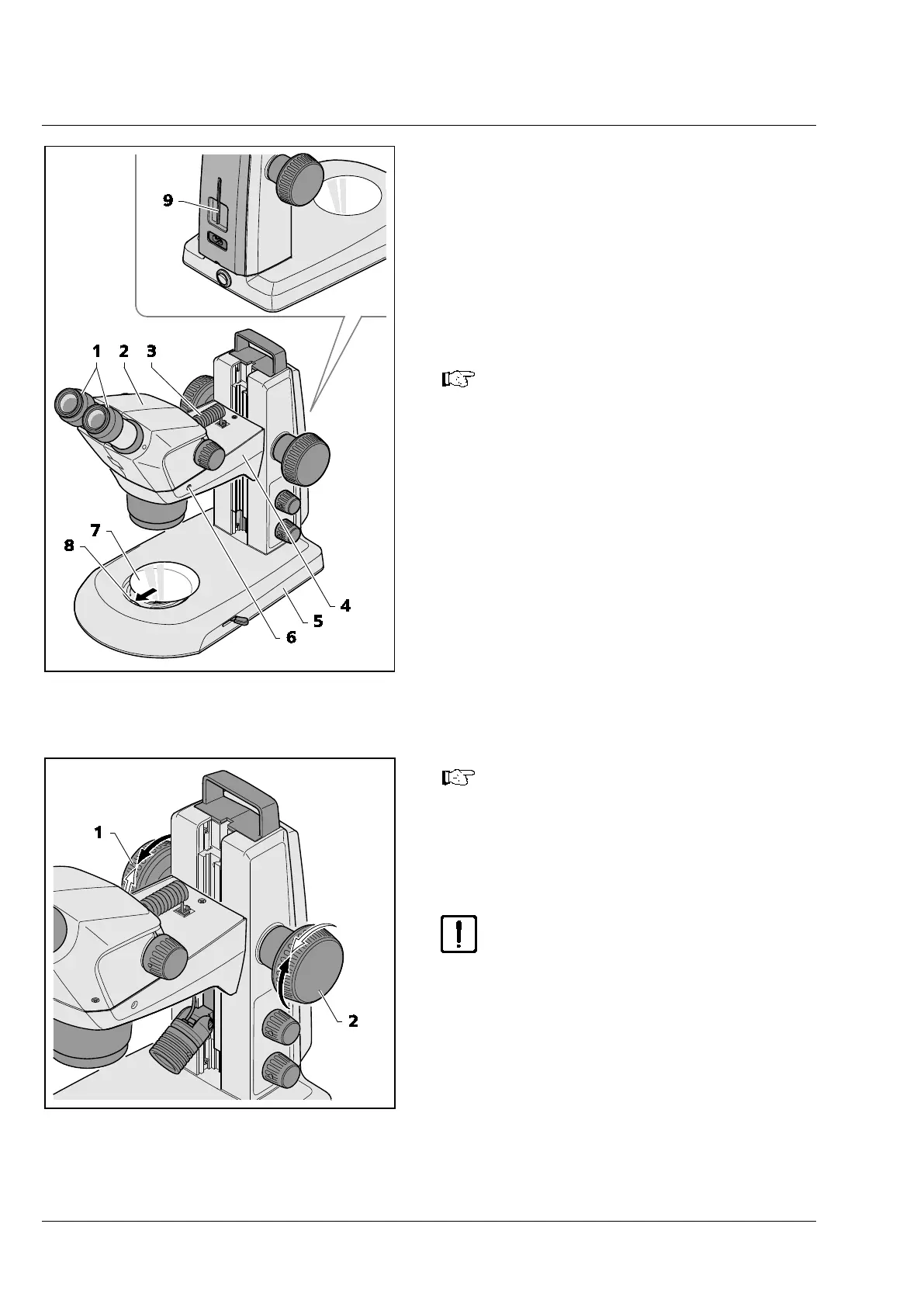
• Insert the connection cable (Fig. 10/3) supplied
with the device into the socket on the Stemi
body and in the socket on the Stemi mount.
• Insert glass plate or B/W plastic plate (Fig. 10/7)
in the mount in the base of the stand.
To this effect, press the glass plate or the B/W
plastic plate against the spring (Fig. 10/8) and
make it lock in.
Installation of an additional reflected-
light illumina
tor has been described in
Section 3.3.1 on page 23.
If necessary, the ease of motion of the
focusing drive can be set as required
on a case-by-
the two focusing buttons (Fig. 11/1
and 2) in opposite directions.
The ease of motion must not be set so
loosely that the drive moves down-
wards by itself. This might damage the
microscope or the specimen.
Fig. 10 Installing the stereo microscope
Fig. 11 Setting the ease of motion of the
focusing drive










 To Next Page