Stereo microscope CARE, MAINTENANCE AND SERVICE
Stemi 305 Maintenance ZEISS
01/2015 435063-7044-001 35
5.2 Maintenance
5.2.1 Replacing the power unit
Only the desktop power unit specified
by the manufacturer may be used.
Make sure that the mains
plug is
removed from the socket before the
instrument is opened.
• Remove the mains plug of the power cable
from the socket.
• Remove the power cable from the back of the
device.
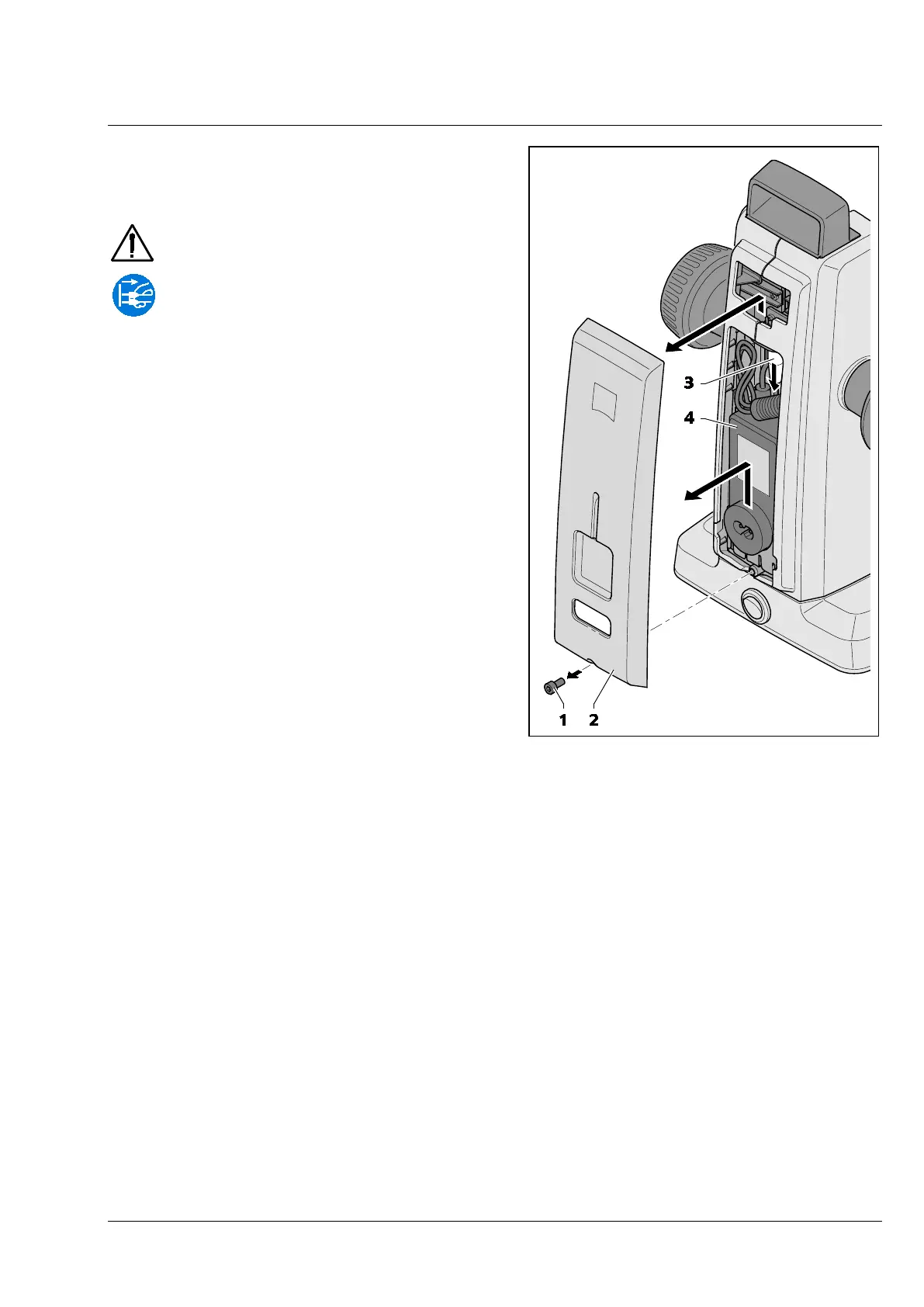
• Use an Allen key to release the screw (Fig. 27/1)
on the underside of the housing cover.
• Pull off housing cover (Fig. 27/2) slightly at the
bottom, then press it upwards.
• Release the plug (Fig. 27/3) and remove the
faulty desktop power unit (Fig. 27/4).
• Insert the new desktop power unit and connect
the plug.
• Press the upper part of the housing cover into
place and push housing cover down.
• Secure housing cover by means of the screw.
• Insert the power cable on the back of the
device.
• Insert the mains plug into a mains supply
socket.
Fig. 27 Changing the power unit










 To Next Page