206-4543
PAGE 7
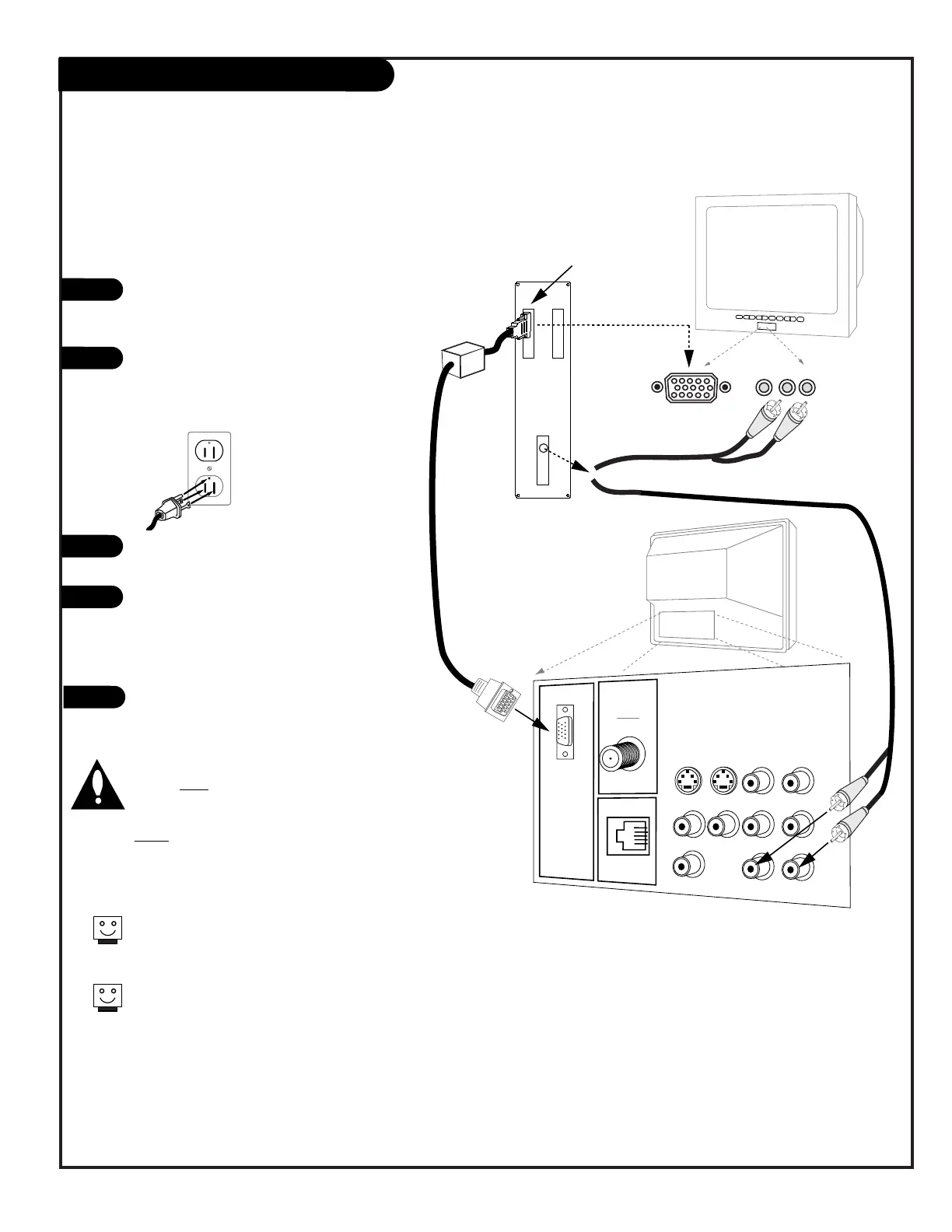
Make the basic connections as indicated.
(Appearance of components may vary from
those in the illustrations.)
Plug in your TV. The Presentation TV is
designed to operate on standard current,
120-volt 60 Hertz AC. Do not attempt to
operate it on DC Current.
Set the our computer’s image output set-
tings to 800 x 600 @ 60Hz or SVGA.
Using the Source menu, highlight “REAR
COMPUTER SVGA” (Rear Computer in) or
“FRONT COMPUTER SVGA” (Front Computer
in) then press ENTER on the remote to
change to the computer image source.
Boot up your computer. As it warms up,
the TV will adapt to your computer.
Note: Unlike a computer monitor, this TV
does not show a computer image on the
screen until the TV has completely adapted
to your computer’s output. This is normal
when using this TV as a computer monitor.
When the TV has completely adapted to your
computer, the computer’s image will appear
on the screen.
Computer Hook Up
Components may vary from those in the illustration.
If you have a Macintosh, use the 2-row to 3-row DB15
adapter on the Macintosh video connector.
On some notebook models, you must locate the “display
toggle key” and switch the display to “external.” Refer
to the instructions for your computer.
1
2
3
4
Here is the basic setup to use the Presentation TV as a
computer monitor




 To Next Page