801910 - Zip Sparkling HydroTap - Installation Instructions - July 2014 - V1.00 Page 35 of 40
The HydroTap is now ready to be commissioned.
•
Turn on the power, gas and water and check for any leaks
•
Familiarise yourself with the operation of the Tap, in preparation for use (See User Guide)
•
Follow the Installation instructions below (and review Section C of the User Guide).
•
After commissioning, the system may be customised by selecting further options in Section G -
Settings, within the User Guide.
1.
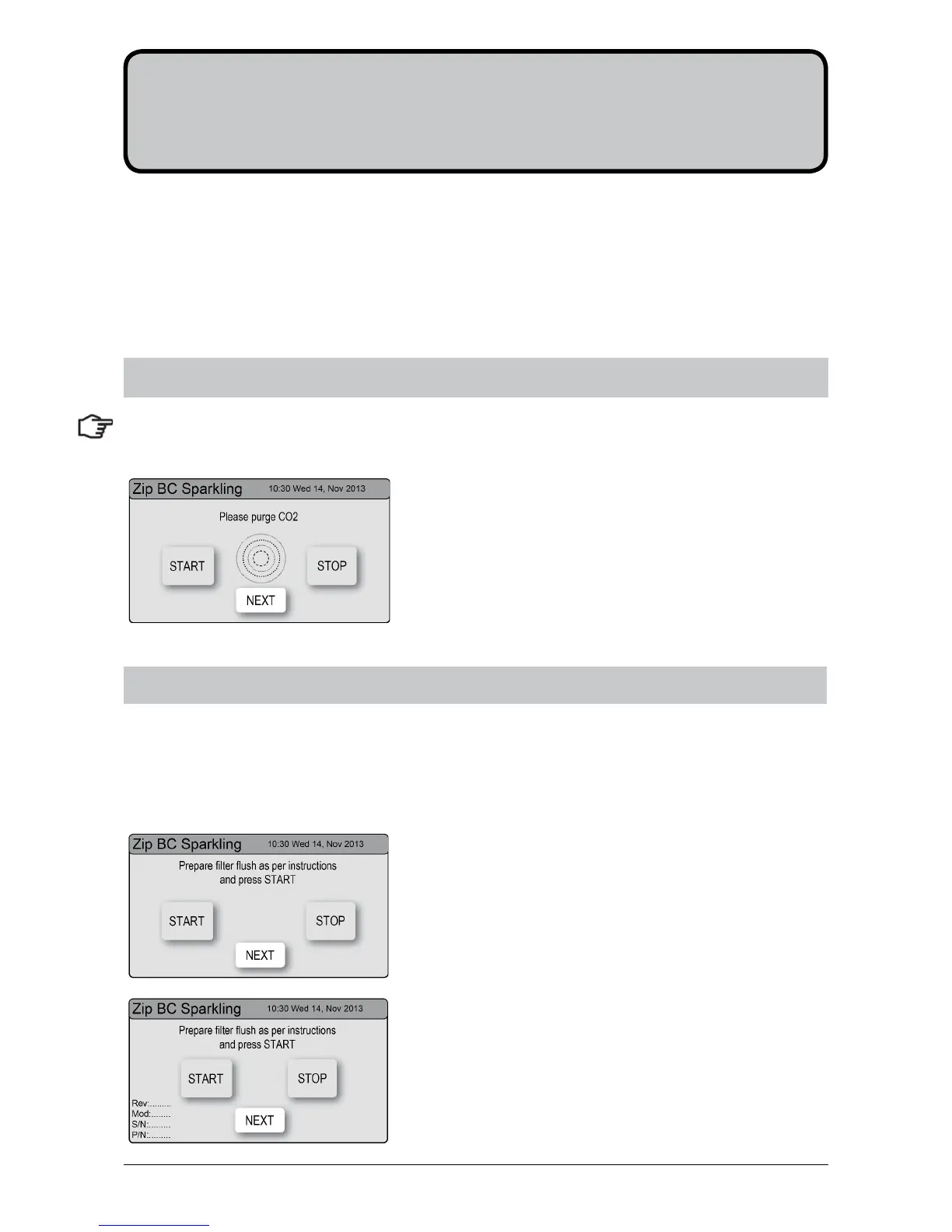
Press [Start] [Stop] buttons to start and stop the filter
flush.
2.
Turn the flush line stop cock ON (See diagram).
3.
Press [Start] and allow at least 10 litres of water to flush
through the filter.
4.
The product details will be displayed in the screen.
5.
Once the filter flush is finished, Turn the stop cock OFF
then press [Stop] to end filter flush mode.
6.
Press [Next] for the Boiling Calibration screen.
Have a bucket or similar container (not supplied) at the ready to hold a quantity of water that will be ejected
while the Filter Flush Mode is in operation. Open the filter access door on the front of the HydroTap and the
filter cartridge will be exposed. Located to the rear RHS of the cartridge is a flush line, approx 600mm long
and the flush line stop cock. Place the free end of the flush line into the bucket or container (not supplied).
7.2 - Filter Flush
Section 7
Commissioning
7.1 - CO2 Purge
1.
Press the [START] button to commence the purging
process.
2.
Purge for 10 seconds and ensure all water has stopped
flowing through the tap. (You will hear the CO2 gas
escaping from the tap).
3.
Press the [Stop] button.
4.
Press [Next] for the filter flush screen
NOTE:
at first commissioning, the system will select the CO2 Purge screen automatically.


 To Next Page