6. Instructions on Sewing Operations
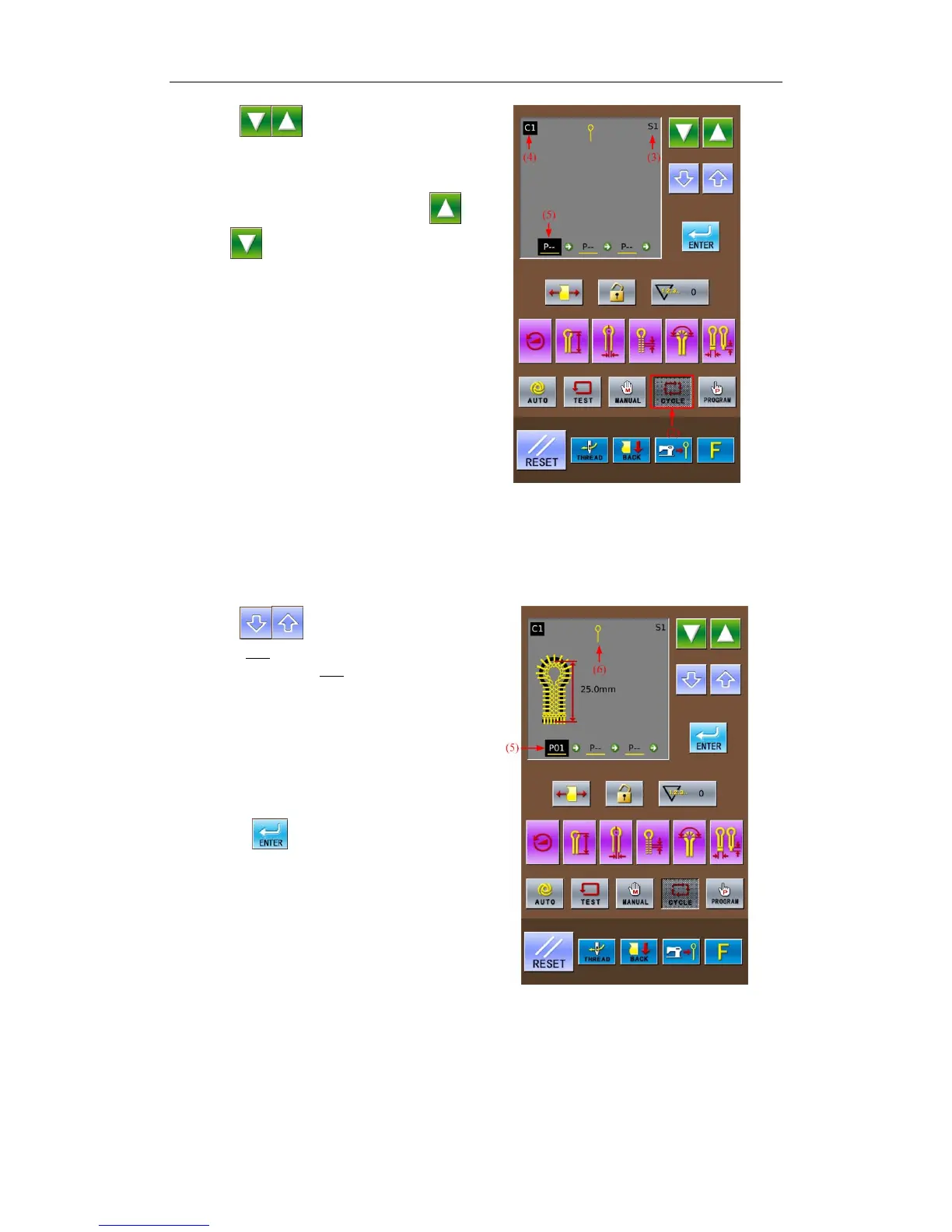
① ress to select C1, the pattern
number of that cyclical pattern program.
The pattern code will change in the
following sequence: P01→P02→…P20→C1
→C2…C9…P01 at each pressing on
.
(Press
to reverse the sequence.)
② Press Cycle Mode Key (2)
The sewing data display area will show
the following contents:
(3)Step Code
(4)Cyclic Program Code
(5)Pattern Content Set in S1.
③ Press
to set the content of S1
(5) as P01
The “___” in “P01
” means that this
pattern has the knife action, therefore the
knife mark (6) is shown in the sewing
data display area
“--” in “P--” means the pattern in this
step has not been set yet.
If you set the existing pattern as “P--”,
the content in the following steps will be
deleted.
④ Press
to confirm the changed
content.
At that time, the content of S1 (5) will
not be shining any more.
39



 To Next Page