6. Instructions on Sewing Operations
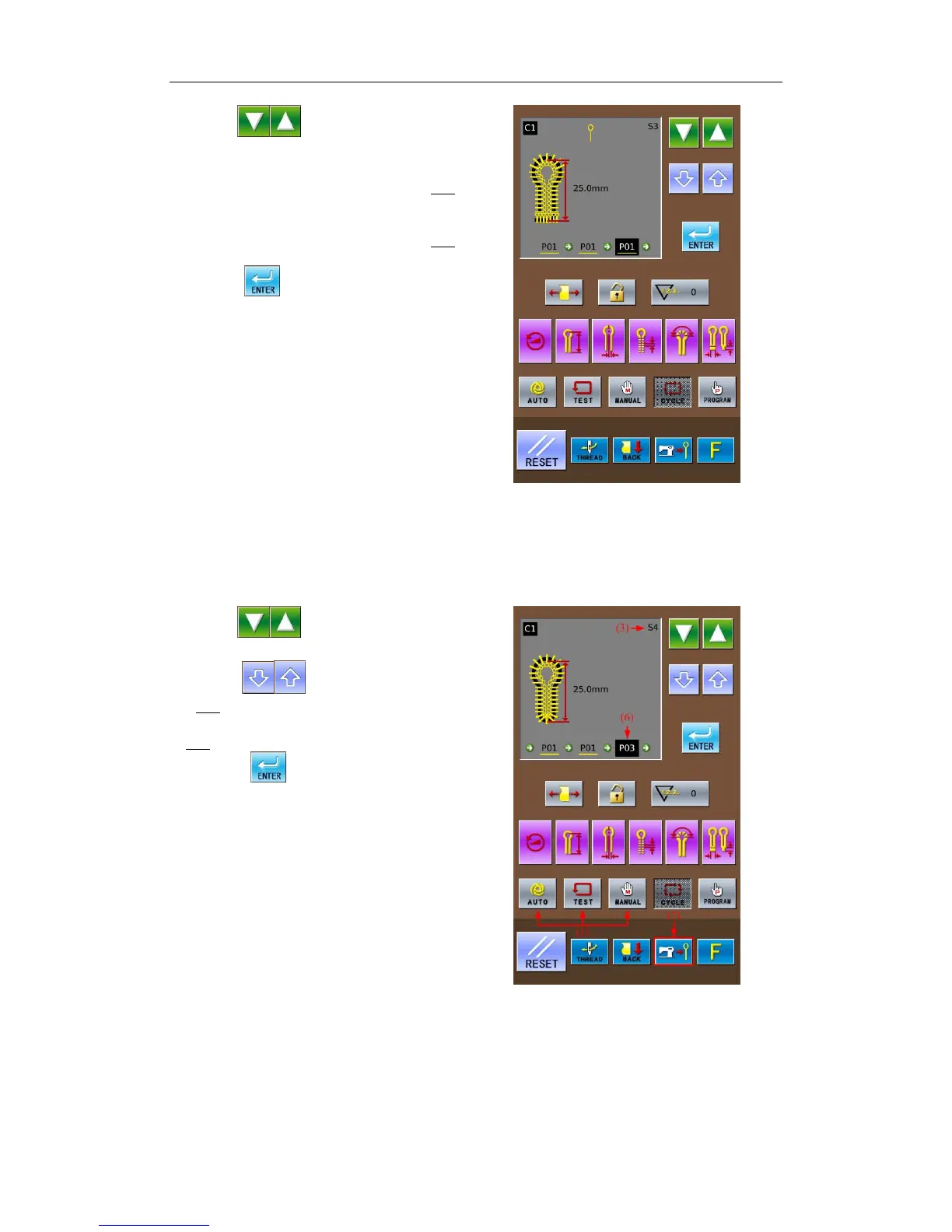
⑥ Press to change the step code
(3)to S2.
⑦ Repeat the operations in steps 4 & 5 at
above to set the content of S2 as “P01
”,
which is as same as that of S1
Repeat the operations in steps 4 & 5 at
above to set the content of S3 as “P01
”,
which is as same as that of S1
⑧ Press
to confirm the changed
content.
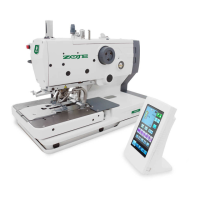
⑨ Press
to change the Step Code
(3)to S4.
Press
to set the content of S4(6)
as P03
.
Press Knife Action Key (7) to change the
“P03
” at (6) to “P03”.(Without Knife Action)
⑩ Press
to confirm the changed
content.
Press any key in(1)to end the setting in
the Cycle Mode
Note: When selecting the cyclical
program to perform the automatic sewing,
the user can change the knife action in the
Auto Mode. And the knife action in the C
pattern will be kept same to the knife mode
set at present.
40



 To Next Page