• LAN IP Address
This is the LAN IP Address of your router. Devices behind the router use this
address as their default gateway. Most users will not need to change this
address.
• Host Name
This is the name that identifies your Travel Router with Wireless-N . Some
service providers require a host name. Your service provider supplies this
name, if needed.
• ISP registered MAC Address
This is the 12-digit Media Access Control (MAC) address of your router.
Click the Clone button to get the MAC address that was registered with your
service provider for your device, if needed.
Go to
Step 4. Wireless Settings on page 21.
Configuring PPPoE
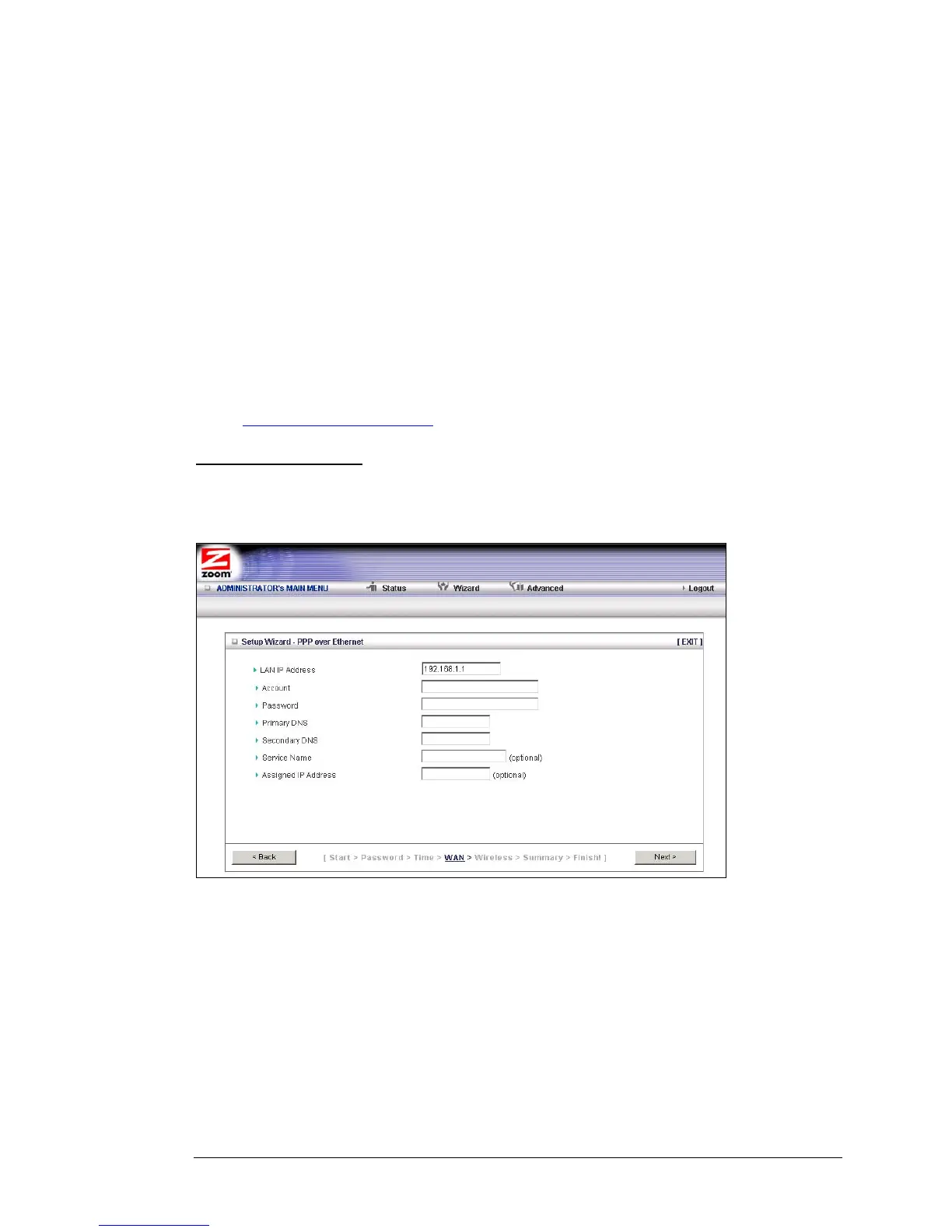
If your ISP uses the Point-to-Point Protocol over Ethernet, for DSL-based Internet
services, you should select the PPPoE button on the Select WAN Type menu. The
following page opens:
• LAN IP Address
This is the LAN IP Address of your router. Devices behind your router use
this address as their default gateway. Most users will not need to change
this address.
• Account
This is the PPPoE account name supplied by your service provider.
• Password
This is PPPoE password supplied by your service provider.
Chapter 2: Using the Configuration Manager 17



 To Next Page