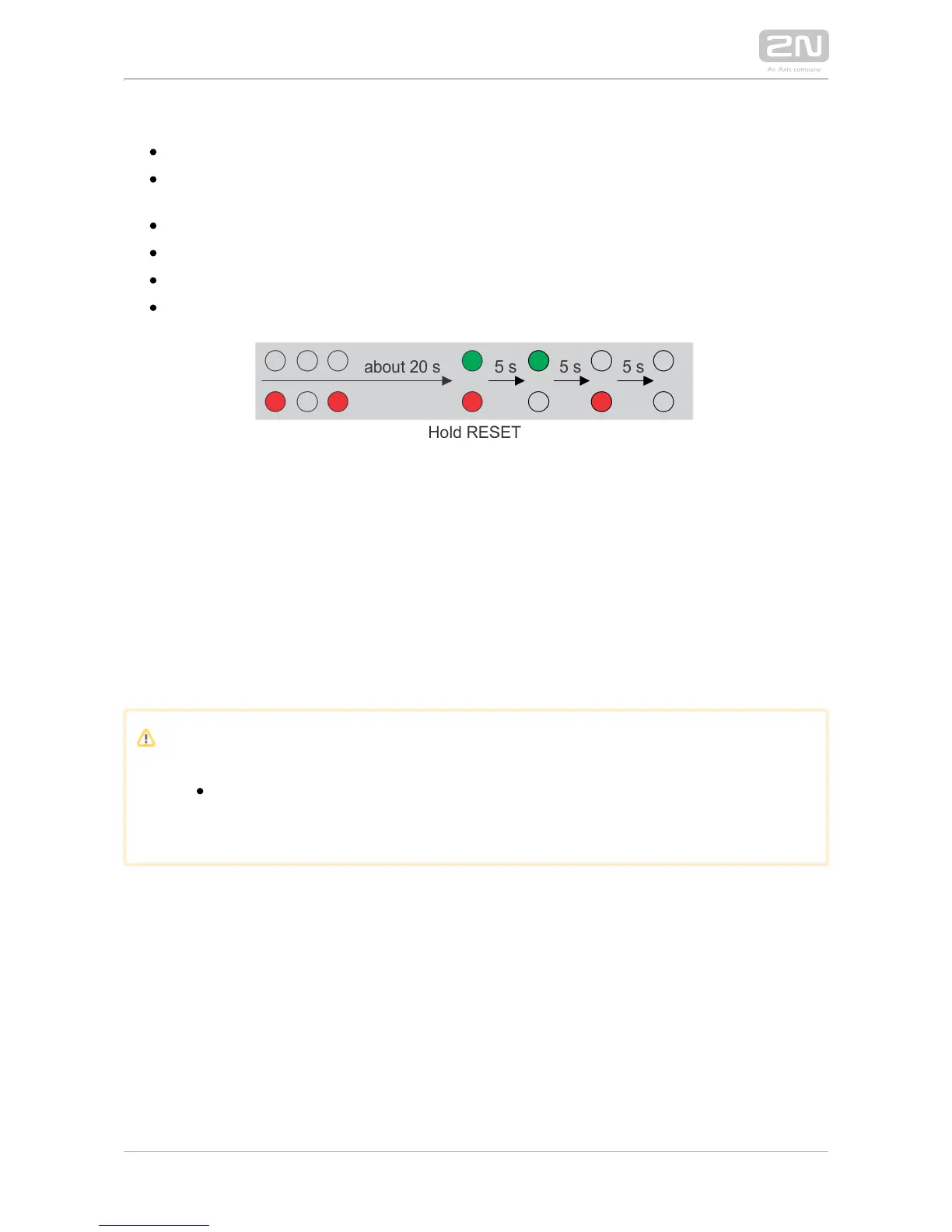
Follow the instructions below to :reset the factory default values
Press the RESET button.
Wait until the red and green LEDs on the device come on simultaneously
(approx. 20 s).
Wait until the red LED goes off (approx. 5 s).
Wait until the green LED goes off and the red LED comes on again (approx. 5 s).
Wait until the red LED goes off (another 5 s).
Release the RESET button.
Card Reader Connection
2N IP Vario
®
(Part Nos. 91371…U) can be equipped with an internal multifunction
module including an RFID card reader (Part No. 9137430E). This module enhances the
functions with an EM41XX RFID card reader, two relays for external load 2N IP Vario
®
switching, two logical inputs and RS-485 and Wiegand interfaces. The current 2N IP
®
software version, however, supports the card reader and relays only.Vario
Caution
The modules ending with U (i.e. 91371…U) can only be 2N IP Vario
®
equipped with the card reader.



 To Next Page